

Send a Twilio SMS reminder after an imeetify appointment is confirmed
When an appointment is confirmed in imeetify, this workflow texts the attendee through Twilio with the details you choose, so they have the date and time on their phone.
 imeetify
 Twilio
2 steps Setup ~5 min Used on 1.2k sites Free to import
What this workflow does
A booking confirmation email can get lost among everything else in an inbox. A short text with the date and time is easier to find later. This workflow sends that text through your Twilio number once an imeetify appointment is confirmed.
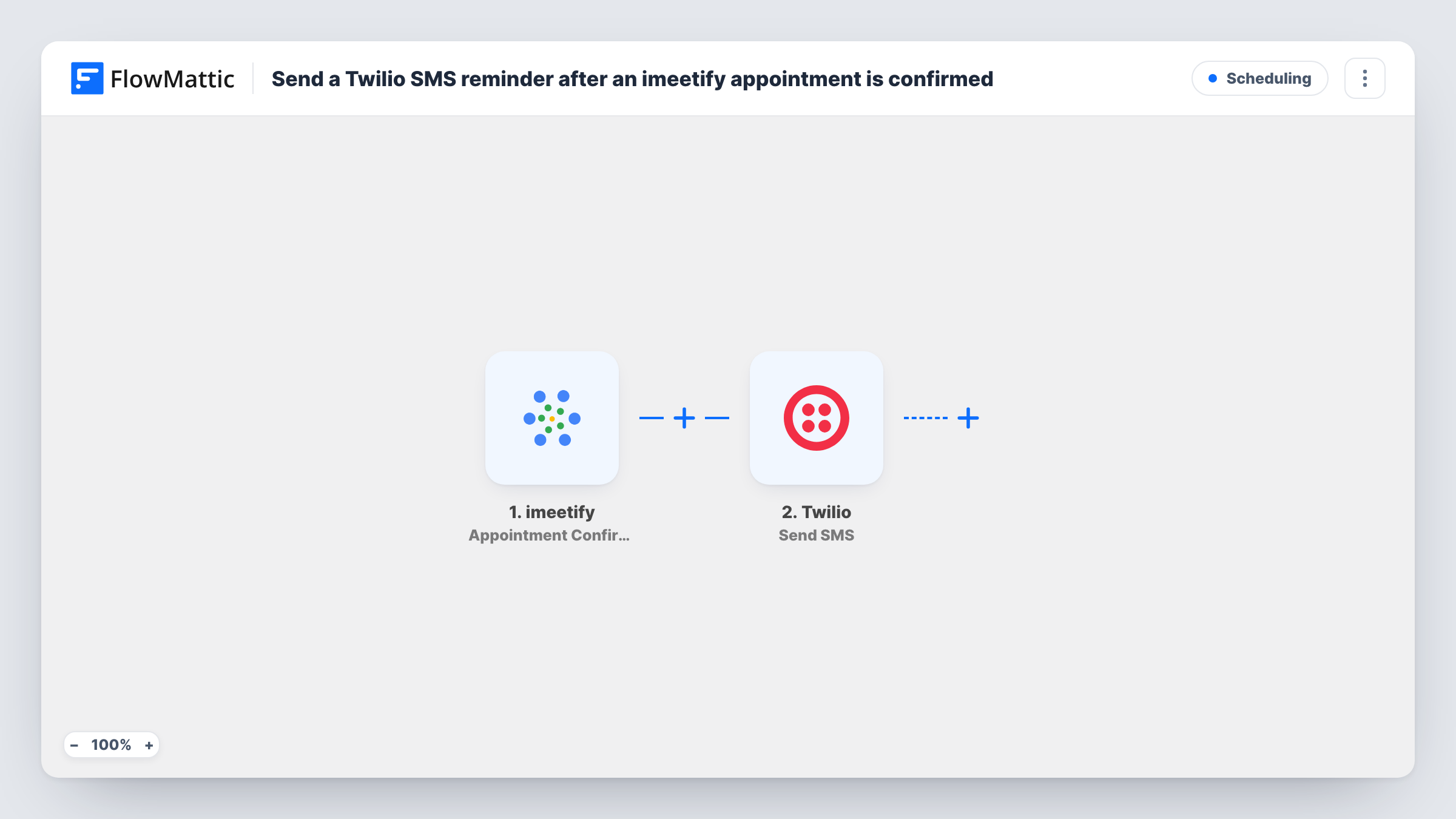
The imeetify trigger fires when a new appointment is confirmed. FlowMattic passes the appointment data to Twilio, whose Send SMS action texts a number you map. You write the message and add values from the booking, such as the attendee's name and the appointment time, if a test run shows imeetify sends them.
The text goes out straight after confirmation, not shortly before the appointment. For a reminder nearer the time, add a Delay step before Twilio, as described in the tips. Each run, and Twilio's response, is listed in Task History.
Consultants booking discovery calls
A client books a call through imeetify. The confirmation triggers a text with the date, time and how you will connect, which they can find again on the day.
Tutors with weekly students
Each confirmed lesson sends the student, or a parent's number if that's what the booking holds, a text with the lesson time.
Service visits at a customer's home
A repair business confirms visit slots in imeetify. The customer gets an SMS with the arrival window so they know when to be home.
How this workflow runs
What happens at each step once the workflow is on, and what you need before you import it.
 imeetify Appointment Confirmation
Runs for every imeetify booking that reaches confirmed. The appointment data is passed on so you can map it into the SMS text and the recipient's number.
- Twilio Send SMS
Sends an SMS from your Twilio number to the attendee. Map their phone number from the booking data and write the message using the appointment details.
What you need
- FlowMatticCore
- imeetify AccountAccount
- Twilio AccountAccount
After importing, map your own data. To keep the template universal, not every step is pre-filled. Open each step in the builder and connect your accounts and fields (channels, lists, sheets, recipients) before you switch the workflow on.
Make it yours
Changes worth making after you import it.
- To text closer to the appointment, add a Delay step between the trigger and Twilio. A fixed wait counts from confirmation, so check whether the Delay options let you wait until a date from the booking.
- Add a Filter that continues only when the attendee's phone number is not empty, if the booking form doesn't require one. Twilio can't send without a number.
- Import a second copy with imeetify's Appointment Cancellation trigger, so attendees also get a text when a booking is cancelled.
Questions about this workflow
Is this a reminder before the imeetify appointment?
As imported, the SMS is sent when the appointment is confirmed. Add a Delay step if you want it sent later, nearer the appointment time.
What format must the phone number be in for Twilio?
Twilio expects international format with the country code, such as +44 followed by the number. Check a test booking to see how imeetify stores numbers.
Which number does the imeetify text come from?
A sending number on your own Twilio account. You connect that account in the Send SMS step and choose the number there.
Will cancelled imeetify appointments get a text?
No. This trigger only covers confirmations. Use the Appointment Cancellation trigger in another workflow for those.
More Scheduling workflows
Other ready-to-import templates from the same category.






Import this workflow into your WordPress site
Download the JSON, import it from the Workflows screen and connect your accounts. Every run stays on your server, with no per-task fees.
30-day money-back guarantee Unlimited workflows and runs Self-hosted