

When a client schedules a meeting via Calendly, create a Google Contact and send the meeting link via Gmail
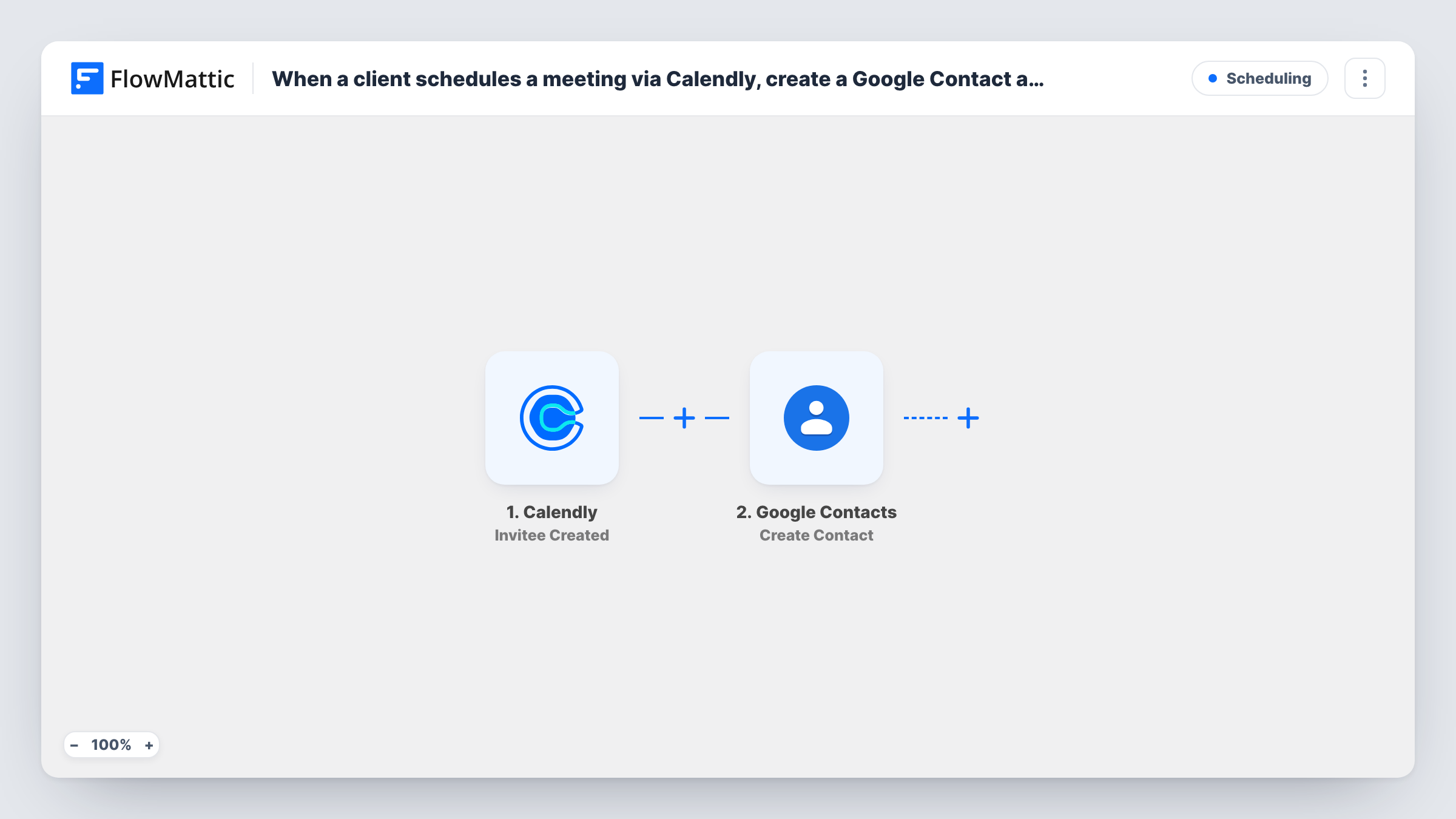
Each Calendly booking saves the invitee to Google Contacts, then Gmail emails them a confirmation with their start time and a meeting link you add to the prewritten message.
 Calendly
 Google Contacts
 Gmail
Gmail3 steps Setup ~5 min Used on 2.1k sites Free to import
What this workflow does
Freelancers and consultants who take bookings through Calendly often want every client in their phone's address book and a personal confirmation from their own inbox. This workflow does both the moment someone books, so a new client is never just a line in a Calendly notification.
The Calendly trigger fires on Invitee Created, which happens each time someone books a meeting with you. The invitee's name, email and the meeting's start time come along with it. The Google Contacts step creates a new contact from that data. It ships unmapped, so you choose which invitee details become the contact's name, email and notes.
The Gmail step is already written. It goes to the invitee's email with the subject "Your meeting is booked", greets them by name and states the start time. The line for the meeting link reads "(add your link here)": replace it with your fixed meeting room link, or map a location value if a test run shows Calendly sending one.
Calendly shows the start time in the format it sends, so read a test email before going live. Each new booking, including a second one from a returning client, runs the whole workflow again.
Consultant confirmations from a personal inbox
A business consultant sends each new booker a confirmation from their own Gmail address with the start time and their standing Zoom room link.
Client list for a photography studio
A photographer who books shoot consultations in Calendly keeps every client in Google Contacts, so the number is on their phone when the client calls.
Tutoring sessions with a fixed classroom link
A private tutor pastes their permanent Google Meet link into the email, and every student who books a lesson receives it with the session time.
How this workflow runs
What happens at each step once the workflow is on, and what you need before you import it.
 Calendly Invitee Created
Runs for every new Calendly booking, the moment an invitee confirms a time with you. The invitee's name, email and the meeting start time are passed on to the next steps.
- Google Contacts Create Contact
Creates a new contact in your Google account. The template leaves the fields empty, so map the invitee's name and email, and add the meeting time to the notes if it helps.
- Gmail Send Email
Emails the invitee from your Gmail account with the subject "Your meeting is booked", their name and start time. Replace "(add your link here)" in the message with your meeting link before you turn it on.
What you need
- FlowMatticCore
- Calendly AccountAccount
- Google Contacts AccountAccount
- Gmail AccountAccount
After importing, map your own data. To keep the template universal, not every step is pre-filled. Open each step in the builder and connect your accounts and fields (channels, lists, sheets, recipients) before you switch the workflow on.
Make it yours
Changes worth making after you import it.
- Edit the Gmail message before activating: the placeholder "(add your link here)" is sent as written until you replace it with a real link or a mapped value.
- If your Calendly event uses a video conferencing location, run a test booking and check Task History for a link in the trigger data you can map instead of a fixed one.
- Map the invitee's email into the contact's email field as well as the name, so a later search in Google Contacts finds the client by address.
- Add Calendly's Invitee Canceled as a second workflow that emails the client a cancellation note, so both sides of a booking are covered.
Questions about this workflow
Does the Gmail email include my meeting link automatically?
No. The message has a placeholder, "(add your link here)". Type your meeting room link there, or map a link field from the Calendly data if your test run shows one.
What if a returning client books again in Calendly?
Every booking runs the workflow, so Google Contacts may get a second entry for the same person. Merge duplicates in Google Contacts, or add a search step before Create Contact.
How does the meeting start time look in the email?
It appears in whatever format Calendly sends it. Book a test meeting and read the email; if the format doesn't suit you, a Date/Time Formatter step between Google Contacts and Gmail can reshape it.
More Scheduling workflows
Other ready-to-import templates from the same category.





Import this workflow into your WordPress site
Download the JSON, import it from the Workflows screen and connect your accounts. Every run stays on your server, with no per-task fees.
30-day money-back guarantee Unlimited workflows and runs Self-hosted