

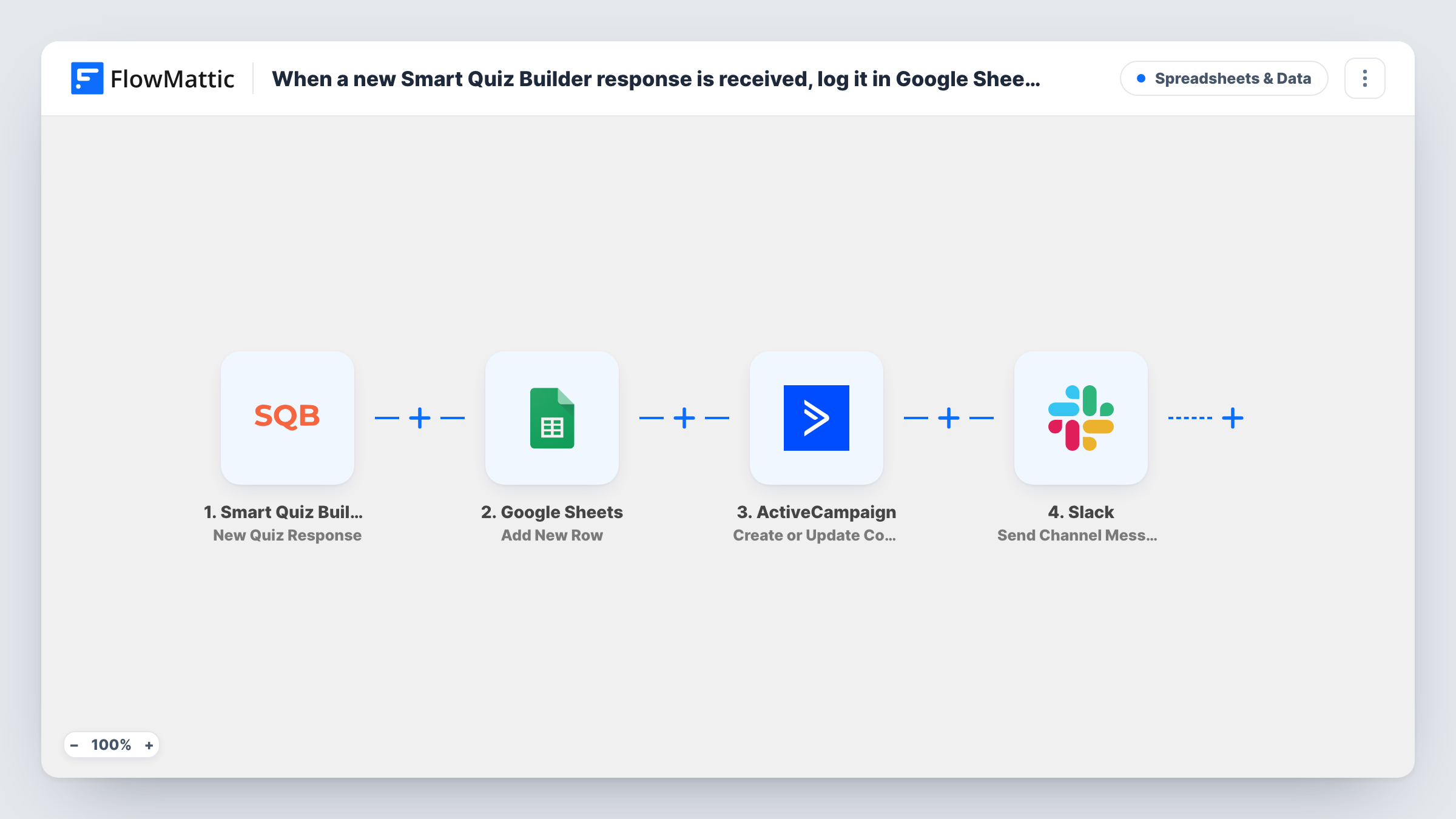
When a new Smart Quiz Builder response is received, log it in Google Sheets, add the lead to ActiveCampaign, then notify the team in Slack
Each completed Smart Quiz Builder quiz is logged as a Google Sheets row, added to ActiveCampaign as a new or updated contact, and announced in a Slack channel, all in one run.
 Smart Quiz Builder
 Google Sheets
 ActiveCampaign
 Slack
Slack4 steps Setup ~8 min Used on 1.4k sites Free to import
What this workflow does
A quiz lead usually needs three things: a record you can analyse, a place in your email marketing, and a heads-up for whoever follows up. Doing those by hand for every response means three tabs and plenty of copying. This workflow handles all three for each finished quiz.
The run starts with the Smart Quiz Builder trigger, New Quiz Response, which fires once a quiz has been filled in completely. A Google Sheets step adds a row with the answers you map. The ActiveCampaign step then creates the contact, or updates it if that email is already there. Last, a Slack message goes to the channel you pick with the details you choose.
The steps run in that order on every finished quiz. A person who takes the quiz twice gets two sheet rows and two Slack messages, while ActiveCampaign keeps one contact and refreshes its fields. Task History shows what each of the three actions returned in every run.
Quiz funnel for an online coach
A coach's personality quiz feeds a sheet for tracking results, adds each taker to ActiveCampaign for a nurture sequence, and pings the coach in Slack about every lead.
Software fit assessment
A SaaS team's fit quiz logs answers for product research, puts the person into ActiveCampaign, and alerts the sales channel so a rep can reach out.
Retail style finder
Shoppers who finish a style quiz land in ActiveCampaign for product emails, while the merchandising team reads the answer sheet and sees each new response in Slack.
How this workflow runs
What happens at each step once the workflow is on, and what you need before you import it.
 Smart Quiz Builder New Quiz Response
Fires when a Smart Quiz Builder quiz is completed. The response, including the quiz taker's email and answers, is available to every later step.
- Google Sheets Add New Row
Logs the quiz response as one new row in your chosen spreadsheet. Map each quiz answer and the contact details to columns so you have a full log of responses.
- ActiveCampaign Create or Update Contact
Creates the quiz taker as a contact in ActiveCampaign, or updates the contact if that email already exists. Map the email and any name fields from the quiz.
- Slack Send Channel Message
Sends the team alert into whichever Slack channel you point it at. Write the text and insert values from the quiz, such as the name and result, so the team knows who to contact.
What you need
- FlowMatticCore
- Smart Quiz Builder AccountAccount
- Google Sheets AccountAccount
- ActiveCampaign AccountAccount
- Slack AccountAccount
After importing, map your own data. To keep the template universal, not every step is pre-filled. Open each step in the builder and connect your accounts and fields (channels, lists, sheets, recipients) before you switch the workflow on.
Make it yours
Changes worth making after you import it.
- Leave a quiz answer out of the ActiveCampaign mapping if it is often blank. A later response with an empty value could clear what that contact already has in that field.
- Add a Filter between the ActiveCampaign step and the Slack step if the team only needs alerts for certain results, such as an outcome that signals a strong sales fit. The sheet and ActiveCampaign steps come before it, so they still run for everyone.
- After the ActiveCampaign step, add its Subscribe or Unsubscribe Contact From List action or the Add/Remove Tag From Contact action, so quiz takers land on the list or tag your email automations use.
Questions about this workflow
What if the quiz taker is already in ActiveCampaign?
The step is Create or Update Contact, so an existing contact with that email is updated with the values you map rather than duplicated.
Does a repeat quiz create another Google Sheets row?
Yes. Each completed quiz adds a new row and sends a new Slack message, even when the same person takes the quiz again.
Can the Slack alert go to one salesperson instead of a channel?
Yes. Change the Slack step's action to Send Direct Message and choose the person. Slack's Send Private Channel Message action covers a private room instead.
Which quiz answers can go into the sheet and ActiveCampaign?
Any value the New Quiz Response trigger passes on. All three actions ship unmapped, so complete a test quiz after import, then map the answers to sheet columns and the email and name fields to ActiveCampaign.
More Spreadsheets & Data workflows
Other ready-to-import templates from the same category.



Import this workflow into your WordPress site
Download the JSON, import it from the Workflows screen and connect your accounts. Every run stays on your server, with no per-task fees.
30-day money-back guarantee Unlimited workflows and runs Self-hosted