

When a new subscription is created in Stripe, create a new customer in Desku.io and add subscription details to Google Spreadsheet
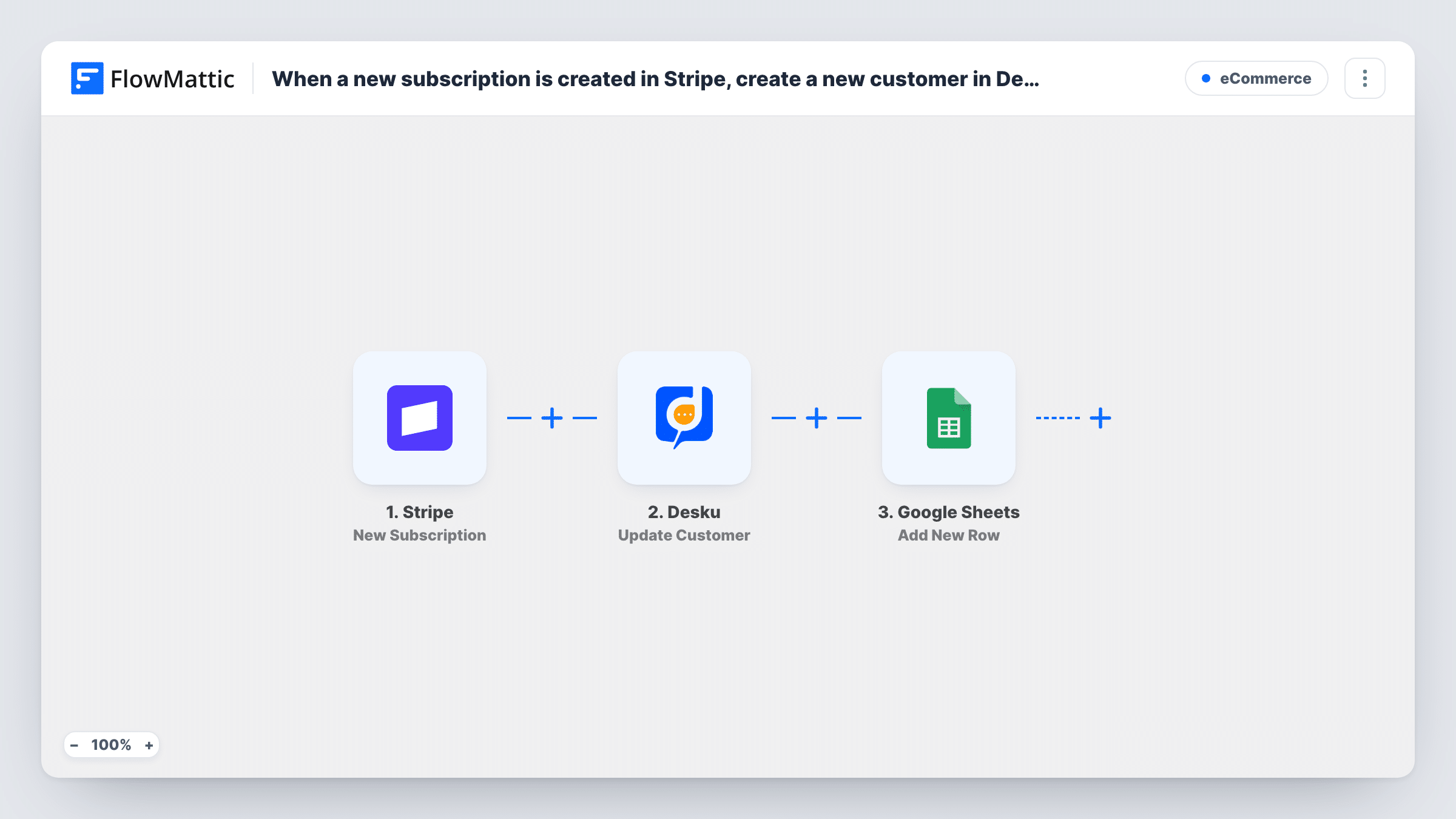
When a customer signs up for a new Stripe plan, FlowMattic creates them as a customer in Desku.io and adds the subscription’s details as a row in your Google Sheets spreadsheet.
 Stripe
 Desku
Desku
 Google Sheets
3 steps Setup ~5 min Used on 2.5k sites Free to import
What this workflow does
A new subscriber is also a future support contact. If your help desk runs on Desku.io, it helps to have each subscriber there before they write in, and a spreadsheet of sign-ups is handy for anyone who doesn't log in to Stripe. This workflow does both each time Stripe reports a new subscription.
The Stripe New Subscription trigger fires whenever a customer is put on a new plan. The subscription data can identify the buyer by Stripe customer ID alone, with no email or name, so look at a test run before mapping. If those details are missing, the tips show how to fetch them.
Desku Create Customer then adds the subscriber to your help desk. Last, Google Sheets Add New Row writes one row per subscription with the values you map, such as the plan, amount, status and start date. Both action steps ship unmapped, so after import you connect each account, pick the spreadsheet and match fields to columns.
Every new subscription starts a run, including a second plan taken by an existing customer. Desku may not accept a second customer with the same email, so test with a real sign-up and check Task History for each step's result.
Subscribers ready in the help desk
A SaaS team's support agents open Desku and find each new subscriber already listed when the first how-do-I question arrives.
Sign-up log for the finance team
The bookkeeper reviews a Google Sheet of new Stripe subscriptions each week, with plan and amount columns, without needing Stripe access.
Tracking which plans sell
A founder sorts the sheet by plan name to see which subscription tier new customers pick most often.
How this workflow runs
What happens at each step once the workflow is on, and what you need before you import it.
 Stripe New Subscription
Runs each time Stripe puts a customer on a new plan. The subscription details are passed on; the customer may appear only as a Stripe customer ID, so check a test run.
- Desku Create Customer
Creates the subscriber as a new customer in Desku.io. The step ships unmapped: connect Desku and map the customer's name and email, from the trigger or from a Stripe customer lookup.
- Google Sheets Add New Row
Adds a row to your spreadsheet for the subscription. Pick the spreadsheet and sheet after import and map the subscription fields you want, such as plan, amount, status and customer.
What you need
- FlowMatticCore
- Stripe AccountAccount
- Desku.io AccountAccount
- Google Sheets AccountAccount
After importing, map your own data. To keep the template universal, not every step is pre-filled. Open each step in the builder and connect your accounts and fields (channels, lists, sheets, recipients) before you switch the workflow on.
Make it yours
Changes worth making after you import it.
- If the Stripe data has no email or name, put Stripe's Find Customer by ID action between the Stripe trigger and the Desku step, and map those details from its result into Desku and the sheet.
- Set up the sheet's header row before importing, with columns like Date, Customer, Email, Plan and Amount, so mapping takes a minute.
- Amounts from Stripe arrive in the smallest currency unit, for example cents for dollars. Label the amount column to say so, or add a formula column in the sheet that divides it by 100.
Questions about this workflow
Where do I get the Stripe customer's email for Desku?
Check a test run first. The New Subscription event may carry only the customer ID. If so, add Stripe's Find Customer by ID step right after the trigger and map the email and name from it.
Does an existing Stripe customer taking a second plan create another Desku customer?
The workflow runs again and tries to create the customer again. Desku may refuse or duplicate an email it already holds, so check Task History for its response.
Which subscription details go into the Google Sheet?
Whichever you map into the Add New Row step. It is empty in the template, so choose fields such as the plan, amount and status for your columns.
More E-Commerce workflows
Other ready-to-import templates from the same category.





Import this workflow into your WordPress site
Download the JSON, import it from the Workflows screen and connect your accounts. Every run stays on your server, with no per-task fees.
30-day money-back guarantee Unlimited workflows and runs Self-hosted