

When a webhook response is received, check if email field value is a valid email using Bounceless, and add a member to the list in Mailchimp
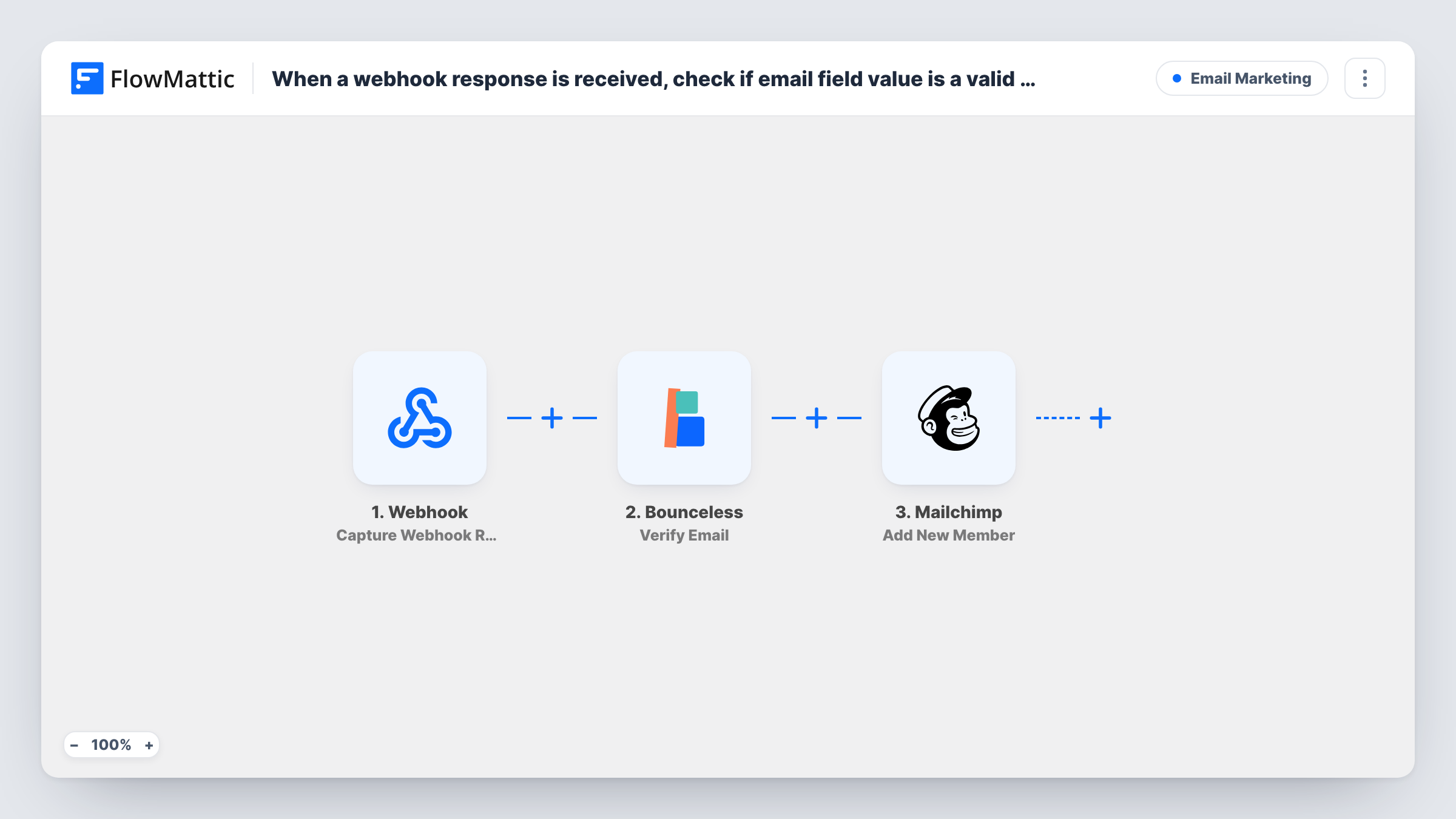
Data posted to a FlowMattic webhook has its email address checked by Bounceless, then the person is added to your Mailchimp list. As imported, every address is added; a Filter keeps out the ones that fail.
 Webhook
 Bounceless
 Mailchimp
3 steps Setup ~5 min Used on 1.4k sites Free to import
What this workflow does
Sign-ups don't always come from a WordPress form. A landing page builder, a quiz tool or your own app can post data to a webhook instead. This workflow takes that data, runs the email address past Bounceless, and then adds the person to Mailchimp, with the check result available to you along the way.
The Webhook trigger gives you a URL. Whatever the sending service posts to it becomes data in FlowMattic. The second step sends the email value to Bounceless with its Verify Email action, and the response comes back as data you can map. The third step uses Mailchimp Add New Member, which adds the person to the audience you choose, or updates them if they are already on it.
Be clear about one thing before you import: as shipped, nothing between Bounceless and Mailchimp acts on the result. Every address goes to Mailchimp whether it passed or failed. To make the check decide who joins, add a Filter after the Bounceless step. You can also map the result into a Mailchimp field so it is stored with the member.
Landing page built outside WordPress
Your page builder posts each opt-in to the webhook URL. Bounceless checks the address, and a Filter you add lets only good ones into Mailchimp.
Sign-ups from a custom app
Your SaaS sends new users to the webhook with their email. Each one is verified and placed on your product updates audience in Mailchimp.
Giveaway entries with a lot of fake emails
Contest tools attract throwaway addresses. With a Filter on the Bounceless result, entries that fail the check never reach your Mailchimp list.
How this workflow runs
What happens at each step once the workflow is on, and what you need before you import it.
 Webhook Capture Webhook Response
Gives you a webhook URL and fires each time data is posted to it. Send one test request after import so FlowMattic captures the fields, including the email address.
- Bounceless Verify Email
Sends the email address from the webhook data to Bounceless for verification. Connect your Bounceless account and map the email field. Whatever Bounceless returns can then be mapped or checked further down the workflow.
- Mailchimp Add New Member
Adds the person to the Mailchimp audience you pick, or updates them if they are already a member. Map the email and any name fields from the webhook data.
What you need
- FlowMatticCore
- Bounceless AccountAccount
- Mailchimp AccountAccount
After importing, map your own data. To keep the template universal, not every step is pre-filled. Open each step in the builder and connect your accounts and fields (channels, lists, sheets, recipients) before you switch the workflow on.
Make it yours
Changes worth making after you import it.
- Add a Filter between Bounceless and Mailchimp that continues only when the verification result shows a valid address. Run one good and one fake address through the webhook first to see the exact value Bounceless returns.
- Use a Router in place of that Filter if you want failed addresses kept somewhere, such as a Google Sheets row, while valid ones go to Mailchimp.
- If the sending service posts the email under a nested key, check the captured webhook data in FlowMattic and map that exact field into both the Bounceless and Mailchimp steps.
Questions about this workflow
Does the Bounceless check stop bad emails from joining Mailchimp?
Not as imported. The template verifies the address and then adds it to Mailchimp regardless of the result. Add a Filter after the Bounceless step to let only valid addresses through.
What if the person is already on my Mailchimp audience?
Add New Member updates an existing member instead of adding a duplicate, so a repeat sign-up refreshes their details.
Which services can send data to this webhook?
Any tool that can post an HTTP request to a URL, such as a form builder, an app or another automation tool. The data only needs to include an email address.
Do I need a Bounceless account to use this Mailchimp workflow?
Yes. The verification runs through your own Bounceless account, which you connect in the second step. You also connect your Mailchimp account for the last step.
More Email Marketing workflows
Other ready-to-import templates from the same category.





Import this workflow into your WordPress site
Download the JSON, import it from the Workflows screen and connect your accounts. Every run stays on your server, with no per-task fees.
30-day money-back guarantee Unlimited workflows and runs Self-hosted