

When a Worksection task is created, add an Airtable record and alert the team in Slack
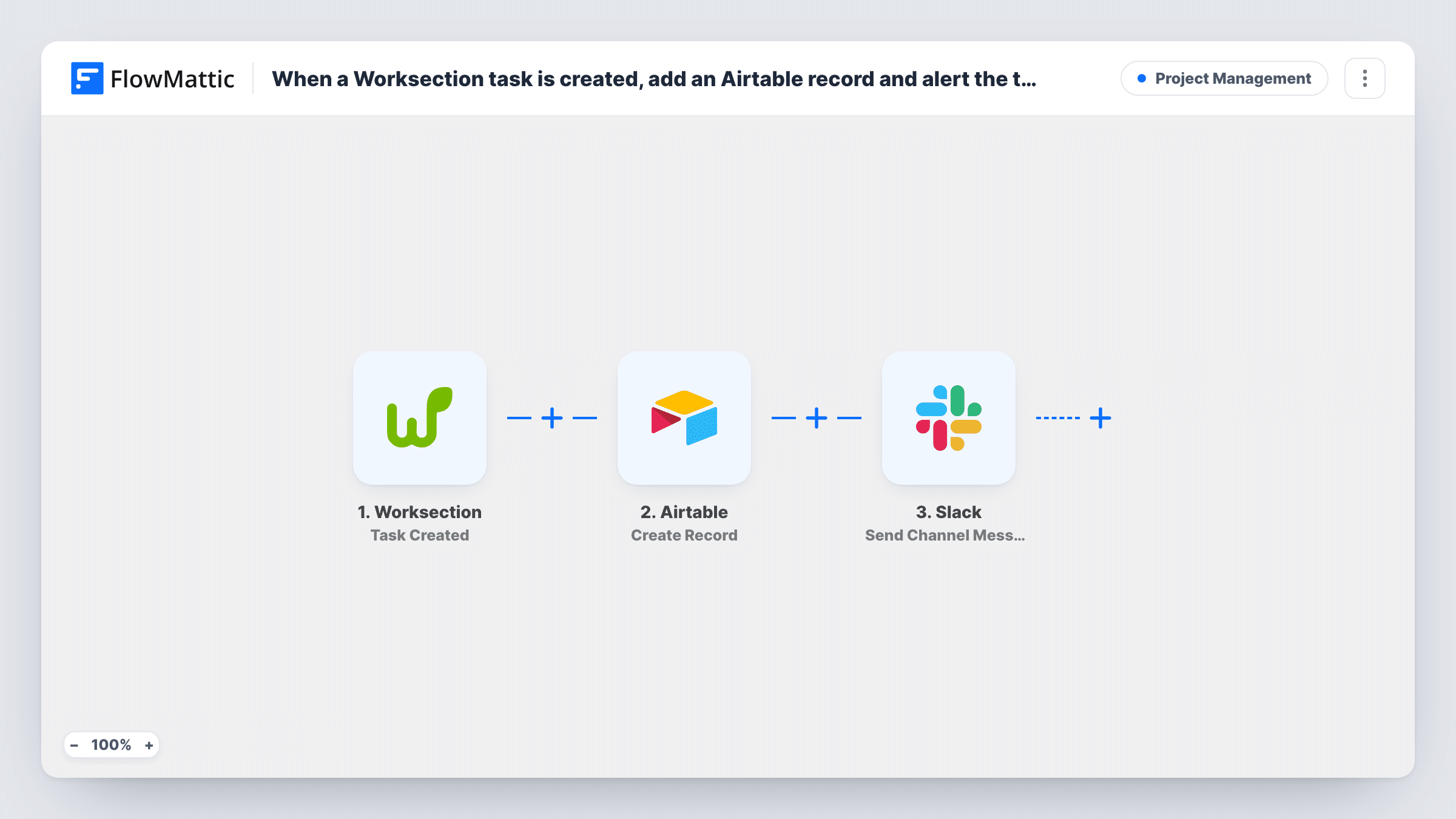
When a new task is created in Worksection, this workflow adds a record to an Airtable table and then posts a message in a Slack channel, so your task log and your team both hear about new work at once.
 Worksection
 Airtable
 Slack
Slack3 steps Setup ~5 min Used on 315 sites Productivity Free to import
What this workflow does
Worksection tracks the work, but you may report on it in Airtable and talk about it in Slack. Keeping all three aligned by hand means copying each new task into a base and then telling the team it exists. This workflow does both for every task someone creates.
A run starts whenever someone adds a task in Worksection. FlowMattic first runs Create Record in Airtable, adding a row to the base and table you pick with the task values you map, such as its name, project and due date. It then runs Send Channel Message in Slack, posting your message to a channel.
The Slack step comes after Airtable, so you can include values from the new record in the message as well as the Worksection details. Task History shows what both steps returned for each new task. Edits and completions are separate Worksection triggers and don't run this workflow.
Operations reporting across projects
An operations lead reports on work volume in Airtable. Each new Worksection task becomes a record, and the team channel hears about it in Slack.
Agency intake from account managers
Account managers create client tasks in Worksection. Producers see each one announced in Slack, and the Airtable base keeps a log for billing.
IT request tracking
An internal IT team logs requests as Worksection tasks, records them in an Airtable table for monthly counts, and posts each in a Slack help channel.
How this workflow runs
What happens at each step once the workflow is on, and what you need before you import it.
 Worksection Task Created
Fires when a user creates a new task in Worksection. The task's details from the event are available to both later steps.
- Airtable Create Record
Creates a new record in the Airtable base and table you choose, with the Worksection task values mapped to its fields. You authorise Airtable in FlowMattic during import.
- Slack Send Channel Message
Posts a message to the Slack channel you set, built from your text plus values from the Worksection task and the new Airtable record. Your Slack workspace is linked during import too.
What you need
- FlowMatticCore
- Worksection AccountAccount
- Airtable AccountAccount
- Slack AccountAccount
After importing, map your own data. To keep the template universal, not every step is pre-filled. Open each step in the builder and connect your accounts and fields (channels, lists, sheets, recipients) before you switch the workflow on.
Make it yours
Changes worth making after you import it.
- If the Slack channel is private, use Slack's Send Private Channel Message action in place of Send Channel Message.
- Put a Filter between the Worksection trigger and the Airtable step if only tasks in certain projects should reach Airtable and Slack, using the project value the trigger sends.
- Create a test task after import and check Task History to see the Worksection fields, then match each one to a field in your Airtable table.
Questions about this workflow
Which Slack channel hears about new Worksection tasks?
Whichever channel you choose when you set up the Slack step. Write the message there and map in the task name and project from Worksection, plus any value from the new Airtable record. For a private channel, see the tips.
Does completing a Worksection task update the Airtable record?
No. This workflow reacts only to new tasks. Completion is a separate Worksection trigger you could use in another workflow.
Do I need a particular Airtable table layout for Worksection tasks?
Any table works. Create the fields you want, such as task name, project and due date, then map Worksection values into them.
Are tasks created before I import this logged in Airtable?
No. Only Worksection tasks created while the workflow is on reach Airtable and Slack.
More Project Management workflows
Other ready-to-import templates from the same category.





Import this workflow into your WordPress site
Download the JSON, import it from the Workflows screen and connect your accounts. Every run stays on your server, with no per-task fees.
30-day money-back guarantee Unlimited workflows and runs Self-hosted