

When an Explodely rebill is cancelled, find the customer in ActiveCampaign, then send a win-back email via Gmail
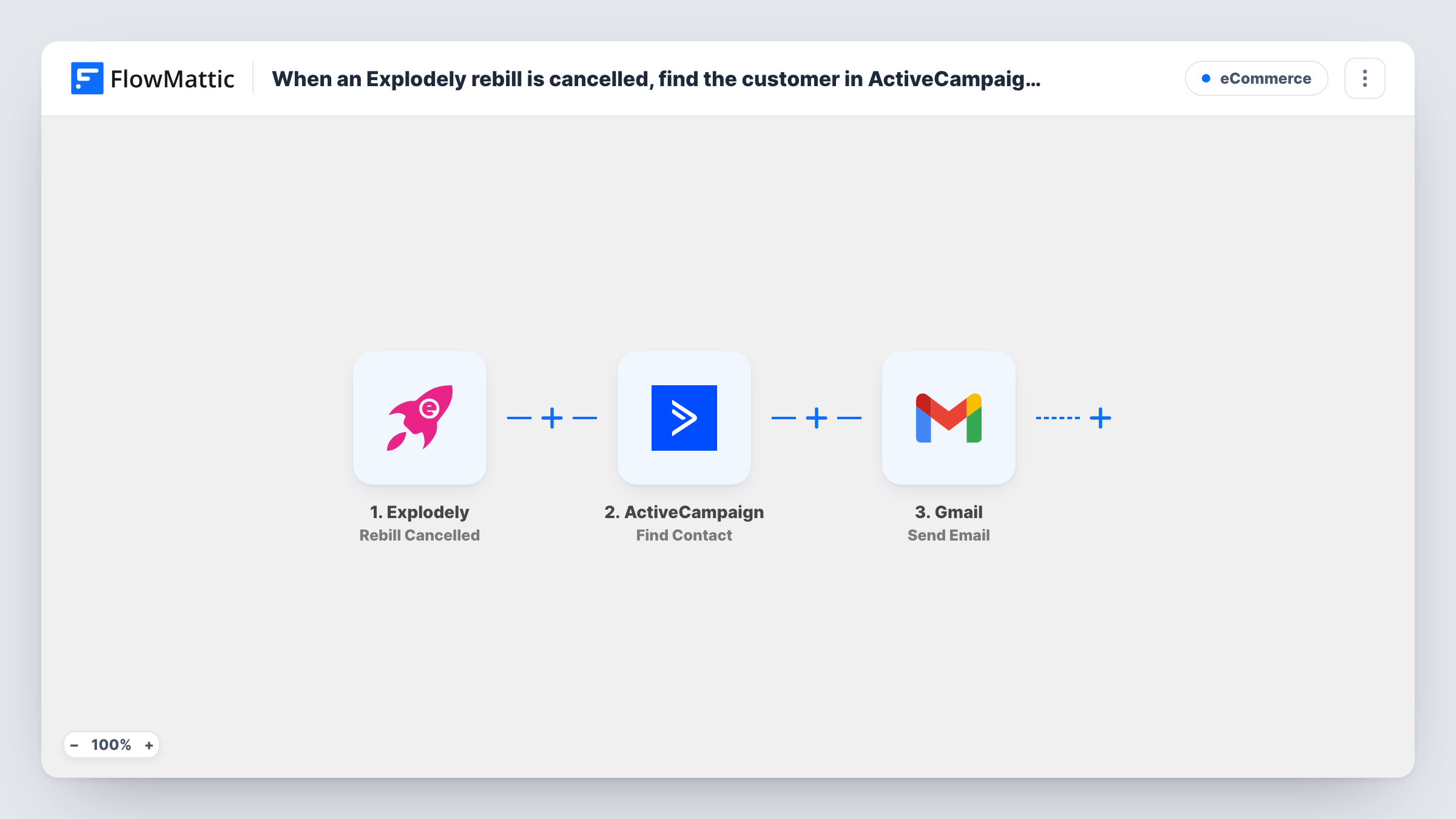
When a rebill is cancelled in Explodely, this workflow looks the customer up in ActiveCampaign and then sends them a win-back email from your Gmail account, using their CRM details to personalise it.
 Explodely
 ActiveCampaign
 Gmail
Gmail3 steps Setup ~5 min Used on 1.2k sites Free to import
What this workflow does
A cancelled subscription is a moment to ask what went wrong or offer a reason to come back. A plain email from a real inbox reads more personally than a system notice, and your CRM usually knows more about the customer than the payment platform does. This workflow brings those together.
The Explodely trigger, Rebill Cancelled, fires when a rebill is cancelled. The customer's details from that event, such as their email address, go to ActiveCampaign, where Find Contact searches for the matching contact by email, ID or phone. Whatever ActiveCampaign returns, such as the contact's first name or custom fields, can then be mapped into the email. The Gmail step sends your win-back message from your connected Google account.
If ActiveCampaign finds no contact, the Gmail step still runs, so values mapped from the lookup are blank in that email. Address the email to the customer's address from Explodely and keep the wording sensible without the CRM fields. Task History shows each run, including what ActiveCampaign returned.
Membership site offering a pause instead
A member who cancels their monthly rebill gets an email from the owner's Gmail suggesting they pause for a month, signed with their first name from ActiveCampaign.
Software seller asking for feedback
Cancelled subscribers receive a short note asking what made them leave, with a link to a one-question survey.
Coaching program with a returning-client discount
Clients whose Explodely rebill is cancelled get an email offering a discount code if they rejoin, worded around details stored in ActiveCampaign.
How this workflow runs
What happens at each step once the workflow is on, and what you need before you import it.
 Explodely Rebill Cancelled
Fires when a rebill is cancelled in Explodely. The customer's details from the cancelled subscription are passed on for the ActiveCampaign lookup and the email.
- ActiveCampaign Find Contact
Searches ActiveCampaign for a contact by email address, ID or phone. Map the customer's email from Explodely and connect your ActiveCampaign account; the contact's fields become available to the Gmail step.
- Gmail Send Email
Emails the customer through the Google account you connect. Map the customer's address as the recipient, write the subject and win-back message, and add ActiveCampaign fields to personalise it.
What you need
- FlowMatticCore
- Explodely AccountAccount
- ActiveCampaign AccountAccount
- Gmail AccountAccount
After importing, map your own data. To keep the template universal, not every step is pre-filled. Open each step in the builder and connect your accounts and fields (channels, lists, sheets, recipients) before you switch the workflow on.
Make it yours
Changes worth making after you import it.
- Add a Filter after the ActiveCampaign step that continues only when a contact was found, if you would rather skip the email than send one without CRM details.
- Add a Delay before the Gmail step so the message arrives a day or two after the cancellation rather than at the same moment.
- Use a contact field from ActiveCampaign, such as the product or plan they had if you store it, to change the offer you describe in the email.
Questions about this workflow
What if the Explodely customer isn't in ActiveCampaign?
Find Contact returns no match and the Gmail step still sends the email. Fields mapped from ActiveCampaign come through empty, so write the message to read well without them or add a Filter.
Does this change the contact in ActiveCampaign?
No. Find Contact only reads. Nothing in this template tags, updates or unsubscribes the contact.
Can I send the win-back email from ActiveCampaign instead of Gmail?
Not in this template. It sends through the Gmail account you connect. Using ActiveCampaign's own campaigns or automations would need different steps.
Which Explodely event starts the email?
Rebill Cancelled, which fires when a recurring rebill is cancelled. Refunds and chargebacks are separate Explodely triggers and don't start this workflow.
More E-Commerce workflows
Other ready-to-import templates from the same category.







Import this workflow into your WordPress site
Download the JSON, import it from the Workflows screen and connect your accounts. Every run stays on your server, with no per-task fees.
30-day money-back guarantee Unlimited workflows and runs Self-hosted