

When donation created in Buy Me a Coffee, add the user to your list in FluentCRM, Send user customized thank you email
Each new Buy Me a Coffee donation creates or updates the supporter as a FluentCRM contact, adds them to the list you choose, and sends them a thank-you email you write, through WordPress mail or SMTP.
 Buy Me a Coffee
 FluentCRM
 Email
Email4 steps Setup ~8 min Used on 2.8k sites Free to import
What this workflow does
Supporters on Buy Me a Coffee are people who already like your work enough to pay for it. Keeping them only in the Buy Me a Coffee dashboard means you can't easily email them about new projects. This workflow brings each donor into FluentCRM on your own WordPress site and thanks them personally.
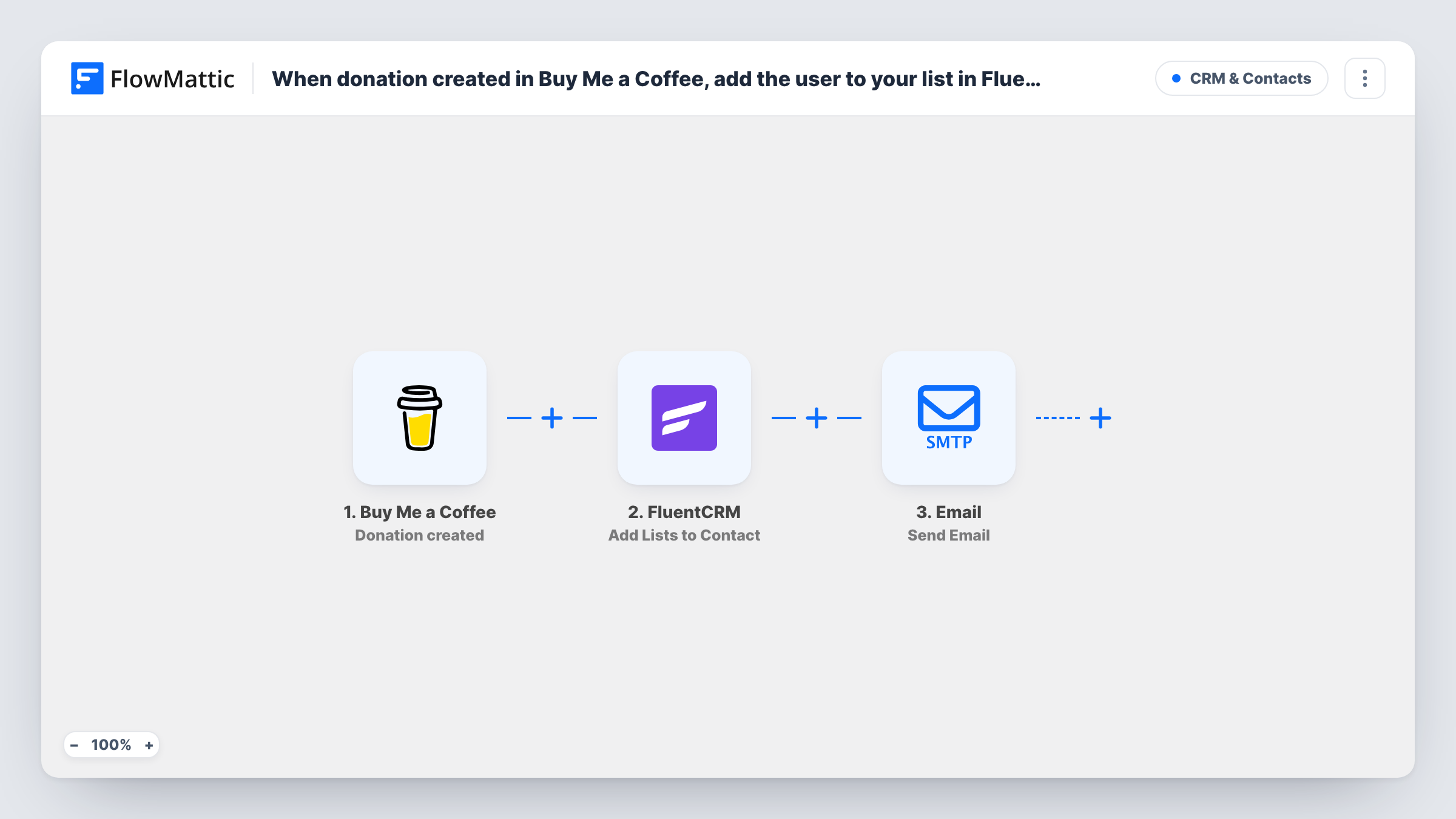
The Buy Me a Coffee Donation created trigger starts a run when Buy Me a Coffee sends its donation webhook. Next, the FluentCRM Create or Update Contact step matches the supporter by email address, adding first-time donors as contacts and refreshing the records of people who have given before. The Add Lists to Contact step then adds that contact to one or more of your lists, which works because the previous step has just made sure the contact exists.
The final Email step sends the thank-you through WordPress's built-in mail or your SMTP account. All three action steps ship unmapped, so after import you map the supporter's email and name, pick the lists, and write the email's subject and message, perhaps quoting the donation amount or the note they left.
Repeat supporters run the workflow on every donation, so they get a thank-you each time. Make a small test donation and check Task History to see which supporter fields Buy Me a Coffee sent.
Podcast supporters list
A podcaster adds every Buy Me a Coffee donor to a FluentCRM supporters list and later emails them early access to new episodes.
Open source sponsors
A plugin developer thanks each donor by email with a note about the next release and keeps them in a list for changelog updates.
Artist fan club
An illustrator sends a personal thank-you to every supporter and groups them in FluentCRM so they get first look at print sales.
How this workflow runs
What happens at each step once the workflow is on, and what you need before you import it.
 Buy Me a Coffee Donation created
Starts the workflow when Buy Me a Coffee sends a Donation created webhook. The donation details, such as the supporter's name, email and amount, are passed on if Buy Me a Coffee includes them.
- FluentCRM Create or Update Contact
Creates the supporter as a FluentCRM contact, or updates the existing contact with the same email address. The step ships unmapped: map the supporter's email and name from the donation.
- FluentCRM Add Lists to Contact
Adds the contact from the previous step to one or more FluentCRM lists. After import, choose the lists and map the contact so FluentCRM knows whom to add.
 Email Send Email
Sends the thank-you email using WordPress mail or your SMTP account. Nothing is set as shipped, so map the supporter's email as the recipient and write a subject and message.
What you need
- FlowMatticCore
- Buy Me a Coffee AccountAccount
- FluentCRM PluginPlugin
After importing, map your own data. To keep the template universal, not every step is pre-filled. Open each step in the builder and connect your accounts and fields (channels, lists, sheets, recipients) before you switch the workflow on.
Make it yours
Changes worth making after you import it.
- Mention the donation amount and the supporter's message in the email body, so the thank-you clearly refers to what they did.
- Create a dedicated FluentCRM list such as "Coffee supporters" before importing, so it's ready to pick in the Add Lists to Contact step.
- Add a Filter between the FluentCRM Add Lists step and the Email step on the donation amount if only larger gifts should get the personal email. Every donor still reaches FluentCRM.
- Set up SMTP details in the Email step if WordPress mail on your host isn't reliable, so thank-you emails don't land in spam.
Questions about this workflow
What happens when a Buy Me a Coffee supporter donates again?
The workflow runs again. FluentCRM finds the contact by email and updates it instead of making a duplicate, the lists are applied again, and the supporter gets another thank-you email.
Does the donor need to be in FluentCRM before the list step?
Yes. Add Lists to Contact works on an existing contact, which is why Create or Update Contact runs first. That earlier step makes the record for a new donor, so the list step has someone to add.
Is the thank-you email written for me?
No. The Email step ships with no subject, body or recipient. Write your own message after import and map the supporter's name and email from the donation.
Will the supporter's email always come through from Buy Me a Coffee?
It depends on what Buy Me a Coffee includes in the donation webhook. Make a test donation and check Task History before you rely on it, since both FluentCRM and the Email step need that address.
More CRM & Contacts workflows
Other ready-to-import templates from the same category.






Import this workflow into your WordPress site
Download the JSON, import it from the Workflows screen and connect your accounts. Every run stays on your server, with no per-task fees.
30-day money-back guarantee Unlimited workflows and runs Self-hosted