

When FluentCart issues a license, send the license key as a secret link by SMS (Twilio)
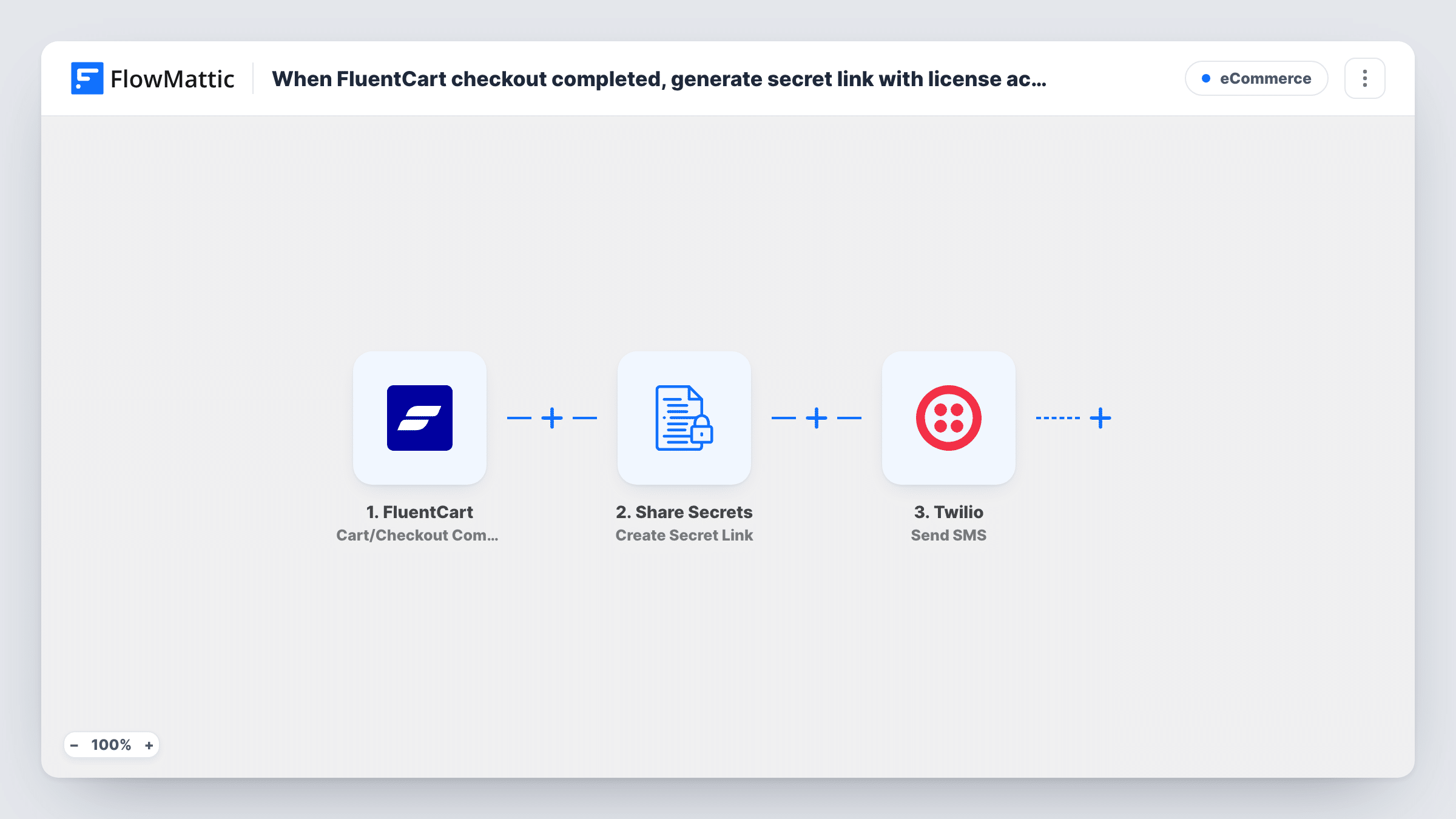
When FluentCart issues a license, FlowMattic puts the license key behind an expiring Share Secrets link and texts that link to the customer with Twilio.
 FluentCart
 Share Secrets
 Twilio
3 steps Setup ~5 min Used on 719 sites Free to import
What this workflow does
Sending a license key in plain text leaves it sitting in a message thread for anyone who picks up the phone later. This workflow keeps the key itself out of the SMS. The customer gets a link that opens the key, and the link stops working once it expires.
The FluentCart trigger, License Issued, is part of FluentCart Pro licensing and fires when a new license is issued. The Share Secrets step then stores the license key, mapped from the trigger, as an encrypted secret titled "Your license key" and returns a secret URL. The template doesn't set an expiry or a view limit, so pick those after import, for example a few days or a single view.
Last, Twilio sends an SMS that thanks the customer for their purchase and includes the secret URL. The message text is written for you, but the recipient number is not mapped. Map the customer's phone from the trigger data, with the country code.
Issue a test license to yourself and open the link from your phone. Task History shows the secret URL that was created and Twilio's response to the send.
Plugin licenses delivered by text
A WordPress plugin developer selling through FluentCart texts each buyer a link to their key, so the key isn't stored in plain text in the SMS thread.
Software keys for on-site installs
A studio that sells desktop software licenses lets buyers open the key on their phone at the machine they're setting up.
Single-view keys for resellers
A seller sets the secret to one view, so a key forwarded after the first reveal can't be opened again by someone else.
How this workflow runs
What happens at each step once the workflow is on, and what you need before you import it.
 FluentCart License Issued [PRO]
Starts the workflow when FluentCart issues a new license, a FluentCart Pro licensing event. The license details, including the key, are passed on for the secret link and the SMS.
- Share Secrets Create Secret Link
Creates an encrypted Share Secrets link holding the license key, titled "Your license key". It returns the secret URL for the SMS. Set how long the link lasts, or how many views it allows, after import.
- Twilio Send SMS
Texts the customer through Twilio with a thank-you note and the secret URL. The message is prewritten; after import, map the customer's phone number as the recipient.
What you need
- FlowMatticCore
- FluentCart PluginPlugin
- Twilio AccountAccount
After importing, map your own data. To keep the template universal, not every step is pre-filled. Open each step in the builder and connect your accounts and fields (channels, lists, sheets, recipients) before you switch the workflow on.
Make it yours
Changes worth making after you import it.
- If the License Issued data has no phone number, add FluentCart's Find Customer (by email) or Get Customer action between the trigger and the Share Secrets step, and map the phone from its result.
- Set the secret to expire after a single view, so the key can only be revealed once from the SMS link.
- Add an Email step after the Twilio step that sends the same secret URL, for buyers whose phone number is missing or wrong.
- Ask for phone numbers with the country code at FluentCart checkout, since Twilio needs the full international number.
Questions about this workflow
Do I need FluentCart Pro for this license key workflow?
Yes. License Issued belongs to FluentCart Pro's licensing, so the trigger only fires on stores that issue licenses through it.
Does the license key appear in the SMS itself?
No. The SMS carries only the Share Secrets link. The key is stored encrypted on your site and shown when the customer opens the link and reveals it.
What happens when the customer opens the link after it expires?
They see an expired message instead of the key. Pick an expiry long enough for buyers to act, and keep another way to resend the key.
Is the customer's phone number already mapped in the Twilio step?
No. Only the message is written. Map the phone from the trigger data, or from a FluentCart customer lookup, and check a test run in Task History.
More E-Commerce workflows
Other ready-to-import templates from the same category.






Import this workflow into your WordPress site
Download the JSON, import it from the Workflows screen and connect your accounts. Every run stays on your server, with no per-task fees.
30-day money-back guarantee Unlimited workflows and runs Self-hosted