

When form submission received in Contact Form 7, Generate a PDF from template in Crove and send it to WhatsApp number of user
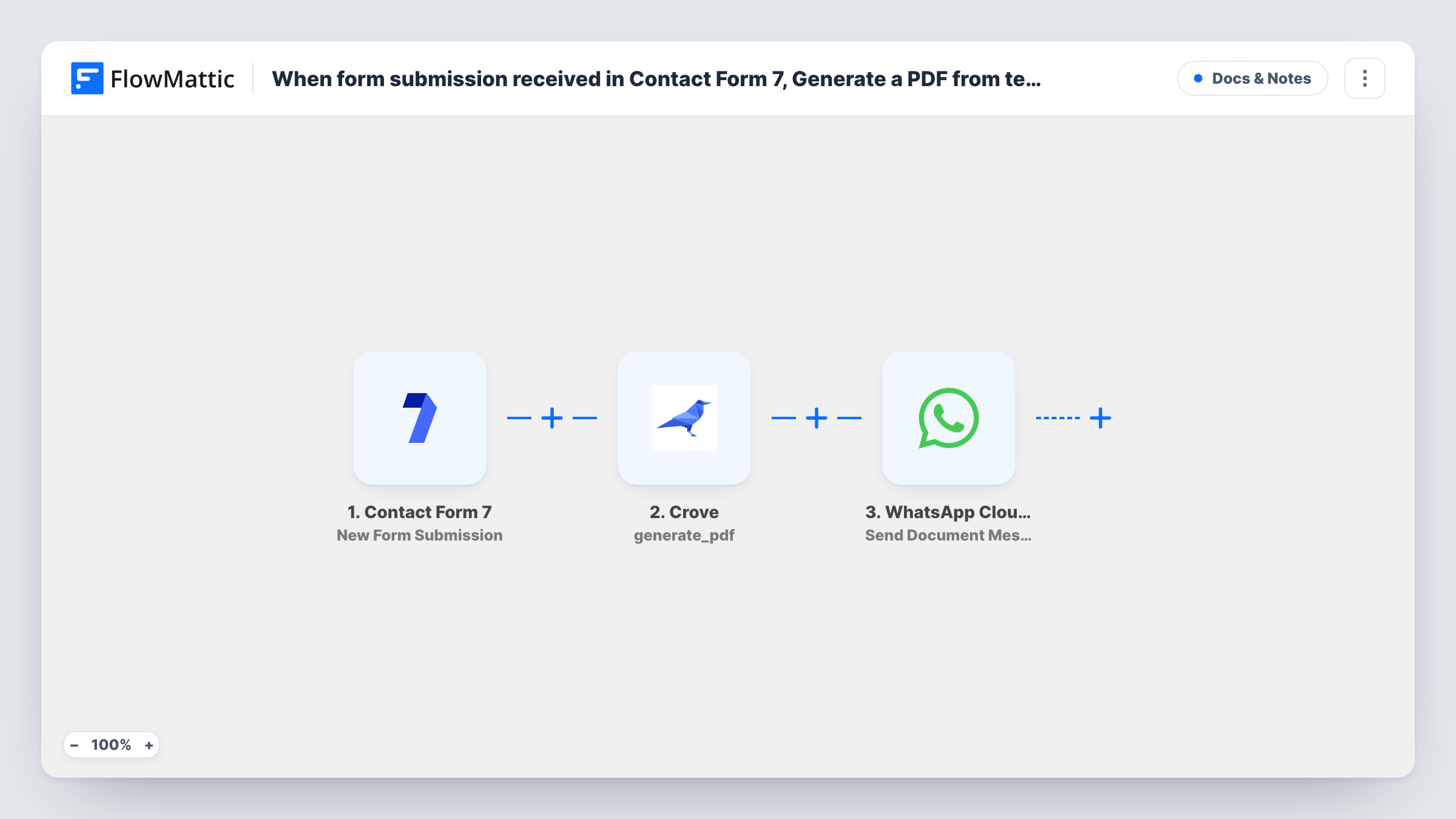
Each Contact Form 7 submission is used to generate a PDF from your Crove template, which is then sent as a document to the phone number the person entered, through the WhatsApp Cloud API.
 Contact Form 7
 Crove
Crove
 WhatsApp Cloud API
3 steps Setup ~5 min Used on 1.3k sites Free to import
What this workflow does
Some forms should end with a document: a quote, a certificate, a booking summary. Filling a template by hand and sending it to each person takes time. This workflow fills a Crove template from the form answers and sends the PDF over WhatsApp.
The Contact Form 7 trigger fires on each new submission, and the answers become data you can map. The Crove step generates a PDF from your template, using the values you map from the form. The WhatsApp Cloud API Send Document Message step then sends that file to the number the visitor typed into your form.
One limit matters here. WhatsApp only delivers a free-form message, including a document message, if the person has messaged your business number within the last 24 hours. Most people filling in a website form haven't, so they usually won't receive the PDF. To reach them reliably, switch to an approved template message with the Send Template Message action. Your form also needs a phone field, sent in the international format WhatsApp expects.
Instant quote for a service enquiry
A visitor fills in a quote form with job details and their number. Crove builds the quote PDF, and WhatsApp sends it if they have messaged your business recently.
Booking confirmation for a returning client
Clients who chat with you on WhatsApp book through a form on your site. Their confirmation PDF arrives in the same chat, inside the 24-hour window.
Event pass after registration
Attendees who first message your WhatsApp number for the link then register on a form, and receive a pass generated from your Crove template.
How this workflow runs
What happens at each step once the workflow is on, and what you need before you import it.
 Contact Form 7 New Form Submission
Runs when a visitor submits a Contact Form 7 form. The answers, including the phone number field, are passed to Crove and WhatsApp for mapping.
- Crove Generate PDF
Generates a PDF from your Crove template using values mapped from the form. Run a test submission to see what Crove returns for the file, so you can map it in the WhatsApp step.
- WhatsApp Cloud API Send Document Message
Sends the generated PDF as a WhatsApp document to the phone number from the form, through your WhatsApp Cloud API business number. Whether it arrives depends on that person having written to you in the past day.
What you need
- FlowMatticCore
- Contact Form 7 PluginPlugin
- Crove AccountAccount
- WhatsApp Cloud API AccountAccount
After importing, map your own data. To keep the template universal, not every step is pre-filled. Open each step in the builder and connect your accounts and fields (channels, lists, sheets, recipients) before you switch the workflow on.
Make it yours
Changes worth making after you import it.
- Switch the last step to Send Template Message with an approved template if most people filling in the form have never messaged your business number.
- Make the phone field required in Contact Form 7 (a tel* tag) and ask for the country code, so every run has a number in a format WhatsApp can use.
- Add a Filter right after the trigger that continues only when the phone field isn't empty, so submissions without a number stop before Crove.
Questions about this workflow
Why didn't the Contact Form 7 visitor receive the PDF on WhatsApp?
Most often because they haven't messaged your business number in the last 24 hours. WhatsApp blocks free-form messages, including documents, outside that window. The failed send and WhatsApp's reason are listed in Task History for that run.
Must the Crove template exist before a Contact Form 7 entry can be turned into a PDF?
Yes. The PDF is built from a template in your Crove account, so set it up with the parts you want filled from the form, then map the form answers to them.
Does Contact Form 7 still email me the submission?
Yes. The workflow listens for submissions and doesn't change the form's mail settings, so your usual notification still arrives.
Which phone number does WhatsApp send the PDF to?
The one the visitor enters in your form. Map that field in the Send Document Message step, and make sure it includes the country code.
More Docs & Notes workflows
Other ready-to-import templates from the same category.





Import this workflow into your WordPress site
Download the JSON, import it from the Workflows screen and connect your accounts. Every run stays on your server, with no per-task fees.
30-day money-back guarantee Unlimited workflows and runs Self-hosted