

When response received in Webhook, search an array field for a specific value using PHP Array, check the response using Filters, and send the data to Pabbly Connect
Receive data at a FlowMattic webhook, search one of its array fields for a value with PHP Array, check the result with a Filter you set up, and forward matching payloads to Pabbly Connect.
 Webhook
 PHP Array by FlowMattic
 Filter
 Pabbly Connect
4 steps Setup ~8 min Used on 743 sites Free to import
What this workflow does
Some systems send a webhook for every event, with a list inside, such as tags, product IDs or roles. Often you only care about payloads where that list holds one particular value. This workflow looks inside the list and passes on just those payloads to Pabbly Connect.
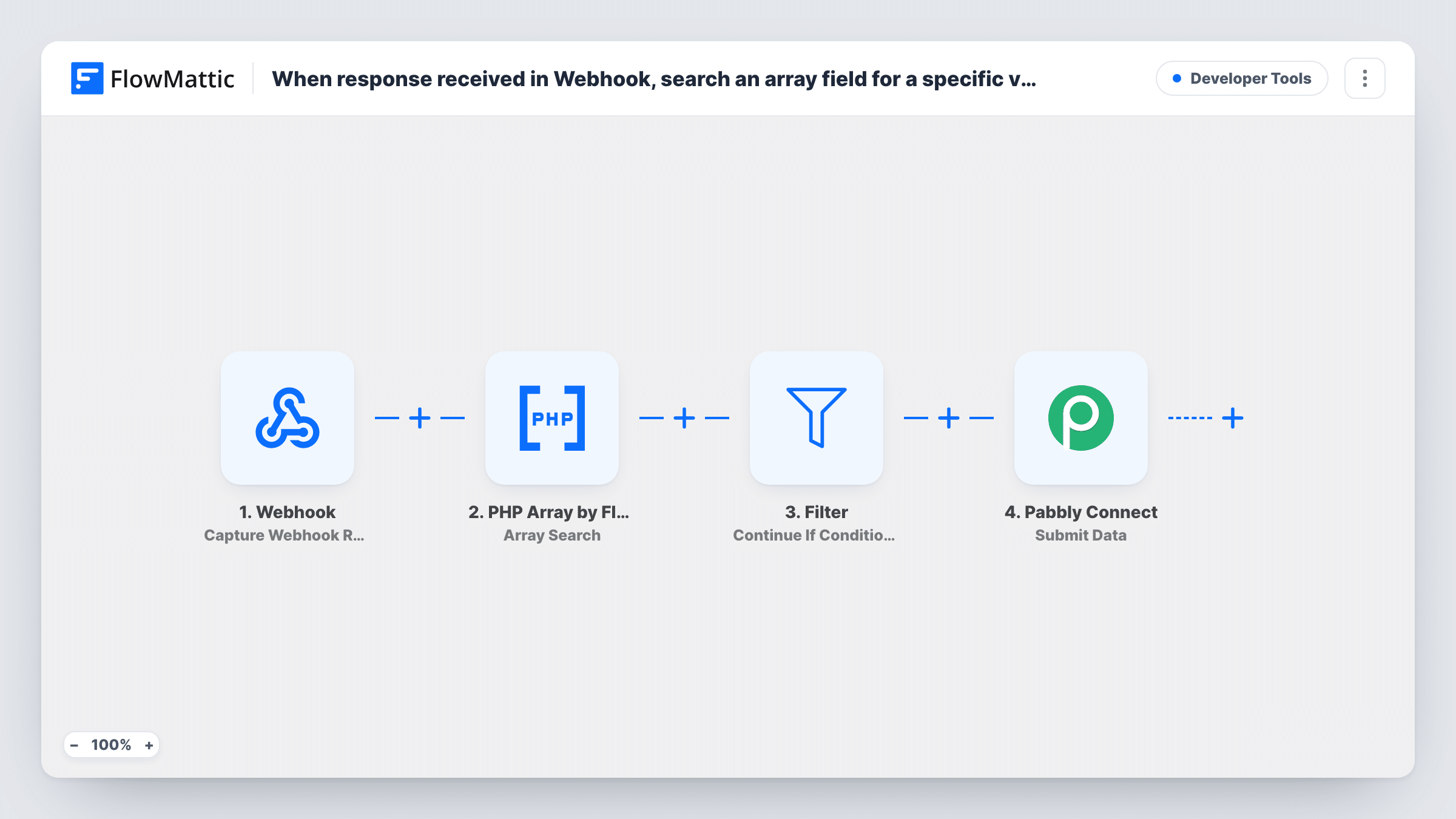
A Webhook trigger gives you a URL that receives the data. The PHP Array step's Array Search looks through the array field you map for the value you enter and returns its key when it is found. Next comes a Filter, then Submit Data, which posts the data as JSON to your Pabbly Connect webhook.
The Filter ships without a condition, and an empty Filter stops every run. Until you set one, nothing reaches Pabbly Connect. Add a condition on the Array Search result, for example that it is not empty, after a test payload shows you what the step returns when the value is found and when it isn't.
The webhook URL accepts posts from any sender unless you turn on the trigger's authentication setting, which asks callers for a key or a signature.
Forward only tagged contacts
Your CRM posts each contact update with a tags array. Only payloads whose tags include VIP pass on to the Pabbly Connect workflow that handles VIPs.
Route orders with a given product
A store sends order webhooks listing product IDs. Payloads that contain your subscription product's ID go to Pabbly Connect for its billing setup.
Hand off one role to another team
A membership system posts user roles as an array. Payloads with the instructor role reach Pabbly Connect, which updates the course platform.
How this workflow runs
What happens at each step once the workflow is on, and what you need before you import it.
 Webhook Capture Webhook Response
Gives you a webhook URL that receives data from any app or script. Post a sample payload to it after import so FlowMattic captures the array field.
- PHP Array by FlowMattic Array Search
Searches the array field you map for the value you enter and returns that value's key when it is present. The Filter that follows can test what this step returns.
- Filter Continue If Condition Meet
As imported this step holds no rule, so it halts each run. Add a rule on the Array Search result so only payloads containing your value continue.
- Pabbly Connect Submit Data
Sends the data you map to your Pabbly Connect webhook as a JSON POST request. Paste the Pabbly Connect webhook URL and choose which values to include.
What you need
- FlowMatticCore
- Pabbly Connect AccountAccount
After importing, map your own data. To keep the template universal, not every step is pre-filled. Open each step in the builder and connect your accounts and fields (channels, lists, sheets, recipients) before you switch the workflow on.
Make it yours
Changes worth making after you import it.
- Turn on Require authentication on incoming requests in the Webhook trigger so only callers with your key or a valid signature can start a run.
- Post two test payloads, one with the value in the array and one without, then check Task History to see what Array Search returned in each case before you set the Filter.
- Want payloads without the value handled too? Swap the Filter for a Router and give the second route its own action, such as a Google Sheets row.
Questions about this workflow
Why doesn't anything reach Pabbly Connect after I import this?
The Filter has no condition yet, and an empty Filter stops every run. Set a condition on the Array Search result and payloads that pass will be sent on.
Does PHP Array Array Search return the matching item?
It returns the key of the value in the array, not the whole item. If you need the full item, PHP Array also has Get Array Item by Value.
Can anyone post to the FlowMattic webhook URL?
Yes, unless you turn on the trigger's authentication setting. With it on, callers must send your authentication key or a valid signature.
Do I need a Pabbly Connect account?
Yes. Submit Data posts to a webhook URL from a Pabbly Connect workflow, so you need one set up to receive the data.
More Developer Tools workflows
Other ready-to-import templates from the same category.





Import this workflow into your WordPress site
Download the JSON, import it from the Workflows screen and connect your accounts. Every run stays on your server, with no per-task fees.
30-day money-back guarantee Unlimited workflows and runs Self-hosted