

When ticket is created in Fluent Support, get all ACF field values for the user and store details to Google Sheet
When a Fluent Support ticket is created, FlowMattic reads every Advanced Custom Fields value saved on the customer’s WordPress user and logs the ticket with those details as a Google Sheets row.
 Fluent Support
 Advanced Custom Fields
 Google Sheets
3 steps Setup ~5 min Used on 535 sites Free to import
What this workflow does
Support agents often need more than the ticket text: the customer's plan, account number, region or any other profile data you keep in Advanced Custom Fields. This workflow pulls those user fields the moment a ticket is opened and writes them into a Google Sheet next to the ticket details, giving you one log for reporting or handover.
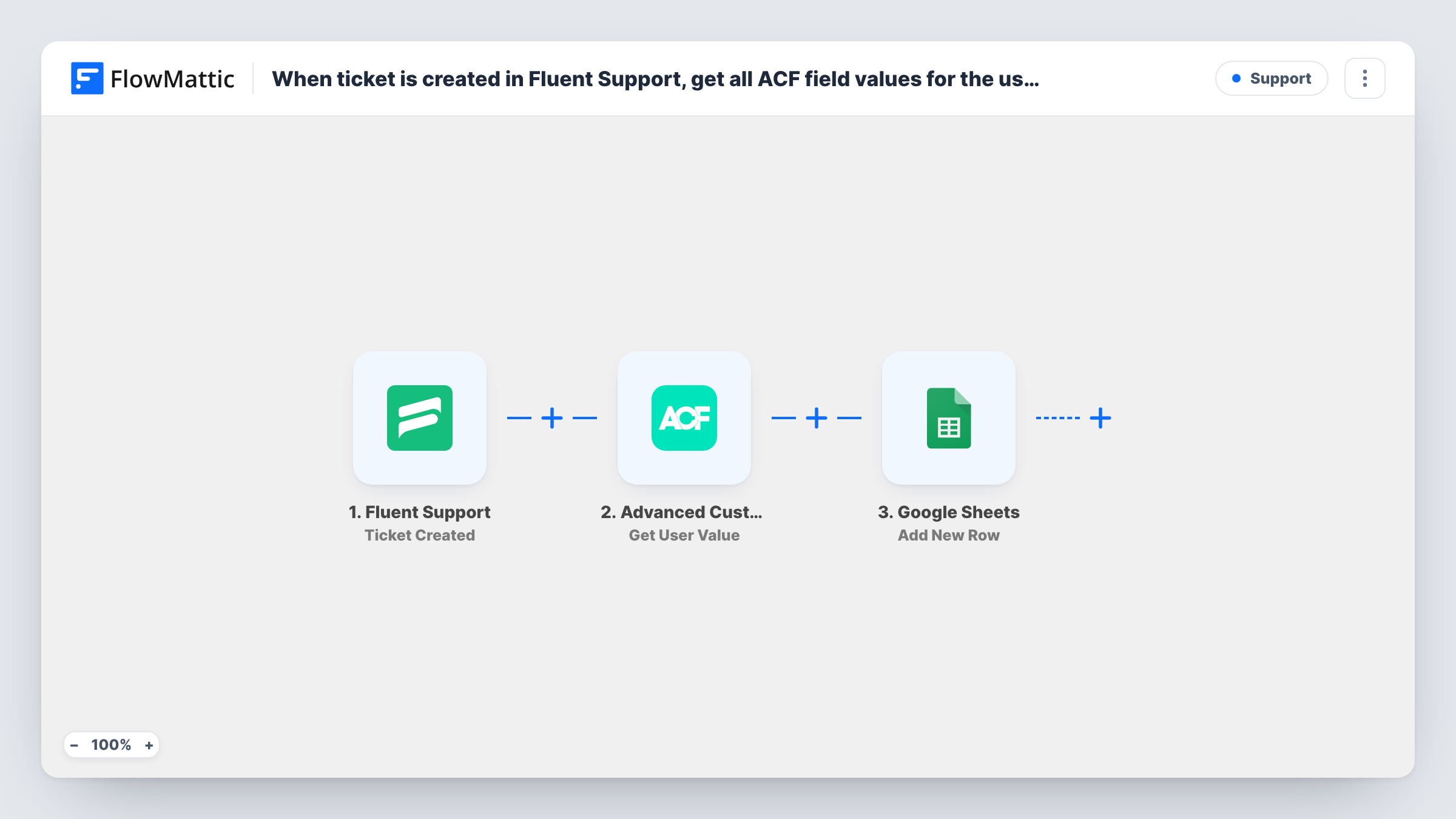
The Fluent Support trigger runs when a new ticket is created, whether a customer opens it or an agent creates it for them. The Advanced Custom Fields step then gets the custom field values for a given WordPress user. Its field name is already set to all, so it returns every ACF user field rather than one; you map the customer's WordPress user ID from the ticket data into it.
Finally, Google Sheets receives one row for the ticket. It isn't mapped in the template, so pick your spreadsheet and sheet and match columns to the ticket fields and the ACF values you care about.
ACF user fields only exist for customers with a WordPress account. If a ticket comes from someone without one, there is no user to read, so test with a guest customer and check Task History to see what each step returned.
Ticket log with membership level
A membership site stores each member's tier in an ACF user field and logs it with every new ticket, so the team can see which tiers raise the most requests.
Account manager handover sheet
An agency keeps the client's account manager in ACF, and the sheet shows who should hear about each new ticket.
Regional support reporting
A software seller records each customer's country in ACF and sorts the ticket sheet by region at the end of the month.
How this workflow runs
What happens at each step once the workflow is on, and what you need before you import it.
 Fluent Support Ticket Created
Starts a run for every new Fluent Support ticket, opened either by the customer or by an agent on their behalf. The ticket and customer details are passed on for the ACF lookup and the sheet.
- Advanced Custom Fields Get User Value
Gets custom field values for a WordPress user. The field name is preset to all, so every ACF user field comes back. Map the ticket customer's WordPress user ID into the step after import.
- Google Sheets Add New Row
Adds one row per ticket to the Google Sheet you choose. The step ships unmapped: connect Google, pick the sheet, and map ticket fields and the ACF values to your columns.
What you need
- FlowMatticCore
- Fluent Support PluginPlugin
- Advanced Custom Fields PluginPlugin
- Google Sheets AccountAccount
After importing, map your own data. To keep the template universal, not every step is pre-filled. Open each step in the builder and connect your accounts and fields (channels, lists, sheets, recipients) before you switch the workflow on.
Make it yours
Changes worth making after you import it.
- Change the field name in the Get User Value step from all to one ACF field name if you only need a single value, such as the customer's plan.
- Put a Filter between the Ticket Created trigger and the Get User Value step that continues only when the customer has a WordPress user ID, so guest tickets don't reach the lookup or the sheet.
- Add columns for the ticket priority and the date it was created, so the sheet can be sorted for weekly support reviews.
Questions about this workflow
Which ACF values does this workflow read from the Fluent Support customer?
Every ACF field saved on that WordPress user, because the field name is set to all. You then choose which of the returned values to map into the Google Sheets columns.
Does it work for Fluent Support customers without a WordPress account?
The ACF step reads fields from a WordPress user, so a customer without an account has none to return. Run a test with a guest ticket and check Task History before relying on those rows.
Are tickets agents create on behalf of customers logged too?
Yes. FlowMattic describes the Ticket Created trigger as firing when a ticket is created by either the customer or an agent, so both kinds start a run.
Can this read ACF fields from a post instead of the user?
Yes. FlowMattic's Advanced Custom Fields integration also has a Get Post Value action. Swap it in if the data lives on a post, and map that post's ID.
More Support workflows
Other ready-to-import templates from the same category.






Import this workflow into your WordPress site
Download the JSON, import it from the Workflows screen and connect your accounts. Every run stays on your server, with no per-task fees.
30-day money-back guarantee Unlimited workflows and runs Self-hosted