

Qualify inbound leads by budget and route them to the right team
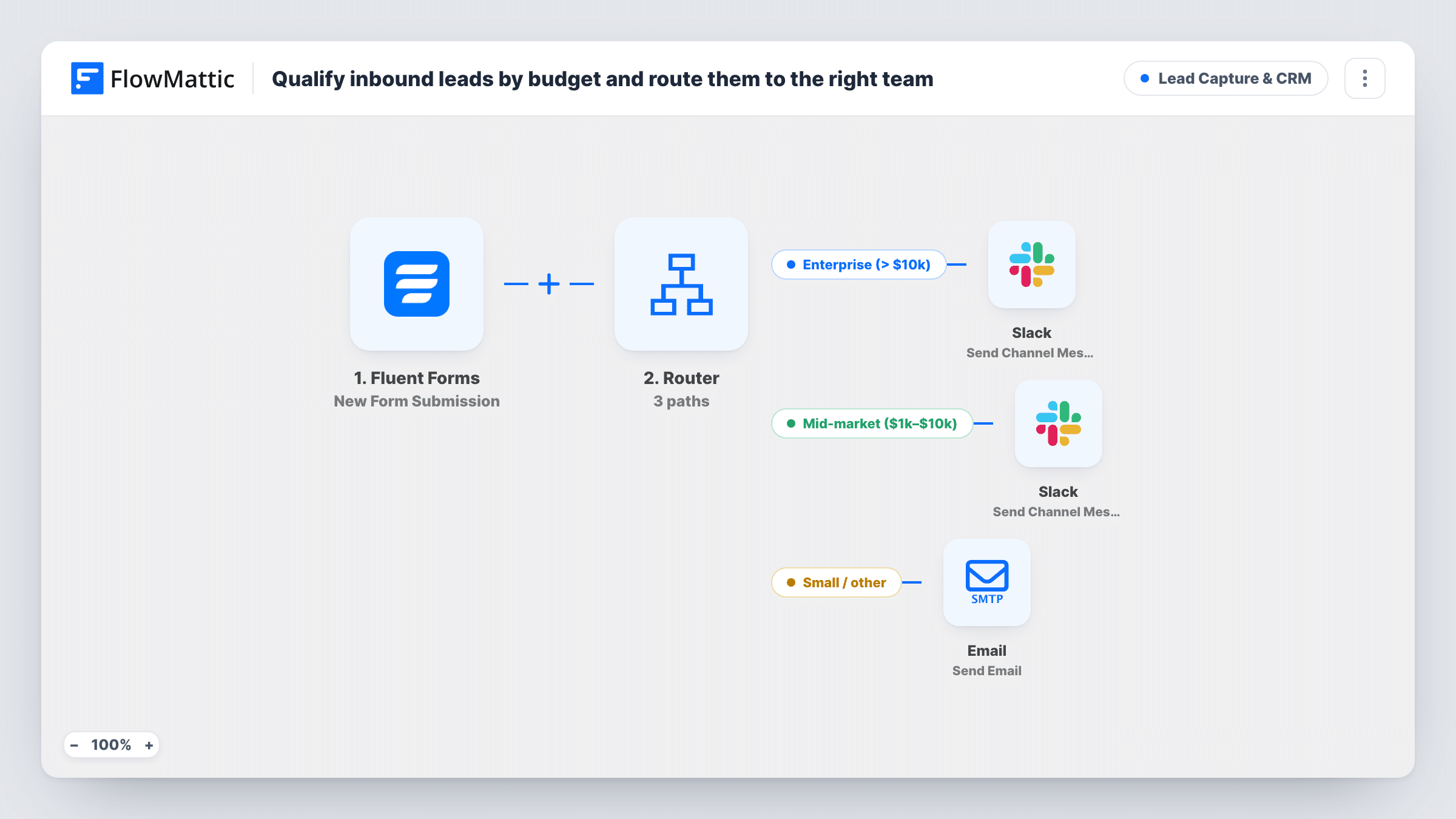
Fluent Forms leads are sorted by the budget they enter: over 10,000 alerts enterprise sales in Slack, 1,001 to 10,000 alerts the mid-market team, and 1,000 or less gets a thank-you email.
 Fluent Forms
 Router
 Slack
 Email
5 steps Setup ~8 min Used on 1.1k sites Growth Free to import
What this workflow does
A budget question on your enquiry form tells you who should answer. Big budgets deserve a senior seller today, mid-sized ones suit inside sales, and small ones are often best served by self-help material. This workflow reads the number and sends each lead to the right team without anyone triaging the form inbox.
The Fluent Forms trigger passes every enquiry to FlowMattic the moment it is sent. A Router compares the budget field. Above 10,000 takes the Enterprise route, which posts the lead's name, company and budget to Slack. From 1,001 to 10,000 takes the Mid-market route, which posts the name and budget to Slack. Up to 1,000 takes the Small route, which emails the lead a thank-you that promises resources.
The ranges don't overlap, so each lead follows one route. The comparisons treat the budget as a whole number, which matters for what people type. A blank budget counts as zero and takes the Small route. Text before the digits, like a dollar sign, also makes it zero, and a comma stops the number early, so 25,000 is read as 25. Use a numeric field with no currency symbol or separators.
After import, choose a Slack channel for each team. The Small route's email says resources follow but includes none, so add your links to the body before going live.
Agency enquiries matched to the right seller
A web agency asks for project budget on its contact form. Six-figure enquiries ping the director's channel, mid-sized ones go to the account team, and small ones get a reply pointing to packaged services.
SaaS demo requests by deal size
A software company's demo form has a budget field. Enterprise-sized requests reach account executives in Slack straight away instead of waiting in a shared queue.
Self-serve help for small budgets
Freelancers and very small businesses who enter a modest budget get an immediate email, so they're not left waiting for a sales call.
How this workflow runs
What happens at each step once the workflow is on, and what you need before you import it.
 Fluent Forms New Form Submission
Starts a run whenever your Fluent Forms enquiry form is submitted. The template uses fields named budget, name, company and email; adjust them to the fields on your form.
- Router 3 paths
Sends the lead down one route by budget: Enterprise above 10,000, Mid-market from 1,001 to 10,000 and Small up to 1,000. Values are compared as whole numbers, so a blank or non-numeric budget counts as 0.
- Slack Send Channel Message
On the Enterprise route, posts Enterprise lead with the person's name, company and budget to Slack. Choose the enterprise sales channel after import.
- Slack Send Channel Message
On the Mid-market route, posts Mid-market lead with the name and budget to Slack. Point it at your inside sales team's channel.
 Email Send Email
On the Small route, emails the lead a thank-you addressed by name, saying you'll be in touch and that resources follow. Add the actual resources to the body.
What you need
- FlowMatticCore
- Fluent Forms PluginPlugin
- Slack AccountAccount
After importing, map your own data. To keep the template universal, not every step is pre-filled. Open each step in the builder and connect your accounts and fields (channels, lists, sheets, recipients) before you switch the workflow on.
Make it yours
Changes worth making after you import it.
- Use a Fluent Forms number field for budget, or a dropdown whose values are plain numbers like 500, 5000 and 25000, so the whole-number comparison reads it correctly.
- To change the bands, edit both conditions on the Mid-market route along with the other two, keeping the edges touching so no lead falls between ranges.
- Add a FluentCRM Create or Update Contact step between the trigger and the Router if every lead should be stored before it is routed.
Questions about this workflow
What if the lead types $25,000 in the budget field?
The dollar sign makes the whole-number comparison read 0, so the lead takes the Small route. Without the sign, 25,000 is read as 25 because the comma ends the number. A numeric field avoids both.
Can a Fluent Forms lead be routed to two teams?
No. The three ranges, above 10,000, 1,001 to 10,000 and up to 1,000, can't overlap, and the Router only runs routes whose conditions match.
What happens if the budget is left empty?
An empty budget counts as 0, which is less than 1,001, so the lead gets the Small route's email. Make the field required if you want every lead to state a figure.
Do enterprise and mid-market leads get an email too?
No. Only the Small route sends an email. The other two routes post to Slack, and your team replies from there.
More Lead Capture & CRM workflows
Other ready-to-import templates from the same category.







Import this workflow into your WordPress site
Download the JSON, import it from the Workflows screen and connect your accounts. Every run stays on your server, with no per-task fees.
30-day money-back guarantee Unlimited workflows and runs Self-hosted