

Recover abandoned WooCommerce carts with timed reminder emails
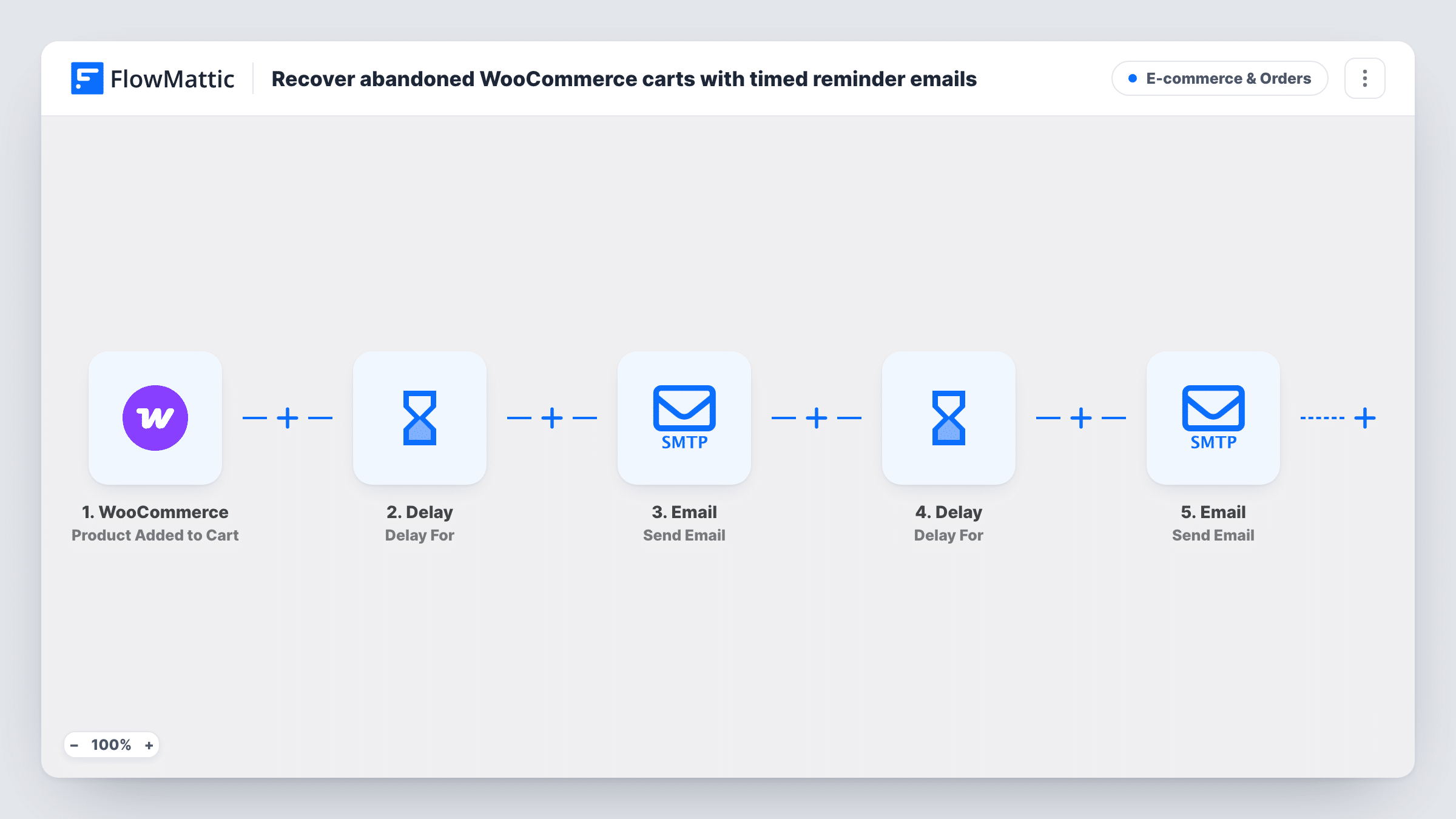
When WooCommerce flags an abandoned cart, the shopper gets a reminder email; a day later the cart is checked again, and only if it is still abandoned a second email offers 10% off with the code SAVE10.
 WooCommerce
 Email
Email
 Delay
Delay
 Filter
6 steps Setup ~12 min Used on 423 sites Revenue Ops Free to import
What this workflow does
Shoppers leave carts for all sorts of reasons, and a short reminder is the usual first step. A discount is a second step you only want to spend on people who still haven't bought. This workflow does both in order, waiting a day between them and checking the cart before offering anything.
The WooCommerce New Cart Abandonment trigger starts the run once a shopper walks away from checkout with items still in the cart. The first Email step goes to the customer's email with the subject "You left something behind", greeting them by name and saying their items are still in the cart. A Delay then waits one day.
After the wait, WooCommerce Check Cart Status looks up the same cart by its ID and reports whether it is abandoned, recovered or active. A Filter lets the run go on only for carts that are abandoned at that point. Those shoppers get a second email offering 10% off with the code SAVE10; anyone who completed the order or came back to the cart gets nothing more.
The workflow doesn't create the SAVE10 coupon. Set it up in WooCommerce before you turn this on. Both emails use FlowMattic's Email module, sending through WordPress mail or your SMTP account.
Gentle nudge, then an offer
A clothing store reminds shoppers about their cart straight away and holds the 10% code for those who still haven't checked out the next day.
Protecting margins on small shops
A handmade jewellery seller avoids handing a discount to people who were going to buy anyway, because the cart is checked before the code goes out.
Running recovery without a separate plugin
A store owner keeps abandoned-cart emails inside FlowMattic, editing the wording and timing in one workflow.
How this workflow runs
What happens at each step once the workflow is on, and what you need before you import it.
 WooCommerce New Cart Abandonment
Runs once WooCommerce marks a cart as abandoned. Passes the cart ID, customer name and email to the later steps.
 Email Send Email
Emails the customer a reminder titled "You left something behind", addressed by name, saying the items are still in the cart and they can complete the order any time.
- Delay Delay For
Waits one day before the next step. Change the delay value or unit if you want the second email sooner or later.
- WooCommerce Check Cart Status
Looks up the same cart by its ID and returns whether it is abandoned, recovered or active.
- Filter Continue If Condition Meet
Continues only when the cart is still abandoned. Recovered or active carts stop here, so those shoppers don't get the discount email.
- Email Send Email
Sends the second email, offering 10% off the cart with the code SAVE10. Create that coupon in WooCommerce first, or change the code to one you already have.
What you need
- FlowMatticCore
- WooCommerce PluginPlugin
After importing, map your own data. To keep the template universal, not every step is pre-filled. Open each step in the builder and connect your accounts and fields (channels, lists, sheets, recipients) before you switch the workflow on.
Make it yours
Changes worth making after you import it.
- Add a Delay of an hour or two between the WooCommerce trigger and the first email, so shoppers who are still deciding aren't emailed the moment they leave.
- Add a link to the cart or shop page in both email bodies, so the shopper can go straight back to checkout.
- Give SAVE10 an expiry date and a one-use-per-customer limit in WooCommerce, so the code isn't reused indefinitely.
- Enter your SMTP details in both Email steps if WordPress mail on your host is unreliable.
Questions about this workflow
Do shoppers who complete their WooCommerce order still get the discount email?
No. After the one-day wait, Check Cart Status looks at the cart, and the Filter only lets the run continue when it is still abandoned. A recovered or active cart stops before the second email.
Does the workflow create the SAVE10 coupon?
No. The email only quotes the code. Create a 10% coupon called SAVE10 in WooCommerce first, or edit the email to use a code you already have.
Can I change how long it waits before the second email?
Yes. Edit the Delay step, which is set to one day. You can use minutes, hours, days or weeks.
Does the first reminder go to every abandoned cart?
Yes. Each abandoned cart starts a run, and the first email goes out right away. Only the second email depends on the cart status check.
More E-commerce & Orders workflows
Other ready-to-import templates from the same category.





Import this workflow into your WordPress site
Download the JSON, import it from the Workflows screen and connect your accounts. Every run stays on your server, with no per-task fees.
30-day money-back guarantee Unlimited workflows and runs Self-hosted