

Confirm completed subscription payments and alert finance when the subscription is not active
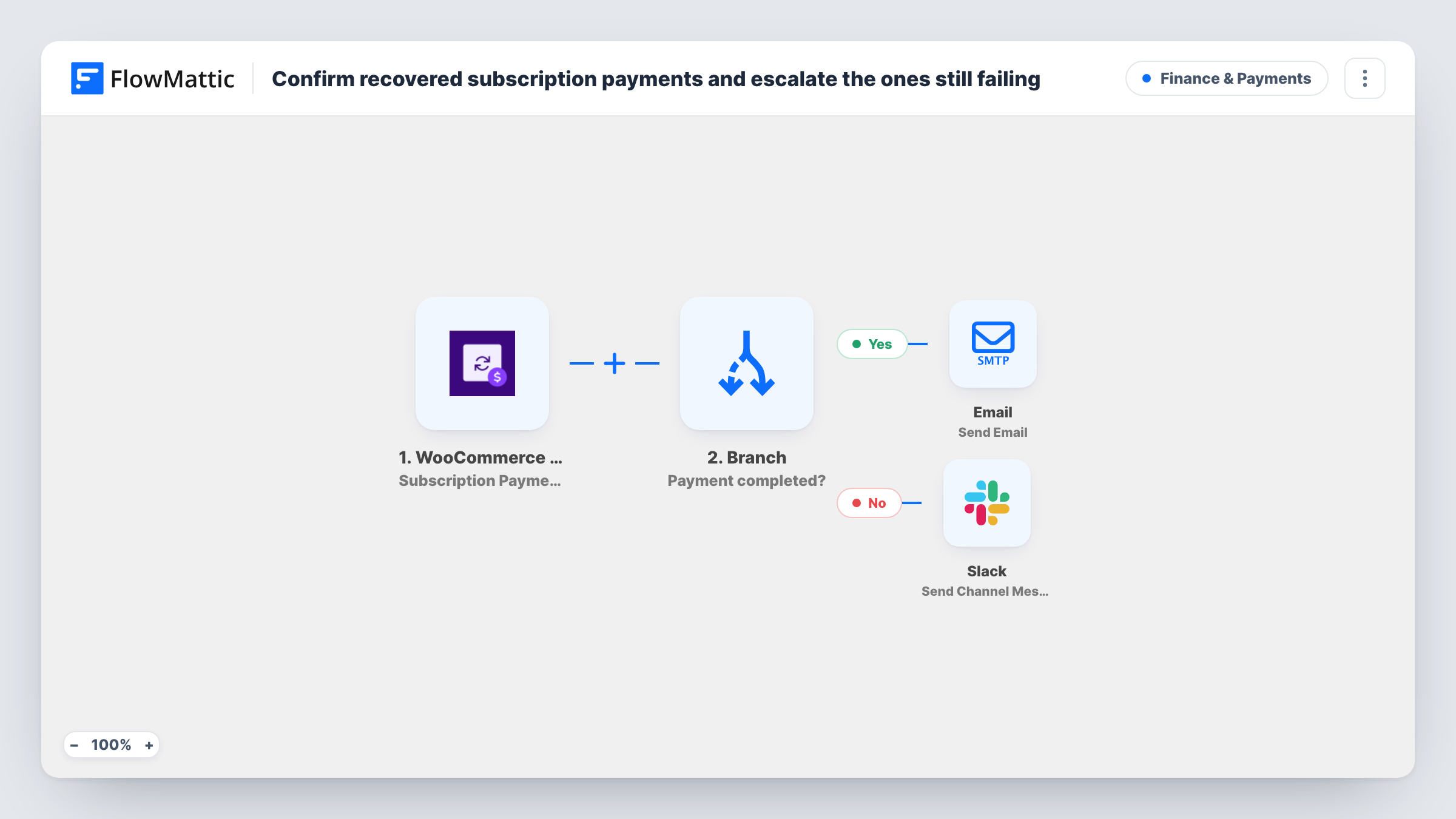
Each time a WooCommerce subscription payment completes, a Branch checks the subscription status. Active subscribers get a payment confirmation email, and any other status posts a Slack alert for finance.
 WooCommerce Subscriptions
 Branch
 Email
Email
 Slack
Slack4 steps Setup ~8 min Used on 2.9k sites Finance Free to import
What this workflow does
A completed payment usually means a healthy subscription, but not always. A payment can come through on a subscription that is on hold, pending cancellation or in another state, and that is worth a second look. This workflow thanks the customer when everything lines up and asks your finance team to check when it doesn't.
The WooCommerce Subscriptions trigger fires when any subscription payment is completed, the first one and renewals alike. A Branch then checks whether the subscription status contains the text "active".
On the yes path, FlowMattic's Email step sends the customer a message confirming that their renewal payment went through, with the plan, amount and currency mapped in. On the no path, a Slack message posts to a channel with the customer's email and asks finance to investigate. Each run follows one path only.
The email and the Slack text use fields from the trigger, such as the plan name and amount. Make a test payment and check Task History to confirm those fields carry values, and remap any that come through empty.
Payment receipts for a membership site
A membership site sends each active member a short confirmation that their monthly payment succeeded, separate from WooCommerce's own order email.
Catching payments on paused subscriptions
A subscription box gets a Slack alert when a payment completes on a subscription that is on hold, so finance can check whether it should be reactivated or refunded.
Finance visibility for a SaaS plugin store
A plugin developer selling yearly licences sees any payment whose subscription isn't active in the finance channel instead of finding it in a monthly report.
How this workflow runs
What happens at each step once the workflow is on, and what you need before you import it.
 WooCommerce Subscriptions Subscription Payment Complete
Fires when any WooCommerce subscription payment is completed. The subscription's status, customer email, plan, amount and currency are passed to the Branch and the next steps.
- Branch Branch
Checks whether the subscription status contains "active". A match takes the yes path to the customer email; any other status takes the no path to Slack.
 Email Send Email
On the yes path, emails the customer that their renewal payment went through, quoting the plan, the amount and the currency. Edit the wording if first payments should read differently.
- Slack Send Channel Message
On the no path, posts a message to the Slack channel you pick with the customer's email, flagging a renewal payment issue for finance to look into.
What you need
- FlowMatticCore
- WooCommerce Subscriptions PluginPlugin
- Slack AccountAccount
After importing, map your own data. To keep the template universal, not every step is pre-filled. Open each step in the builder and connect your accounts and fields (channels, lists, sheets, recipients) before you switch the workflow on.
Make it yours
Changes worth making after you import it.
- Add the subscription status and ID to the Slack text, so finance can see straight away which state the subscription is in and open it in WooCommerce.
- Reword the yes-path email so it doesn't say renewal, since the trigger also fires on a subscription's first payment.
- Use the Subscription Renewal Payment Complete trigger instead if you only want renewals checked and the first payment left to WooCommerce's own emails.
- Point the Slack step at a private finance channel with Slack's Send Private Channel Message action if payment details shouldn't sit in a public channel.
Questions about this workflow
Does the Branch run both the email and the Slack alert for one subscription payment?
No. A Branch has a yes path and a no path, and each run takes one of them. Active subscriptions get the email, every other status gets the Slack message.
Does this fire for the first WooCommerce subscription payment too?
Yes. FlowMattic describes the trigger as firing when any subscription payment is completed, so first payments and renewals both start a run.
Do I need the WooCommerce Subscriptions plugin?
Yes. The trigger comes from WooCommerce Subscriptions, so the plugin must be active on the same WordPress site as FlowMattic.
What if the plan or amount shows up blank in the subscription email?
Check the trigger output in Task History after a test payment and remap the email to the fields that hold the plan name and amount on your store.
More Finance & Payments workflows
Other ready-to-import templates from the same category.





Import this workflow into your WordPress site
Download the JSON, import it from the Workflows screen and connect your accounts. Every run stays on your server, with no per-task fees.
30-day money-back guarantee Unlimited workflows and runs Self-hosted