

AI deal-desk agent that creates HubSpot deals from quote requests
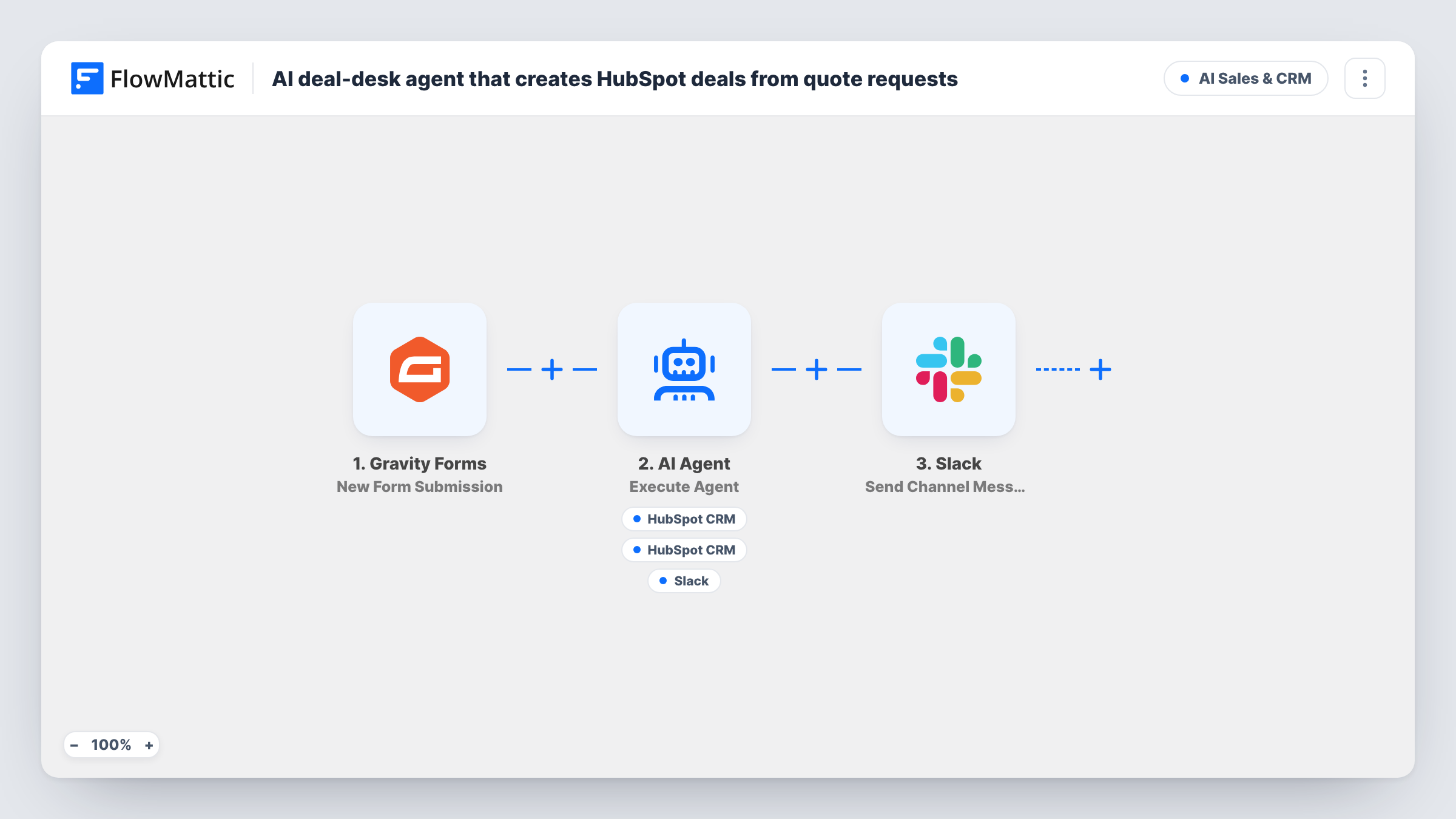
A Gravity Forms quote request goes to an AI agent that estimates deal size and urgency, can create the HubSpot deal and contact, and can summarise the request for your sales channel in Slack.
 Gravity Forms
 AI Agent
 HubSpot CRM
 Slack
Slack6 steps Setup ~12 min Used on 1.1k sites Revenue Ops Free to import
What this workflow does
Quote requests arrive with a company name, a rough budget and a paragraph about what the buyer needs. Someone on the sales team then has to size it, open a deal in the CRM and tell the others. This workflow gives that first pass to an AI agent.
A visitor submits your Gravity Forms quote form. An AI Agent on OpenAI GPT-4o reads the company, budget and needs. Its instructions are to estimate deal size and urgency, create a HubSpot deal, and post a summary to sales. It has three tools. HubSpot CRM Create Deal takes a deal name and amount that the agent fills in. Create Contact uses the email and name from the form. A Slack channel message carries the agent's own summary.
The agent chooses which tools to call, so it can skip the contact or the summary on some runs. After it finishes, a fixed Slack message says a new deal was created from the company. That message posts on every submission, even if no deal was made, so confirm in Task History while you test.
The amount comes from the agent's estimate, not straight from the budget field. Review it in HubSpot before forecasting on it.
B2B services quote form
An agency gets project enquiries with a budget range. Each one becomes a HubSpot deal with an estimated amount, and the sales channel sees the agent's read on urgency.
Equipment or bulk order requests
Buyers describe quantities and timelines in the message box. The agent turns that into a named deal and a short summary the account team can act on.
Small sales teams sharing one channel
Two or three reps watch one Slack channel. The agent's summary and the fixed new-deal notice tell them a quote has landed and roughly what it is worth.
How this workflow runs
What happens at each step once the workflow is on, and what you need before you import it.
 Gravity Forms New Form Submission
Begins when a visitor submits your Gravity Forms quote form. The workflow uses fields named company, budget, message, email and name, so match them or remap in the later steps.
- AI Agent Execute Agent
Runs an AI agent on OpenAI GPT-4o with the company, budget and needs. It is told to estimate deal size and urgency, create a HubSpot deal and post a summary for sales, using its tools as it decides.
- HubSpot CRM Create Deal
Agent tool that creates a HubSpot deal. The agent writes the deal name and the amount from its own estimate of the request.
- HubSpot CRM Create Contact
Agent tool that creates a HubSpot contact from the email and name on the form. Test with an email already in HubSpot to see how your account handles it.
- Slack Send Channel Message
Agent tool that posts a Slack channel message for the sales team. The agent writes the summary text, including its view on size and urgency.
- Slack Send Channel Message
Once the agent finishes, posts a fixed Slack channel message that a new deal was created for the company on the form, on every quote request whether or not a deal exists.
What you need
- FlowMatticCore
- Gravity Forms PluginPlugin
- AI ProviderAccount
- HubSpot CRM AccountAccount
- Slack AccountAccount
After importing, map your own data. To keep the template universal, not every step is pre-filled. Open each step in the builder and connect your accounts and fields (channels, lists, sheets, recipients) before you switch the workflow on.
Make it yours
Changes worth making after you import it.
- Tell the agent how you size deals, for example to use the top of the budget range as the amount, so the HubSpot figure follows your rules.
- Add a Filter after the trigger that continues only when the budget field is not empty, if quote requests without a budget shouldn't become deals.
- Ask the agent in its instructions to put the urgency it estimated at the start of the Slack summary, so reps can scan the channel quickly.
- Submit a test quote after import, then open HubSpot to check the deal and the contact, and see whether they are linked the way your team expects.
Questions about this workflow
Does the agent set the HubSpot deal stage or owner?
The template only has the agent fill the deal name and amount. Run a test and look at the new deal in HubSpot to see which stage and owner it gets.
Is the HubSpot deal amount the same as the budget on the Gravity Forms form?
Not necessarily. The agent fills the amount from its own estimate based on the budget and the message. Give it a rule in the instructions if you want the budget used as-is.
Why might Slack say a deal was created when there is none?
The final Slack step posts a fixed message after the agent, whatever the agent did. If the agent skipped Create Deal, the message still appears.
What happens when the same company requests another quote?
The agent can create another deal for each submission. Check a repeat request in a test to see how HubSpot handles the contact email that already exists.
More AI Sales & CRM workflows
Other ready-to-import templates from the same category.






Import this workflow into your WordPress site
Download the JSON, import it from the Workflows screen and connect your accounts. Every run stays on your server, with no per-task fees.
30-day money-back guarantee Unlimited workflows and runs Self-hosted