

When a product purchase is completed in Groove Sales, create a coupon and add email to it in WooCommerce and share the coupon to the users WhatsApp
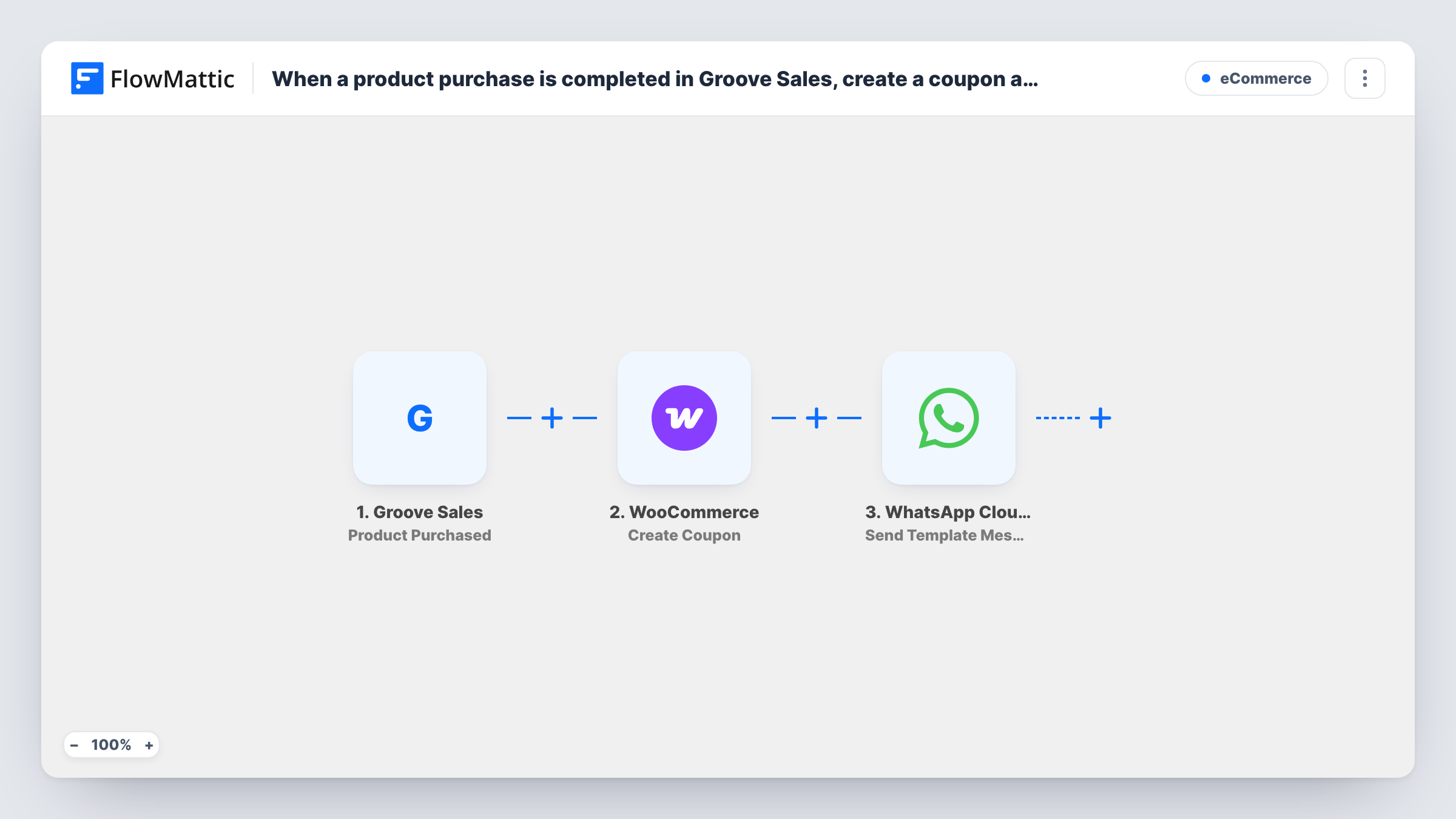
When someone buys a product through Groove Sales, this workflow creates a WooCommerce coupon tied to the buyer’s email and sends it to them as a WhatsApp template message through the WhatsApp Cloud API.
 Groove Sales
 WooCommerce
 WhatsApp Cloud API
3 steps Setup ~5 min Used on 3.2k sites Free to import
What this workflow does
Selling through Groove Sales and running a WooCommerce store side by side gives you two places customers can buy. A coupon for the store, sent right after a Groove purchase, gives buyers a reason to visit it. Doing that by hand means creating a code per buyer and messaging each one, which nobody keeps up with. This workflow does both steps per sale.
The Groove Sales trigger starts a run for every product sale in your Groove account. FlowMattic then creates a coupon in WooCommerce, where you set the discount and map in the buyer's email so the coupon is limited to them. The last step sends an approved template message through the WhatsApp Cloud API to the buyer's phone number, with the coupon code from the previous step in it.
Each coupon needs a code WooCommerce hasn't used yet, so build it from purchase data that differs per sale. The WhatsApp step needs a phone number, so check that your Groove Sales checkout collects one. Task History shows each run and any error a step returned.
Course buyers invited to your merch store
Someone buys an online course through Groove Sales and receives a WhatsApp message with a store coupon for your WooCommerce shop of workbooks and merchandise.
Cross-selling physical add-ons
A buyer of a digital product gets a personal coupon for the related physical kit sold in WooCommerce, usable only with their own email.
Thank-you discount for new customers
Every Groove Sales purchase earns the buyer a WooCommerce discount delivered on WhatsApp, which they can use on their next order from your store.
How this workflow runs
What happens at each step once the workflow is on, and what you need before you import it.
 Groove Sales Product Purchased
Runs when a product is purchased in Groove Sales. The purchase and buyer data from the event is passed to the coupon and WhatsApp steps.
- WooCommerce Create Coupon
Adds a coupon for this buyer to the WooCommerce store on your site. Set the discount, map a code that is unique per purchase, and map the buyer's email so the coupon is tied to them. A test run confirms the coupon settings in WooCommerce.
- WhatsApp Cloud API Send Template Message
Sends one of your approved WhatsApp templates to the buyer through the WhatsApp Cloud API. Connect your account, map the buyer's phone number, and place the coupon code from the WooCommerce step in the template.
What you need
- FlowMatticCore
- Groove Sales AccountAccount
- WooCommerce PluginPlugin
- WhatsApp Cloud API AccountAccount
After importing, map your own data. To keep the template universal, not every step is pre-filled. Open each step in the builder and connect your accounts and fields (channels, lists, sheets, recipients) before you switch the workflow on.
Make it yours
Changes worth making after you import it.
- After a test purchase, open the new coupon in WooCommerce and check its usage restrictions show the buyer's email. That confirms the email mapping in the Create Coupon step works.
- Build the coupon code from a value that differs per sale, such as an order ID if the Groove Sales purchase data includes one, joined to a short prefix like THANKS.
- Add a Filter after the trigger if only certain Groove Sales products should earn a coupon, continuing only when the product value in the purchase data matches.
Questions about this workflow
Can someone else use the WooCommerce coupon?
WooCommerce can limit a coupon to listed email addresses and checks the buyer's billing email at checkout. Map the Groove Sales buyer's email into that restriction, then confirm it on a test coupon.
Does the buyer need to have messaged my WhatsApp number first?
No. The step sends a template message, which WhatsApp delivers outside the 24-hour reply window, as long as the template is approved for your business account.
What if the Groove Sales purchase has no phone number?
The coupon is still created in WooCommerce, but the WhatsApp step has no number to send to and Task History shows the error. Add an email step as well if some buyers don't give a phone number.
Must the WooCommerce store run on the WordPress site where FlowMattic is installed for the Groove coupons?
Yes. WooCommerce is a WordPress plugin, and FlowMattic creates the coupon in the store on the site where it is installed.
More E-Commerce workflows
Other ready-to-import templates from the same category.





Import this workflow into your WordPress site
Download the JSON, import it from the Workflows screen and connect your accounts. Every run stays on your server, with no per-task fees.
30-day money-back guarantee Unlimited workflows and runs Self-hosted