

Create a social card with Image Builder for every new post and host it on Supabase
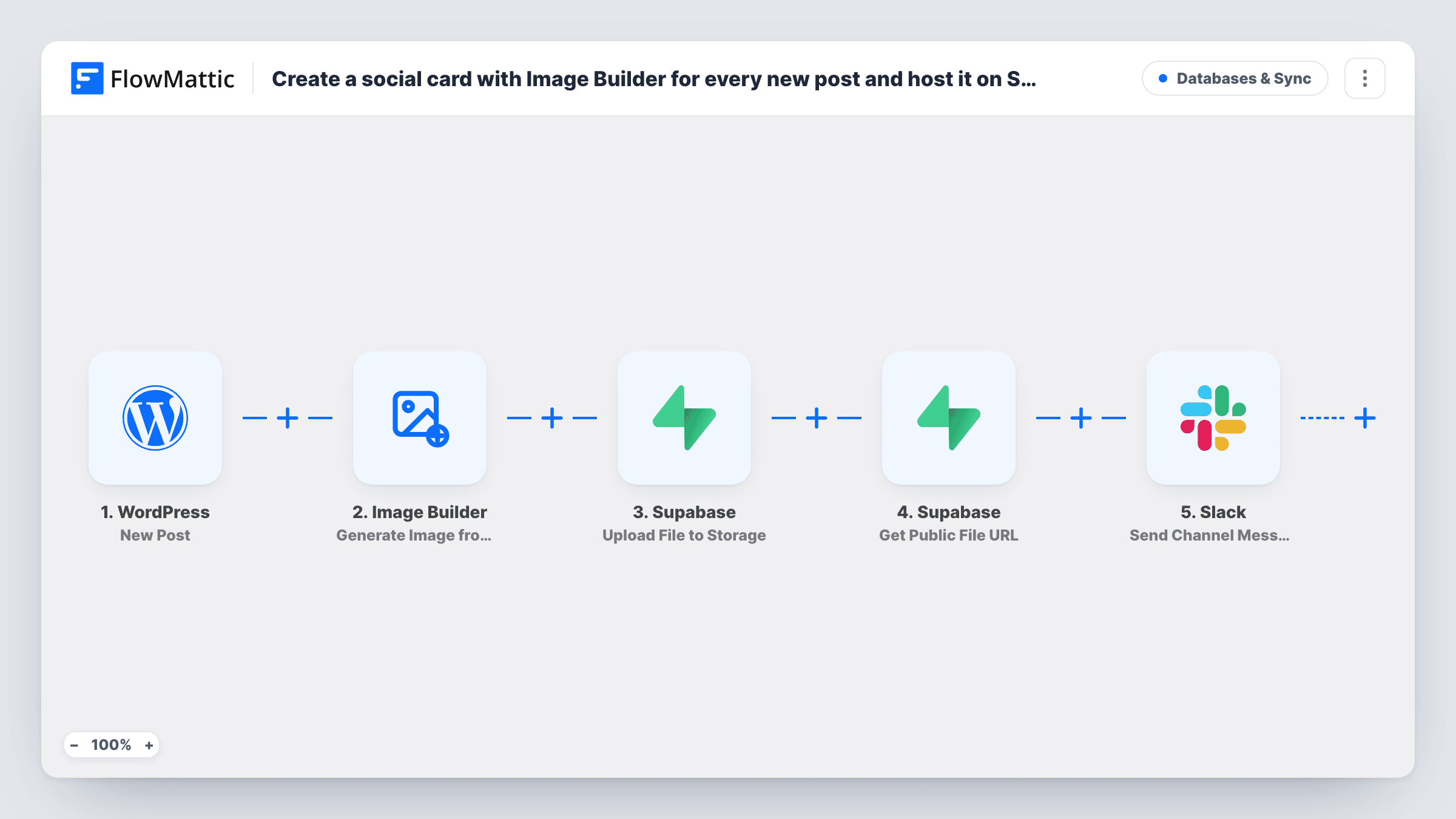
When you publish a WordPress post, this workflow renders a social card from your Image Builder template, stores the PNG in a Supabase Storage bucket and posts its public link to a Slack channel.
 WordPress
 Image Builder
 Supabase
 Slack
Slack5 steps Setup ~8 min Used on 2.5k sites Databases & Sync Free to import
What this workflow does
Every post you share on social media looks better with its own image, but making one by hand for each article takes time. With a saved Image Builder template, the card can be produced as the post goes live. This workflow does that, hosts the image in Supabase and tells your team where to find it.
The WordPress trigger fires once, when a post is first published. Image Builder renders a PNG from your saved template through Cloudflare Browser Rendering and saves it to the Media Library, named after the post ID. Supabase then uploads the PNG to a bucket called social-cards and fetches its public URL. Finally, Slack posts the post title and that URL to the channel you choose.
The template refers to Image Builder template 8, an ID from its author's site, so choose your own template after import and map the post title or other fields into it. Image Builder needs Cloudflare Browser Rendering set up in FlowMattic. The public URL only opens if the Supabase bucket is public.
A blog's social media queue
The social media manager sees each new article's card and link in Slack and adds it to the next scheduled posts.
Consistent cards for a news site
Every story gets a card in the same layout with its headline, so the publication's shared links look alike without a designer.
Hosting images outside WordPress
A team serving images from Supabase keeps all share cards in one public bucket that other tools can link to.
How this workflow runs
What happens at each step once the workflow is on, and what you need before you import it.
 WordPress New Post
Fires once, when a post is first published. Later changes to the article, and any WordPress page, leave it idle. The post ID, title and other details go to the next steps.
- Image Builder Generate Image from Template
Renders a PNG from a saved Image Builder template and saves it to the Media Library as card- plus the post ID. Select your own template and map the post title or other fields into it.
- Supabase Upload File to Storage
Uploads the PNG to the Supabase Storage bucket social-cards, at cards/post- plus the post ID. Create that bucket first, or change its name here and in the next step.
- Supabase Get Public File URL
Gets the public URL of the uploaded card from the same bucket and path. The link opens only when the social-cards bucket is set to public in Supabase.
- Slack Send Channel Message
Posts a message to your chosen Slack channel with the post title and the card's public URL, so the team can grab the image for sharing.
What you need
- FlowMatticCore
- Supabase AccountAccount
- Slack AccountAccount
After importing, map your own data. To keep the template universal, not every step is pre-filled. Open each step in the builder and connect your accounts and fields (channels, lists, sheets, recipients) before you switch the workflow on.
Make it yours
Changes worth making after you import it.
- If the trigger should cover only blog posts, set its post type setting to post, so custom post types don't get cards too.
- Map the featured image, author name or category into the Image Builder step as well as the title, after checking a test publish for the field names.
- To post into a private channel, swap the last step for Slack's Send Private Channel Message action.
Questions about this workflow
Do I need Cloudflare for Image Builder to make the social card?
Yes. FlowMattic's Image Builder renders the template through Cloudflare Browser Rendering, so add those credentials in FlowMattic Settings before you turn the workflow on.
Does updating a published WordPress post create a new card?
No. The New Post trigger fires once, when the post is first published. Later edits don't run the workflow, so the card keeps the original title.
Why doesn't the Supabase link open?
Public URLs only work for public buckets. Set the social-cards bucket to public in Supabase, or use Create Signed File URL instead for a time-limited link.
Is the image also kept in WordPress?
Yes. Image Builder saves the PNG to your Media Library before the Supabase upload, so the card exists in both places.
More Databases & Sync workflows
Other ready-to-import templates from the same category.




Import this workflow into your WordPress site
Download the JSON, import it from the Workflows screen and connect your accounts. Every run stays on your server, with no per-task fees.
30-day money-back guarantee Unlimited workflows and runs Self-hosted