

AI agent that scores leads and files them where they belong
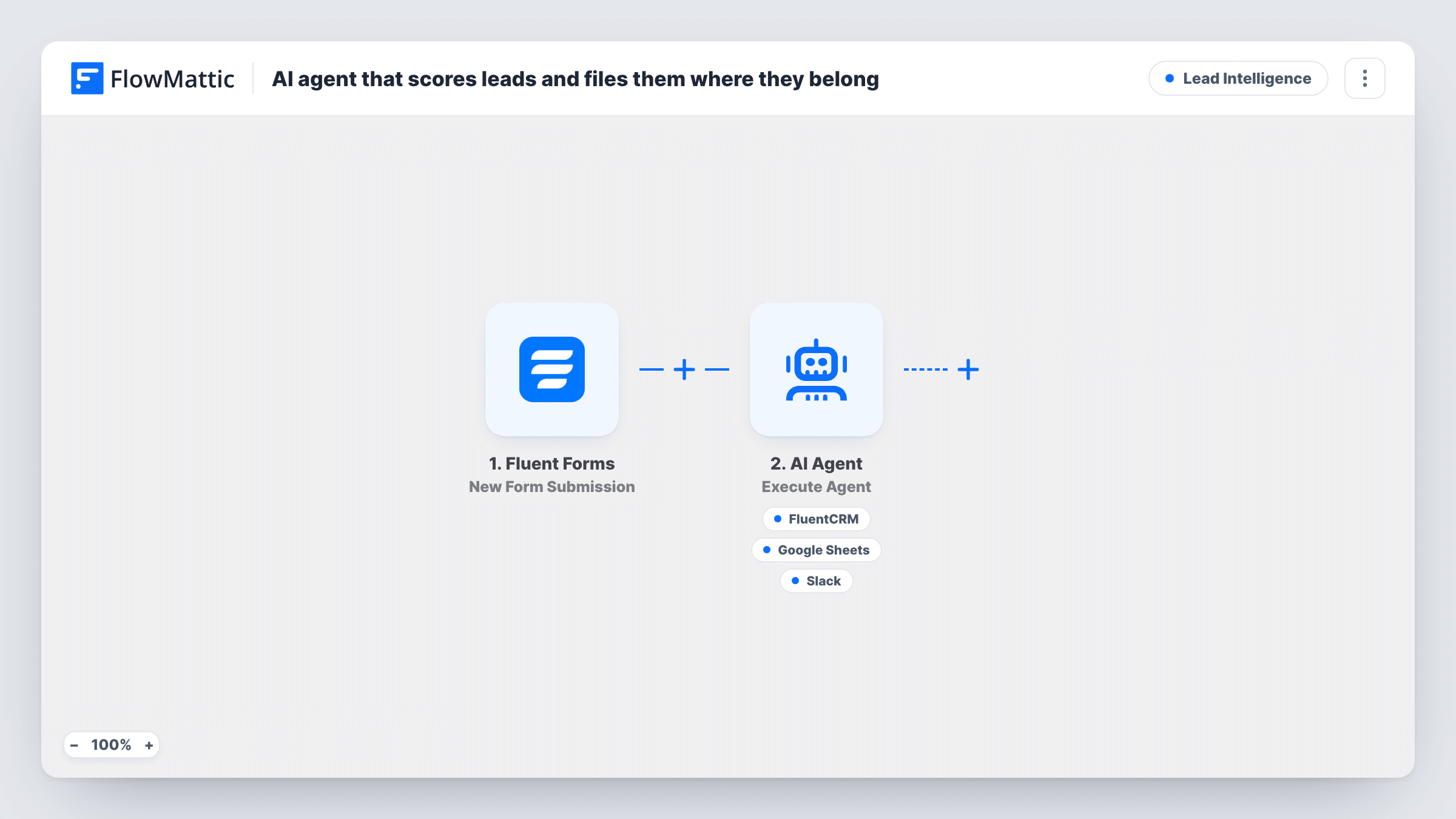
Each Fluent Forms lead goes to an AI agent that scores fit and intent from 1 to 10. It has tools to add the lead to FluentCRM, record the score in Google Sheets and alert sales in Slack when the score is 8 or higher.
 Fluent Forms
 AI Agent
 FluentCRM
 Google Sheets
 Slack
Slack5 steps Setup ~8 min Used on 777 sites Growth Free to import
What this workflow does
Reading every enquiry to decide whether it deserves a fast reply is slow, and the decision changes with whoever is reading. This workflow asks an AI agent to judge each lead the same way, keep a record of its scores, and tell sales about the promising ones.
When someone submits your Fluent Forms form, FlowMattic passes the AI Agent their name, role, company, budget and message. The agent, set up with OpenAI's GPT-4o, is told to score the lead from 1 to 10 for fit and intent, add them to the CRM, record the score in a sheet, and alert sales when the score is 8 or higher. It has three tools for that. One creates or updates a FluentCRM contact from the submitted email and name. One adds a Google Sheets row. One posts a Slack message that the agent writes.
The agent decides when to use each tool, based on its instructions and the lead in front of it. So the score threshold is a rule you give it, not a hard check in the workflow. Watch Task History for the first few leads to see which tools it called and what it recorded.
B2B services firm with mixed enquiries
Your form gets students, job seekers and real buyers. The agent scores each one, and sales only hears in Slack about the leads it rates 8 or above.
Building a scored lead history
Every scored lead the agent records lands in Google Sheets, so after a month you can compare its scores with which leads actually bought.
Small team with no lead qualifier
Nobody has time to triage the inbox. FluentCRM still receives each lead the agent adds, and your one salesperson starts the day with the Slack alerts.
How this workflow runs
What happens at each step once the workflow is on, and what you need before you import it.
 Fluent Forms New Form Submission
Runs each time someone submits your Fluent Forms form. The name, email, role, company, budget and message answers are passed to the AI Agent.
- AI Agent Execute Agent
Gives the lead's details to an AI agent told to score them 1 to 10 for fit and intent, add them to the CRM, record the score in a sheet and alert sales at 8 or higher.
- FluentCRM Create or Update Contact
A tool the agent can call to create or update a FluentCRM contact from the submitted email and name. An existing contact with that email is updated, not duplicated.
- Google Sheets Add New Row
A tool the agent can call to add a row to Google Sheets for recording the score. Connect your Google account, then run a test to see which values reach the sheet.
- Slack Send Channel Message
A tool the agent can call to post a message to Slack. The agent writes the text itself. Its instructions say to use it for leads scoring 8 or higher.
What you need
- FlowMatticCore
- Fluent Forms PluginPlugin
- AI ProviderAccount
- FluentCRM PluginPlugin
- Google Sheets AccountAccount
- Slack AccountAccount
After importing, map your own data. To keep the template universal, not every step is pre-filled. Open each step in the builder and connect your accounts and fields (channels, lists, sheets, recipients) before you switch the workflow on.
Make it yours
Changes worth making after you import it.
- Describe your ideal customer in the agent's instructions, for example company size, role and budget range, so the 1 to 10 score reflects your market rather than a general guess.
- Change the alert threshold in the instructions from 8 to a number that suits your lead volume, then compare a week of Slack alerts with the scores in the sheet.
- Add a Filter after the trigger that stops entries with an empty message field if your form makes it optional, since the agent has little to score them on.
Questions about this workflow
Will every Fluent Forms lead be added to FluentCRM?
The agent is told to add each lead to the CRM, and it chooses when to call the tool. Check Task History for your first leads to confirm it calls the FluentCRM tool every time.
Can the agent alert sales for a lead scoring below 8?
The workflow has no fixed check on the score. The threshold sits in the agent's instructions, so the agent decides. For a hard rule, remove the Slack tool, have the agent reply with only the score, and add a Filter and a regular Slack step after it.
Which AI model scores the leads?
The AI Agent step is set to OpenAI's GPT-4o. You need an AI provider connected in FlowMattic before the workflow runs.
What does the agent see about each lead?
The name, role, company, budget and message from the form. The email is used by the FluentCRM tool but is not part of what the agent is given to score.
More Lead Intelligence workflows
Other ready-to-import templates from the same category.




Import this workflow into your WordPress site
Download the JSON, import it from the Workflows screen and connect your accounts. Every run stays on your server, with no per-task fees.
30-day money-back guarantee Unlimited workflows and runs Self-hosted