

Answer help-form questions instantly and only open a ticket when needed
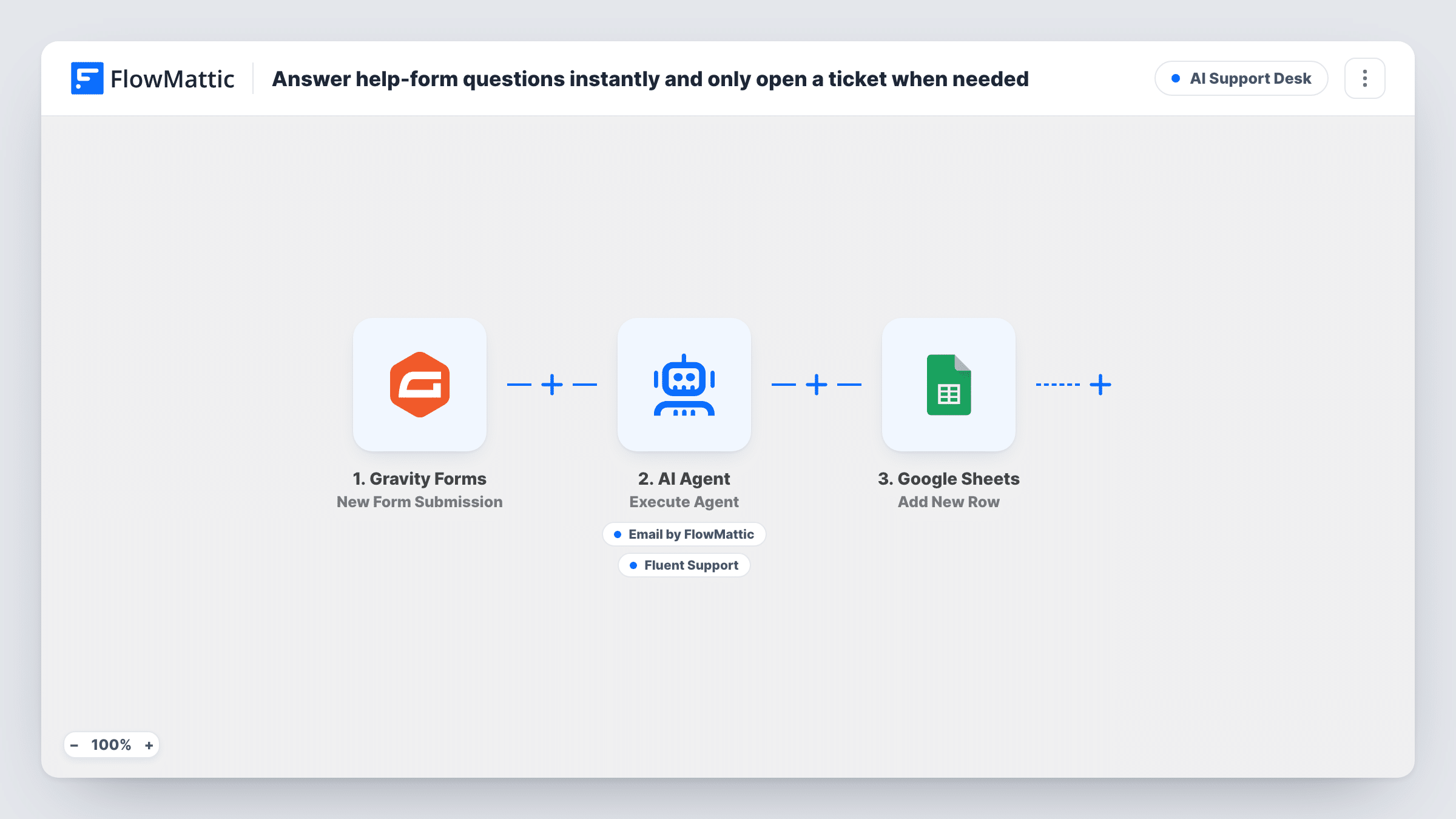
Questions sent through a Gravity Forms help form go to an AI Agent that emails an answer to simple ones and opens a Fluent Support ticket for account-specific or complex ones, then the run is logged in Google Sheets.
 Gravity Forms
 AI Agent
 Email
 Fluent Support
 Google Sheets
5 steps Setup ~8 min Used on 322 sites Agentic Support Free to import
What this workflow does
Many help-form questions have short, general answers, yet each one still lands in the support queue and waits for a person. This workflow lets an AI Agent take the first look. Simple questions get an email reply without waiting, and anything that needs your team becomes a ticket.
When someone submits your Gravity Forms help form, FlowMattic sends their name, email and message to the AI Agent. It is told to act as a first-line help agent: email a clear answer to simple questions, and open a support ticket instead for anything account-specific or complex. Its two tools are Send Email, addressed to the person who asked, and Fluent Support's Create a New Ticket Using Customer, which uses the same email with a title and content the agent writes.
Every run then adds a Google Sheets row, with nothing mapped as imported. The agent answers from its general knowledge plus whatever you add to its instructions. It cannot see your documentation or the customer's account, so give it the facts it should rely on before you switch it on.
Product help form on a WordPress site
Visitors ask how to reset a password or where to find an invoice. With those answers written into the agent's instructions, they get an email reply, and billing disputes become tickets.
Plugin or theme support before purchase
Pre-sales questions about features get a direct answer by email, while questions about a specific license or site go to Fluent Support for your team.
Small team with a busy inbox
One person handles support part-time. The agent clears the common questions, so the Fluent Support queue holds the ones that need a human.
How this workflow runs
What happens at each step once the workflow is on, and what you need before you import it.
 Gravity Forms New Form Submission
Runs when your Gravity Forms help form is submitted. The agent's input uses the name, email and message fields from the entry.
- AI Agent Execute Agent
The AI Agent reads the question and decides whether to answer it by email or open a support ticket, following its instructions. It is set up with OpenAI GPT-4o; connect your provider when importing.
 Email Send Email
The agent's tool for answering simple questions. It sends to the email from the form, with a subject and body the agent writes, through your FlowMattic email settings.
- Fluent Support Create a New Ticket Using Customer
The agent's tool for escalating. It creates a Fluent Support ticket for the customer's email, with a ticket title and content written by the agent from the question.
- Google Sheets Add New Row
Adds a row to Google Sheets after the agent step on every run. Map the question, the email and the agent's response into it to see how questions were handled.
What you need
- FlowMatticCore
- Gravity Forms PluginPlugin
- AI ProviderAccount
- Fluent Support PluginPlugin
- Google Sheets AccountAccount
After importing, map your own data. To keep the template universal, not every step is pre-filled. Open each step in the builder and connect your accounts and fields (channels, lists, sheets, recipients) before you switch the workflow on.
Make it yours
Changes worth making after you import it.
- Paste your most common answers and policies into the agent's instructions. Without them it falls back on general knowledge, which may not match how your product works.
- Check which Gravity Forms field holds the question. The input uses message; if your form has a separate question field, map that one instead.
- Tell the agent which topics must always become a ticket, such as refunds, billing or account access, so those never get an automated answer.
Questions about this workflow
Can the agent look up the customer's account or orders?
No. It sees only the name, email and message from the Gravity Forms entry. Questions that need account details should be escalated, and the instructions already ask for that.
Could a question get both an email and a ticket?
The instructions say to do one or the other, but the agent decides which tools to call. Review a few test runs in Task History to confirm it behaves as you want.
Is Fluent Support needed even if most questions are simple?
Yes. The escalation tool creates tickets in Fluent Support, so it must be installed on the same WordPress site as FlowMattic.
What does the Google Sheets row contain?
Nothing until you map it. Add the question, email and the agent's output to build a log of what was answered and what was escalated.
More AI Support Desk workflows
Other ready-to-import templates from the same category.



Import this workflow into your WordPress site
Download the JSON, import it from the Workflows screen and connect your accounts. Every run stays on your server, with no per-task fees.
30-day money-back guarantee Unlimited workflows and runs Self-hosted