

Draft a roundup highlight from each standout blog comment with AI
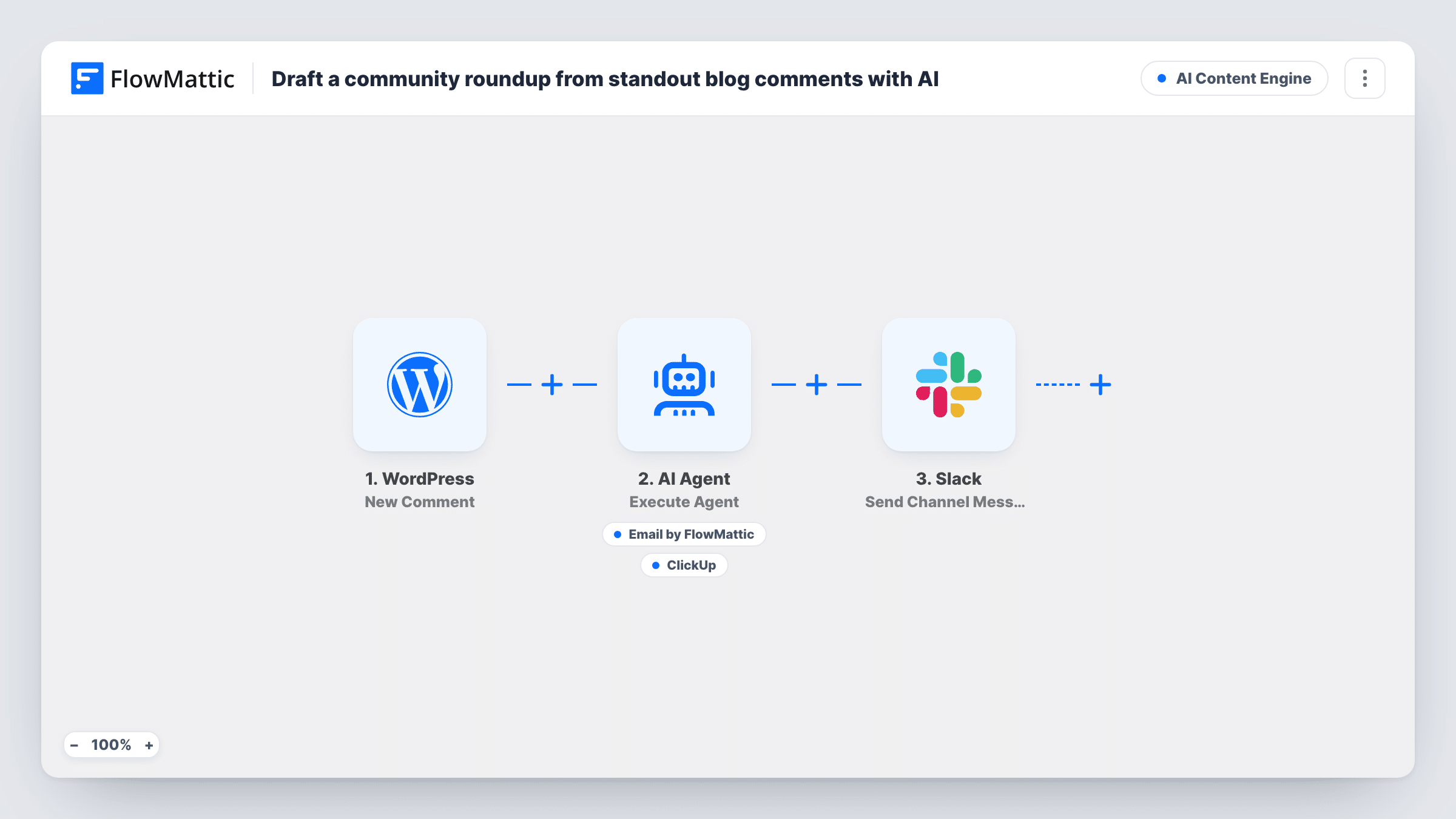
Each new WordPress comment goes to an AI agent that judges whether it deserves a spot in your community roundup. For standout comments it writes a credited highlight and can email it or open a ClickUp task.
 WordPress
 AI Agent
 Email
Email
 ClickUp
 Slack
Slack5 steps Setup ~8 min Used on 2.6k sites Content Ops Free to import
What this workflow does
Your best reader comments are good material for a newsletter or a weekly roundup, but finding them means reading every comment. This workflow has an AI agent read each one for you, decide which are worth featuring, and draft a short highlight that credits the author.
The WordPress New Comment trigger fires when a comment is added. The AI Agent gets the comment text and the author's name. Its input also has a line for the post title, but the New Comment trigger sends the post's ID, not its title, so that line arrives blank until you add a lookup. Its instructions are to act as a roundup curator: judge whether the comment is insightful enough to feature and, if it is, write a short highlight blurb.
The agent has two tools. Send Email delivers the blurb to your editor, and Create Task in ClickUp logs a task to feature the comment. The agent writes the email and task text itself and chooses which tools to use, so a comment it judges ordinary should produce neither. The editor's email address and the ClickUp list aren't set in the template, so fill those in after import.
The last step posts a Slack message for every comment, saying it was reviewed for the roundup. It also ends with the post title placeholder, which stays empty for the same reason. That note goes out whether or not the agent featured the comment.
Reader voices in a weekly newsletter
A food blog's editor gets an email with a ready-made blurb whenever a reader leaves a thoughtful tip under a recipe, and drops the best ones into Friday's newsletter.
Community highlights tracked in ClickUp
A software company's content team gets a ClickUp task for each standout comment on its tutorials, so featuring it is assigned and tracked like other work.
Moderator awareness in Slack
Moderators see a Slack note for every reviewed comment, which shows them when discussion on the blog picks up.
How this workflow runs
What happens at each step once the workflow is on, and what you need before you import it.
 WordPress New Comment
Fires when a new comment is added on your WordPress site. It passes the comment text, the author's name and the ID of the post, but not the post's title.
- AI Agent Execute Agent
Runs an AI agent on GPT-4o that judges whether the comment is insightful enough for the roundup and, if so, writes a short highlight crediting the author.
 Email Send Email
Agent tool that emails the highlight blurb to your editor. Enter the editor's address after import; the agent writes the subject and the body.
- ClickUp Create Task
Agent tool that creates a ClickUp task to feature the comment, with a name and description the agent writes. Choose the list for these tasks after import.
- Slack Send Channel Message
Posts a Slack note that the comment was reviewed for the roundup. The post title in the text is blank as imported. It runs for every comment, featured or not. Choose which Slack channel gets it when you set the step up.
What you need
- FlowMatticCore
- AI ProviderAccount
- ClickUp AccountAccount
- Slack AccountAccount
After importing, map your own data. To keep the template universal, not every step is pre-filled. Open each step in the builder and connect your accounts and fields (channels, lists, sheets, recipients) before you switch the workflow on.
Make it yours
Changes worth making after you import it.
- Put a Filter between the New Comment trigger and the AI Agent step that continues only for approved comments, if a test run shows the comment status. Spam then never reaches the agent, ClickUp or Slack.
- Spell out in the agent's instructions what counts as standout for your site, such as a personal result or a correction, so its choices match your editor's.
- Tell the agent in its instructions to use only ClickUp, or only email, if your editor wants one place to collect highlights.
- Add WordPress Get Post by ID between the New Comment trigger and the AI Agent, using the comment's post ID, then map its title and permalink into the agent's input and the Slack text.
Questions about this workflow
Does every WordPress comment become a roundup highlight?
No. The agent is told to feature only comments it judges insightful enough. It is still an AI judgement, so review its picks for the first weeks and tune the instructions.
Do spam or unapproved comments start the workflow?
The trigger fires when a new comment is added, so check a test run to see whether held or spam comments reach it on your site. A Filter on the comment status keeps them out.
Why does Slack get a message for comments that weren't featured?
The Slack step comes after the agent and runs on every comment. It only says the comment was reviewed. Delete that step if your team only wants to hear about featured comments.
Do I need ClickUp for this comment roundup workflow?
Only if you want tasks. You can remove the ClickUp tool from the agent and keep the email, or the other way round.
More AI Content Engine workflows
Other ready-to-import templates from the same category.






Import this workflow into your WordPress site
Download the JSON, import it from the Workflows screen and connect your accounts. Every run stays on your server, with no per-task fees.
30-day money-back guarantee Unlimited workflows and runs Self-hosted