

Prioritise leads who are the actual decision maker
Ninja Forms leads whose job role mentions director trigger a Slack alert to sales and are added to FluentCRM. Everyone else gets a note on their FluentCRM record marking them as an influencer.
 Ninja Forms
 Branch
 Slack
Slack
 FluentCRM
5 steps Setup ~8 min Used on 1.7k sites Growth Free to import
What this workflow does
Talking to the person who signs off on a purchase saves weeks. Talking only to people who research and pass things up the chain can stall a deal. If your lead form asks for a job role, this workflow uses that answer to put decision makers in front of sales first.
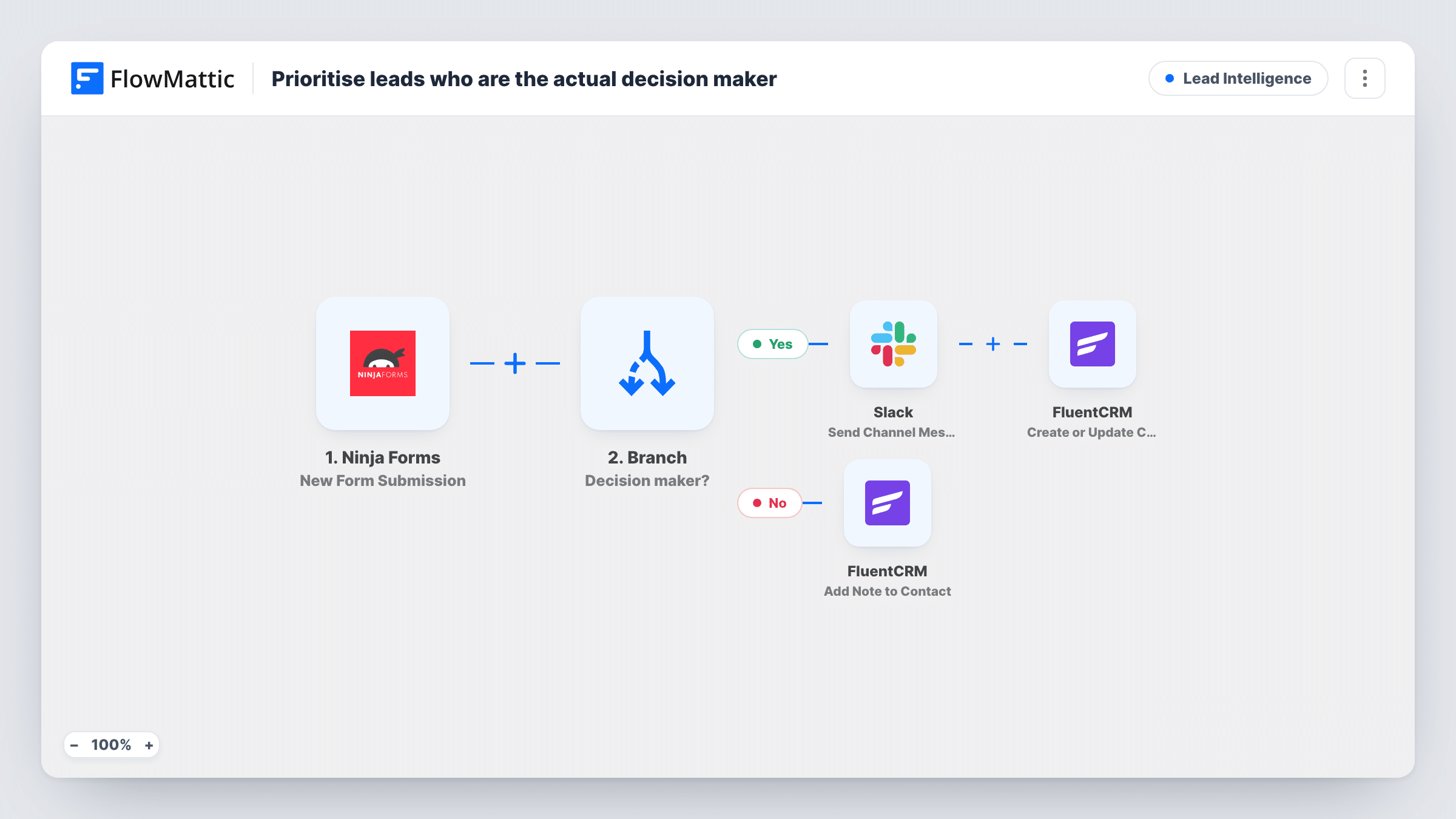
Each run starts with a Ninja Forms submission carrying the lead's name, email and role. A Branch checks whether the role contains director. On the Yes path, Slack posts Decision-maker lead with the name and role, and then FluentCRM creates or updates the contact. On the No path, FluentCRM adds a note titled Influencer, saying the person is not the decision maker and should get educational content.
The check is narrow as imported. A founder, owner, CEO or head of department does not contain director, so they take the No path. Add those words to the Branch or offer a fixed role list on the form. The No path also skips creating a contact, so test it with an email that is not yet in FluentCRM.
B2B consultancy contact form
Directors asking about a project reach a partner through Slack the same day, while analysts collecting information are noted for a slower, content-led follow-up.
Trial sign-up for business software
Trial users who say they direct a team are flagged to sales for a call, and the rest are marked so marketing sends them how-to material.
Event sponsorship enquiries
Marketing directors who ask about sponsoring land in the sales channel, while coordinators gathering prices get a note on their record.
How this workflow runs
What happens at each step once the workflow is on, and what you need before you import it.
 Ninja Forms New Form Submission
Runs each time a Ninja Forms form is submitted. The sample entry has name, email, phone and a role field, which the Branch reads.
- Branch Decision maker?
Checks whether role contains director. Yes leads go to the Slack alert and FluentCRM. All other leads go to the No path and the Influencer note.
- Slack Send Channel Message
On the Yes path, posts Decision-maker lead followed by the name and role. Connect Slack and send a test to make sure it lands in your sales channel.
- FluentCRM Create or Update Contact
On the Yes path, creates or updates the FluentCRM contact using the submitted email, with the name placed in the first name field and last name left blank.
- FluentCRM Add Note to Contact
On the No path, adds a note titled Influencer to the FluentCRM contact with the lead's email, reading Not the decision maker - send educational content.
What you need
- FlowMatticCore
- Ninja Forms PluginPlugin
- Slack AccountAccount
- FluentCRM PluginPlugin
After importing, map your own data. To keep the template universal, not every step is pre-filled. Open each step in the builder and connect your accounts and fields (channels, lists, sheets, recipients) before you switch the workflow on.
Make it yours
Changes worth making after you import it.
- Widen the Branch with more conditions, such as role contains owner, founder or chief, so other titles that sign off on purchases also reach sales.
- Swap the free-text role field for a dropdown on your Ninja Forms form. A fixed list makes the Branch reliable and spares you from guessing every way people write titles.
- Put a Create or Update Contact step at the start of the No path so influencers become FluentCRM contacts before the note is added.
Questions about this workflow
Does a CEO count as a decision maker here?
Not as imported. The Branch only looks for the word director in the role. Add conditions for CEO and similar titles if you want them on the Yes path.
Are influencers added to FluentCRM?
The No path only adds a note to the contact with their email. It does not create a contact first, so add that step if every lead should be in FluentCRM.
Does Director with a capital D take the Yes path?
Yes. Branch text checks ignore upper and lower case, so Director, director and DIRECTOR all match. It is a contains check, so a role such as Assistant to the Director also takes the Yes path.
Does this send the educational content?
No. It only adds a note saying the lead should get it. Use the note, or a FluentCRM automation of your own, to decide what they receive.
More Lead Intelligence workflows
Other ready-to-import templates from the same category.





Import this workflow into your WordPress site
Download the JSON, import it from the Workflows screen and connect your accounts. Every run stays on your server, with no per-task fees.
30-day money-back guarantee Unlimited workflows and runs Self-hosted