

Add hired JobScore candidates to a Google Calendar onboarding event
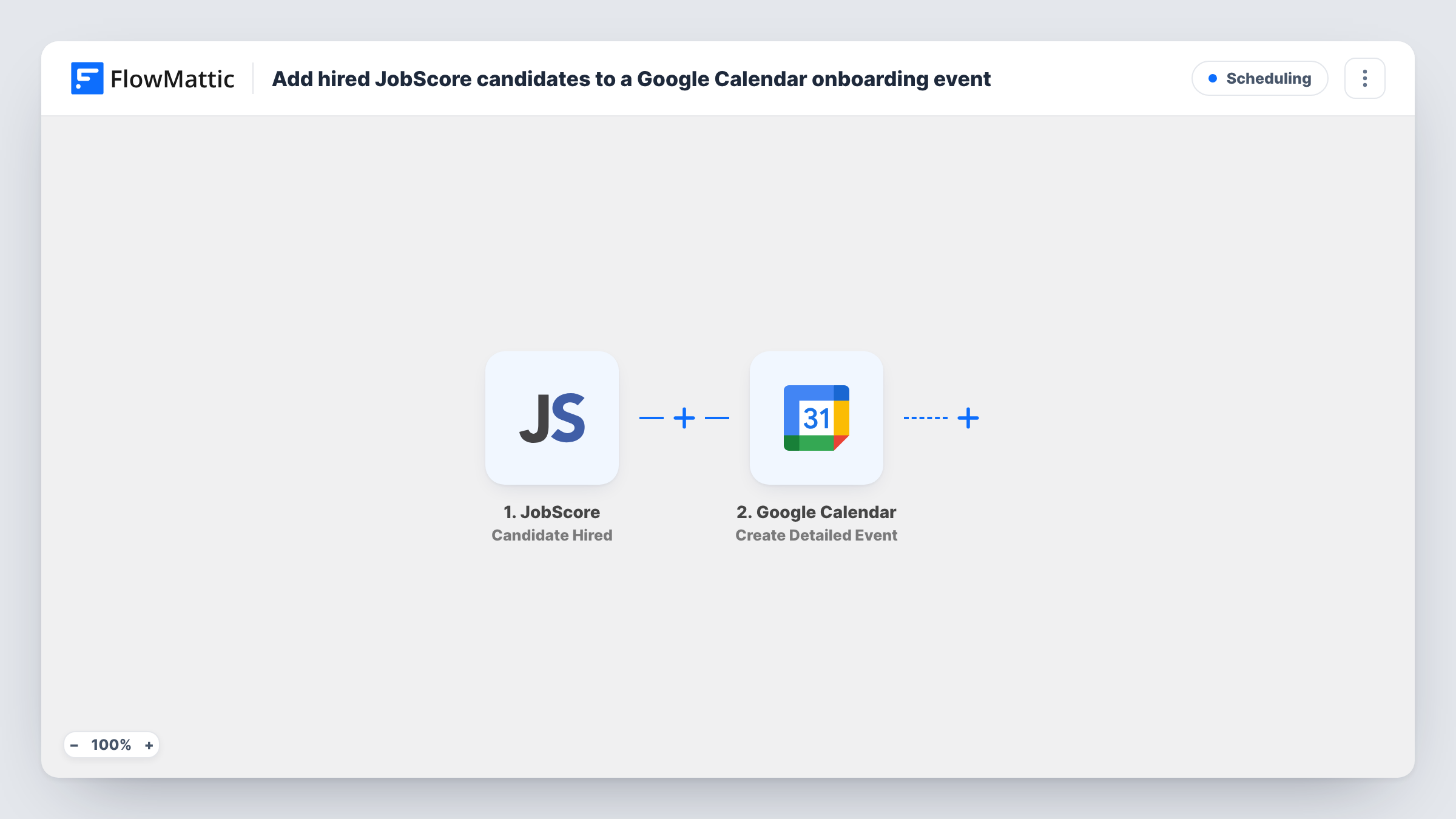
When a candidate is marked as hired in JobScore, this workflow creates an onboarding event in Google Calendar with the new hire’s details, so the first meeting is on your calendar without retyping anything.
 JobScore
 Google Calendar
2 steps Setup ~5 min Used on 1.1k sites Free to import
What this workflow does
Once an offer is accepted, someone has to put the onboarding meeting in the calendar, and that step often waits until a manager remembers. This workflow books it at the moment the hire is recorded in your applicant tracking system.
The JobScore trigger starts a run the moment a candidate is moved to hired. FlowMattic passes the hire's data to Google Calendar, whose Create Detailed Event action creates a new event on the calendar you pick. You map values such as the candidate's name and job title into the event title and description.
Each hire creates its own new event. The flow does not add people to an onboarding event you already have, such as a recurring orientation. You set the event time in the step. If JobScore's data includes a start date, map it; if not, a Date/Time Formatter step can work out a date, such as a week after the hire. Look at a test run to see which dates JobScore provides. Inviting the new hire also depends on the hire's email being in the JobScore data.
First-day welcome meeting
Each new hire gets a welcome meeting on the HR calendar with their name and role in the title, ready for the manager to join.
Equipment and account setup
IT sees an onboarding event for every hire on a shared calendar, which gives them a date to have the laptop and accounts ready.
Growing teams hiring every week
Recruiters stop booking onboarding by hand. Every candidate moved to hired in JobScore shows up on the calendar on their own.
How this workflow runs
What happens at each step once the workflow is on, and what you need before you import it.
 JobScore Candidate Hired
Fires when a candidate is hired in JobScore. The candidate and job details sent with the event become values you can map into the calendar event.
- Google Calendar Create Detailed Event
Creates a new event in Google Calendar for that hire. Connect your Google account, choose the calendar, set when the event happens, and map the hire's name and role into it. Run a test to see the other options.
What you need
- FlowMatticCore
- JobScore AccountAccount
- Google Calendar AccountAccount
After importing, map your own data. To keep the template universal, not every step is pre-filled. Open each step in the builder and connect your accounts and fields (channels, lists, sheets, recipients) before you switch the workflow on.
Make it yours
Changes worth making after you import it.
- Add the hiring manager or HR as fixed guests on the event if the step offers guests, so they see each onboarding meeting without checking the shared calendar.
- Invite the new hire only if a test run shows JobScore sends their email. Map it as a guest so the invite reaches them directly.
- Add a Filter after the trigger on the job or department if only some hires should get this onboarding event, for example only full-time roles.
Questions about this workflow
Does this add new hires to an existing Google Calendar onboarding event?
No. It creates a new event for each JobScore hire. For a shared orientation, swap this step for Google Calendar's Add Attendee to Event and pick that event.
When does the JobScore onboarding event take place?
At the time you set in the Google Calendar step. Map a start date from JobScore if the hire data includes one, or add a Date/Time Formatter step with Add/Subtract Time to set a date relative to the hire. Test it before going live.
What happens if a candidate is marked hired twice in JobScore?
Each Candidate Hired event runs the workflow, so a second hire event creates a second calendar event. Delete the extra one in Google Calendar.
Does the new JobScore hire receive a calendar invitation?
Only if you add them to the event as a guest, which needs their email in the JobScore data. Check a test run, and map it into the step if it is there.
More Scheduling workflows
Other ready-to-import templates from the same category.




Import this workflow into your WordPress site
Download the JSON, import it from the Workflows screen and connect your accounts. Every run stays on your server, with no per-task fees.
30-day money-back guarantee Unlimited workflows and runs Self-hosted