

Ask Grok for customer support responses and send via Gmail when new ticket created in FluentSupport
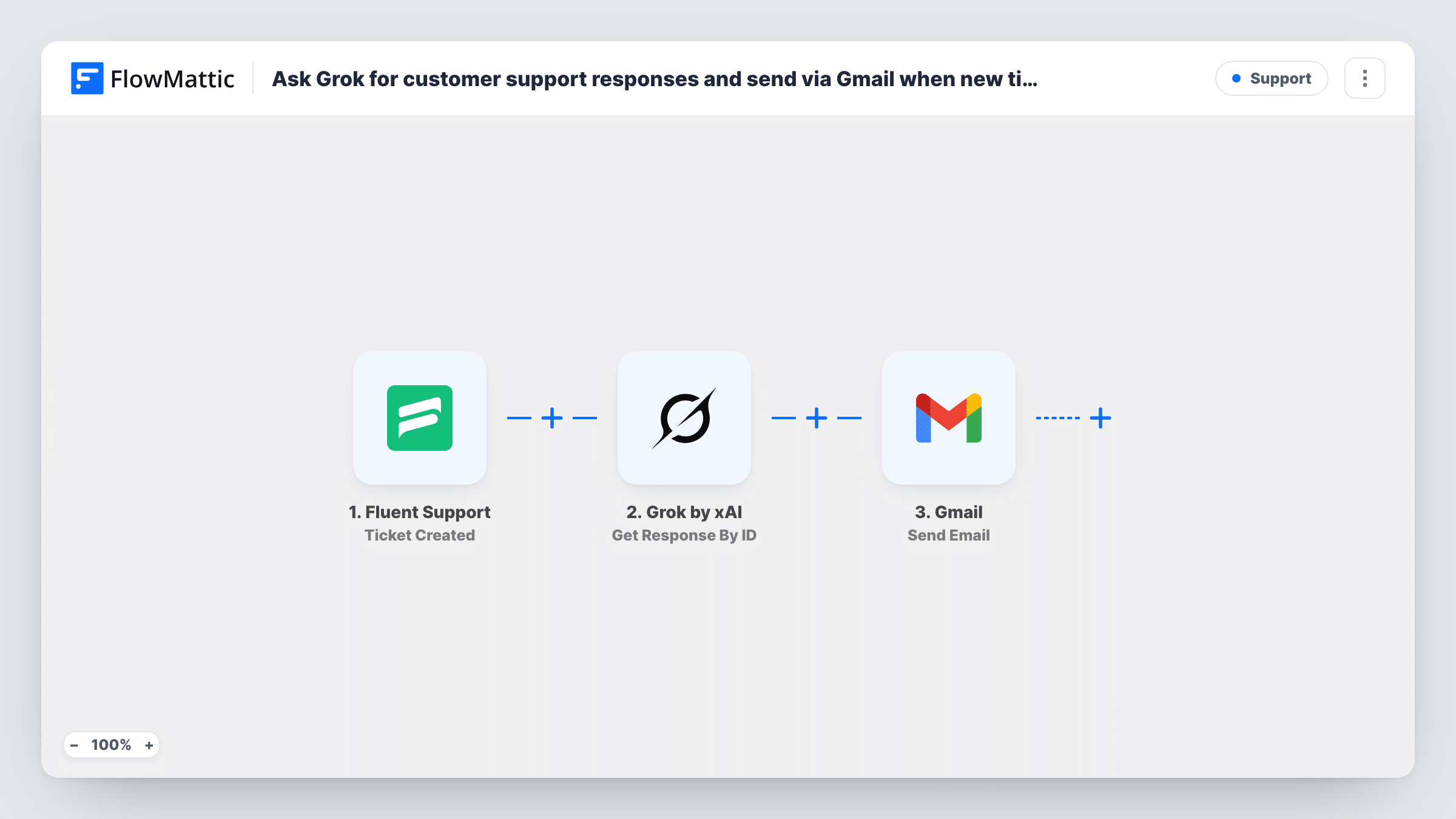
When a ticket is created in Fluent Support, Grok drafts a friendly reply from its subject and message, and Gmail emails that reply to the customer under a Re: subject line.
 Fluent Support
 Grok by xAI
 Gmail
Gmail3 steps Setup ~5 min Used on 589 sites Free to import
What this workflow does
Customers who open a ticket want to hear back quickly, even if the full answer takes longer. This workflow asks Grok to write a first reply to each new Fluent Support ticket and sends it to the customer from your Gmail account, so nobody waits in silence while the team catches up.
The Fluent Support Ticket Created trigger fires when a new ticket is created, whether the customer opens it or an agent creates it for them. The ticket's subject, message and customer email are passed on.
The Grok by xAI Ask Grok step already has a prompt: it asks for a helpful, friendly customer support reply and includes the ticket subject and message. The step doesn't pass Grok your help articles or the customer's account data, so add facts about your product to the prompt if the reply should mention them.
The Gmail Send Email step is set to the customer's email, with "Re:" plus the ticket subject. The message body is not mapped yet: after import, map Grok's answer from the previous step into it, or the email goes out without the reply. The email is sent from Gmail, so it isn't added to the ticket's thread in Fluent Support.
Instant first response for a small team
A two-person plugin business answers every new Fluent Support ticket with a Grok-written acknowledgement, then follows up with the real fix later.
Out-of-hours replies
Tickets opened overnight still get a polite reply by email that restates the question, so the customer knows it was received.
Drafting help for common questions
A membership site whose tickets are often about logins and billing uses Grok's reply to suggest the usual first steps.
How this workflow runs
What happens at each step once the workflow is on, and what you need before you import it.
 Fluent Support Ticket Created
Fires when a new ticket is created in Fluent Support, by a customer or by an agent. The ticket's subject, message and customer email become available to the next steps.
- Grok by xAI Ask Grok
Asks Grok to write a helpful, friendly support reply. The prompt is already set and includes the ticket's subject and message; add product details to it if Grok should use them.
- Gmail Send Email
Emails the customer from Gmail, using the ticket's customer email and "Re:" with the ticket subject. Map Grok's answer into the message body after import, since the template leaves the body empty.
What you need
- FlowMatticCore
- Fluent Support PluginPlugin
- Grok by xAI AccountAccount
- Gmail AccountAccount
After importing, map your own data. To keep the template universal, not every step is pre-filled. Open each step in the builder and connect your accounts and fields (channels, lists, sheets, recipients) before you switch the workflow on.
Make it yours
Changes worth making after you import it.
- Add Human in the Loop between the Ask Grok step and the Gmail step, so an agent approves each reply before it is sent. Set its timeout action to End Workflow so nothing goes out unapproved.
- Swap the Gmail step for Fluent Support's Reply to Ticket action if you want Grok's answer saved in the ticket thread instead of a separate email.
- Put a Filter between the Fluent Support trigger and the Ask Grok step if agents create tickets for customers, so only tickets you choose get an automatic reply. Pick a field from a test ticket.
Questions about this workflow
Does the Grok reply show up inside the Fluent Support ticket?
No. The workflow sends a separate email from Gmail. To keep the reply in the ticket, use Fluent Support's Reply to Ticket action in place of the Gmail step.
Is the AI reply checked by anyone before the customer gets it?
Not as imported. Each new ticket gets an email straight away once the body is mapped. Add a Human in the Loop step between Ask Grok and Gmail if an agent should review it first.
Do tickets an agent creates get a Grok email too?
Yes. The Ticket Created trigger fires for tickets made by customers and by agents, so the customer on an agent-created ticket also receives the reply.
What does Grok know about my product when it answers?
The workflow gives it the ticket subject and message plus the instructions, and nothing from your helpdesk or store. Add your key facts or policies to the prompt in the Ask Grok step if the replies should use them.
More Support workflows
Other ready-to-import templates from the same category.






Import this workflow into your WordPress site
Download the JSON, import it from the Workflows screen and connect your accounts. Every run stays on your server, with no per-task fees.
30-day money-back guarantee Unlimited workflows and runs Self-hosted