

Calculate the age based on the user's birth date in FluentForm submission, and update the age in FluentCRM
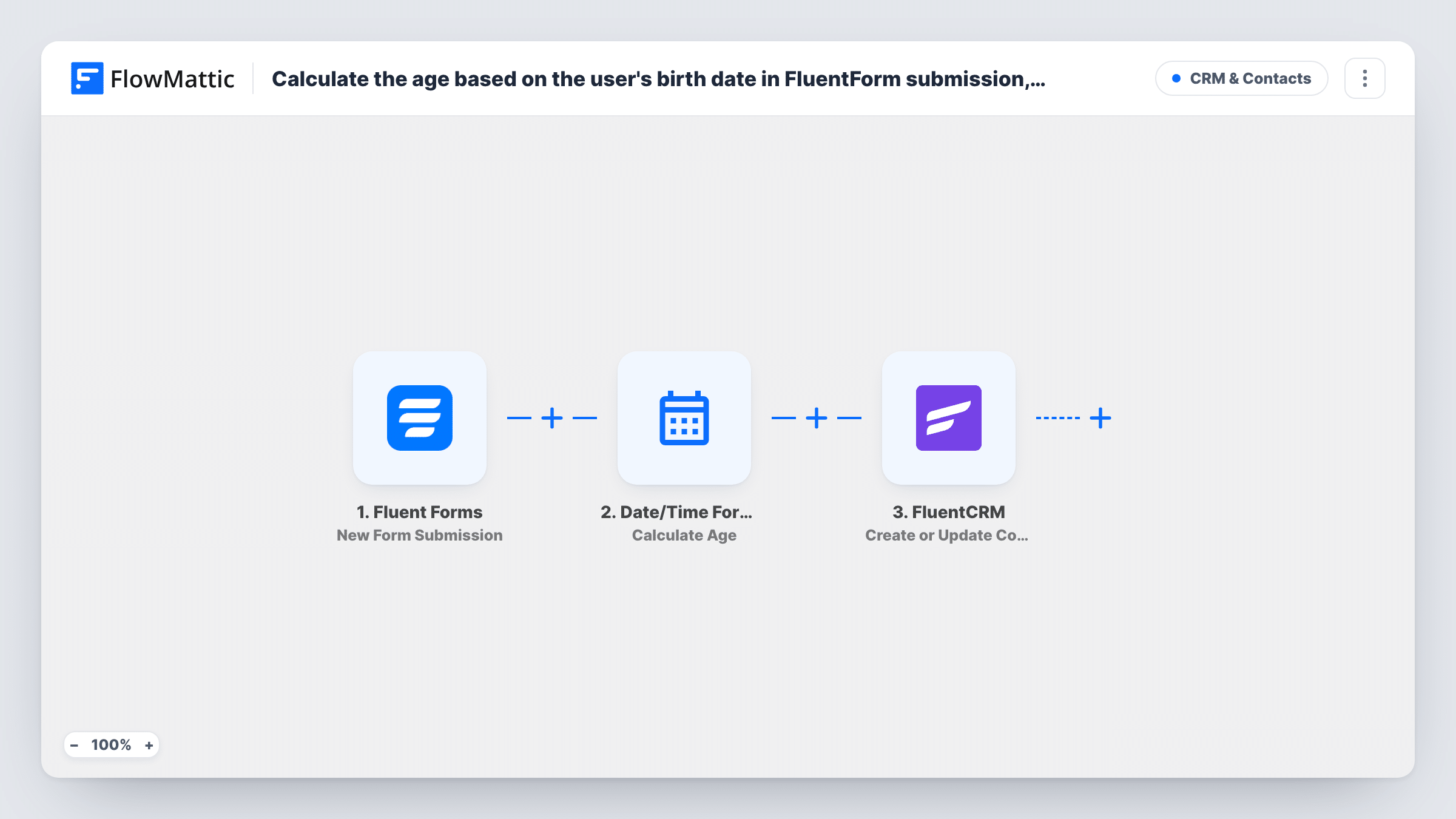
When someone submits a Fluent Forms form with their birth date, this workflow works out their age with the Date/Time Formatter and saves it on their FluentCRM contact, creating the contact if it is new.
 Fluent Forms
 Date/Time Formatter
 FluentCRM
3 steps Setup ~5 min Used on 2.0k sites Free to import
What this workflow does
Forms usually ask for a date of birth, but email segments and tags work better with a plain age. Working it out by hand for each sign-up is not practical. This workflow turns the submitted birth date into an age and writes it to the person's record in FluentCRM.
The Fluent Forms trigger fires when a new submission is received. The birth date field goes to the Date/Time Formatter, whose Calculate Age action returns the age for that date. The last step sends the email, name and calculated age to FluentCRM with Create or Update Contact. FluentCRM matches on the email address, so an existing contact is updated and a new one is created otherwise.
The age is worked out at the moment of submission. It is a stored number, so it does not go up on the person's birthday. To keep the age somewhere in FluentCRM, the contact needs a field to hold it; a test run shows which fields the FluentCRM step offers. Everything stays on your WordPress site.
Age-based newsletter segments
A fitness studio collects birth dates on its sign-up form and segments FluentCRM contacts by age to send class suggestions that fit.
Checking eligibility after an event registration
An event organiser stores each registrant's age in FluentCRM, so staff can review who meets an age requirement before the event.
Insurance or finance enquiries
An advisor's enquiry form records age on the FluentCRM contact, ready for the follow-up conversation.
How this workflow runs
What happens at each step once the workflow is on, and what you need before you import it.
 Fluent Forms New Form Submission
Starts the run as soon as Fluent Forms receives a new entry. The birth date, email and other answers are passed on to the next two steps.
- Date/Time Formatter Calculate Age
Calculates the person's age from the birth date they entered. Map the form's date field into this step; the age it returns is used in the FluentCRM step.
- FluentCRM Create or Update Contact
Creates the FluentCRM contact, or updates it when the email address already exists. Map the email, name and the age from the previous step into the contact.
What you need
- FlowMatticCore
- Fluent Forms PluginPlugin
- FluentCRM PluginPlugin
After importing, map your own data. To keep the template universal, not every step is pre-filled. Open each step in the builder and connect your accounts and fields (channels, lists, sheets, recipients) before you switch the workflow on.
Make it yours
Changes worth making after you import it.
- Use a date picker field in Fluent Forms for the birth date, so every submission sends the date in the same format for the age calculation.
- Add a Filter after the trigger that continues only when the birth date is not empty, so contacts are not updated with a blank age.
- Submit a test entry after import and check the Calculate Age output in Task History before mapping it into FluentCRM.
Questions about this workflow
Does the age in FluentCRM go up on the contact's birthday?
No. The age is calculated once, when the form is submitted, and saved as it was then. A new submission recalculates it.
What if the Fluent Forms submitter is already a FluentCRM contact?
Create or Update Contact matches by email address, so the existing contact is updated with the new details and age instead of being duplicated.
Where is the age stored on the FluentCRM contact?
In whichever contact field you map it to. Run a test after import to see the fields the FluentCRM step offers, and set up a custom field in FluentCRM first if you need one.
Is the birth date sent outside WordPress?
No. Fluent Forms, the Date/Time Formatter step and FluentCRM all run on your WordPress site through FlowMattic.
More CRM & Contacts workflows
Other ready-to-import templates from the same category.





Import this workflow into your WordPress site
Download the JSON, import it from the Workflows screen and connect your accounts. Every run stays on your server, with no per-task fees.
30-day money-back guarantee Unlimited workflows and runs Self-hosted