

Send customized email with content generated by Shopia when someone files the form on your website
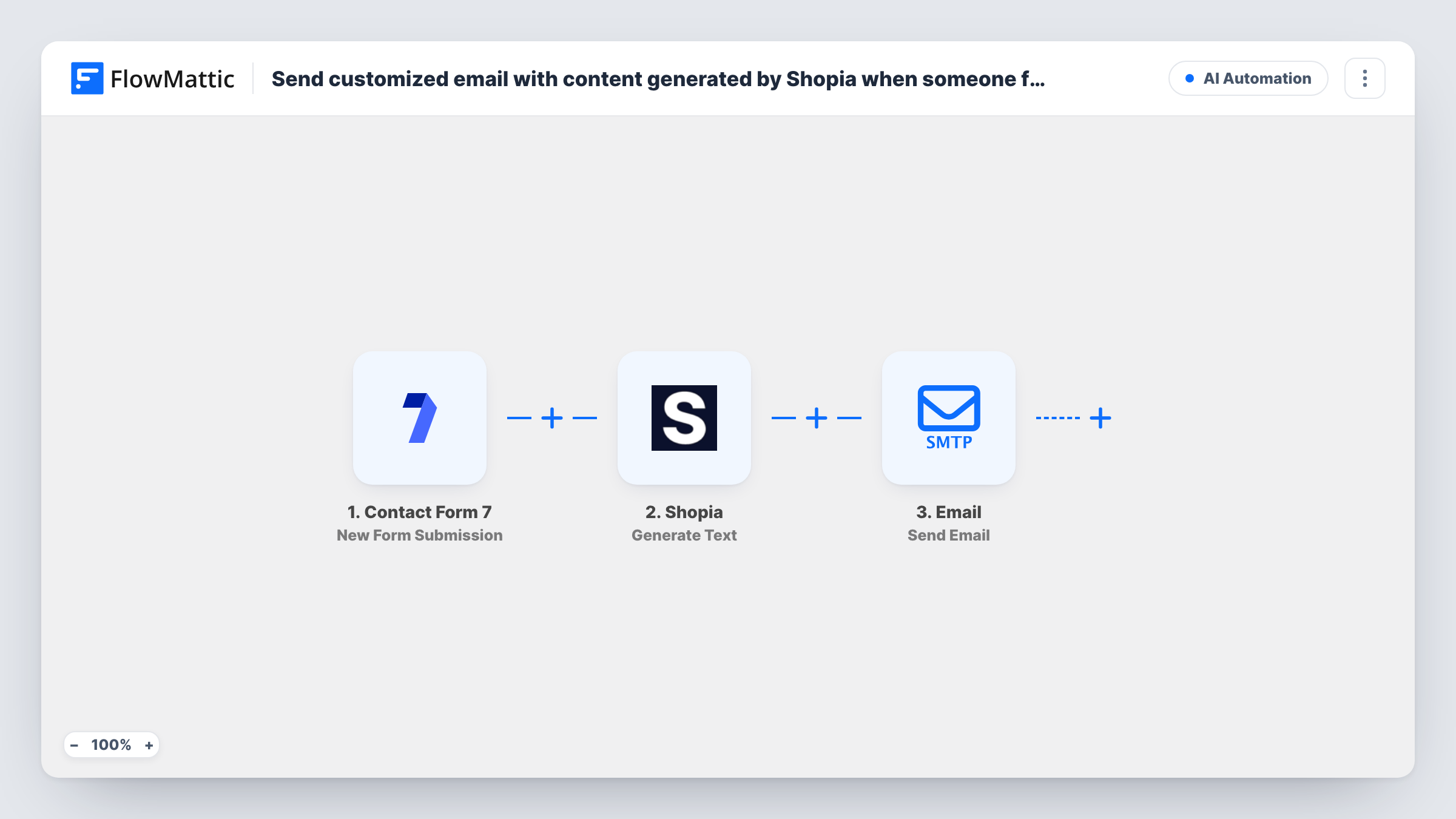
When a visitor submits a Contact Form 7 form, Shopia writes text from their answers and FlowMattic emails it to them through WordPress mail or your SMTP account, so each enquiry gets a reply shaped by what they asked.
 Contact Form 7
 Shopia
 Email
Email3 steps Setup ~5 min Used on 963 sites Free to import
What this workflow does
A plain auto-reply says the same thing to everyone. If you want each person to get a note that speaks to what they wrote, someone has to read the form and type a reply. This workflow hands that first draft to an AI writer and sends it on as soon as the form arrives.
The Contact Form 7 trigger starts a run for every submission on your site. FlowMattic passes the answers you map to Shopia, whose Generate Text action returns a single piece of generated text. That text then goes into the body of a message sent by FlowMattic's Email module, which uses the built-in WordPress mail function or a custom SMTP account you add.
Nothing waits for approval as imported. Whatever Shopia returns is mailed straight away, so test the prompt with a few sample entries before you switch the workflow on. Task History keeps each run, including the text Shopia produced and the email step's response.
Answering service enquiries with a tailored note
A visitor describes the job they need done. Shopia drafts a reply that refers back to their request, and the email reaches them while they are still comparing providers.
Product questions on a small shop site
Someone asks through a Contact Form 7 form which item suits them. The generated text responds to their question, and you follow up personally later if needed.
Thank-you notes after feedback forms
Customers leave comments on a feedback form. Each one receives a thank-you message written around the points they raised instead of a stock reply.
How this workflow runs
What happens at each step once the workflow is on, and what you need before you import it.
 Contact Form 7 New Form Submission
Starts a run each time someone submits a Contact Form 7 form on your WordPress site. The submitted fields become data you can use in the Shopia prompt and the email.
- Shopia Generate Text
Sends the details you map from the form to Shopia, which generates and returns one piece of text. Connect your Shopia account and build the request from the visitor's answers.
 Email Send Email
Sends an email with FlowMattic's Email module, using WordPress mail or the SMTP account you set up. Map the visitor's email address from the form as the recipient and Shopia's text as the message.
What you need
- FlowMatticCore
- Contact Form 7 PluginPlugin
- Shopia AccountAccount
After importing, map your own data. To keep the template universal, not every step is pre-filled. Open each step in the builder and connect your accounts and fields (channels, lists, sheets, recipients) before you switch the workflow on.
Make it yours
Changes worth making after you import it.
- Add a Filter after the trigger so only forms with a filled-in message or a ticked consent box go on to Shopia. Empty or test entries then never produce an email.
- Put a Human in the Loop step between Shopia and the Email step if you want to read and approve each generated reply before it goes out. Pick End Workflow for the timeout, since the default continues without a reply.
- Add a Delay before the Email step so the reply lands a few minutes after the form is sent, which reads less like an instant auto-response.
Questions about this workflow
Do I need an SMTP service to send the Shopia-written email?
No. The Email module can use the built-in WordPress mail function. Adding your own SMTP account is optional and is set up in the Email step.
Can I check the Shopia text before the visitor receives it?
Not as imported. The text is emailed as soon as Shopia returns it. Add a Human in the Loop step before the Email step to review each one first.
Does Contact Form 7 stop sending its own notification email?
No. FlowMattic picks up each entry after Contact Form 7 has handled it. Your form's mail settings stay as they are, so the usual notifications still arrive.
What happens if Shopia returns an error for a submission?
The run carries on, so the Email step may still send with an empty or partial body. Task History shows the error on the Shopia step, which helps you spot and fix it.
More AI Automation workflows
Other ready-to-import templates from the same category.







Import this workflow into your WordPress site
Download the JSON, import it from the Workflows screen and connect your accounts. Every run stays on your server, with no per-task fees.
30-day money-back guarantee Unlimited workflows and runs Self-hosted