

Send WhatsApp Notifications messages for new SureForms submissions
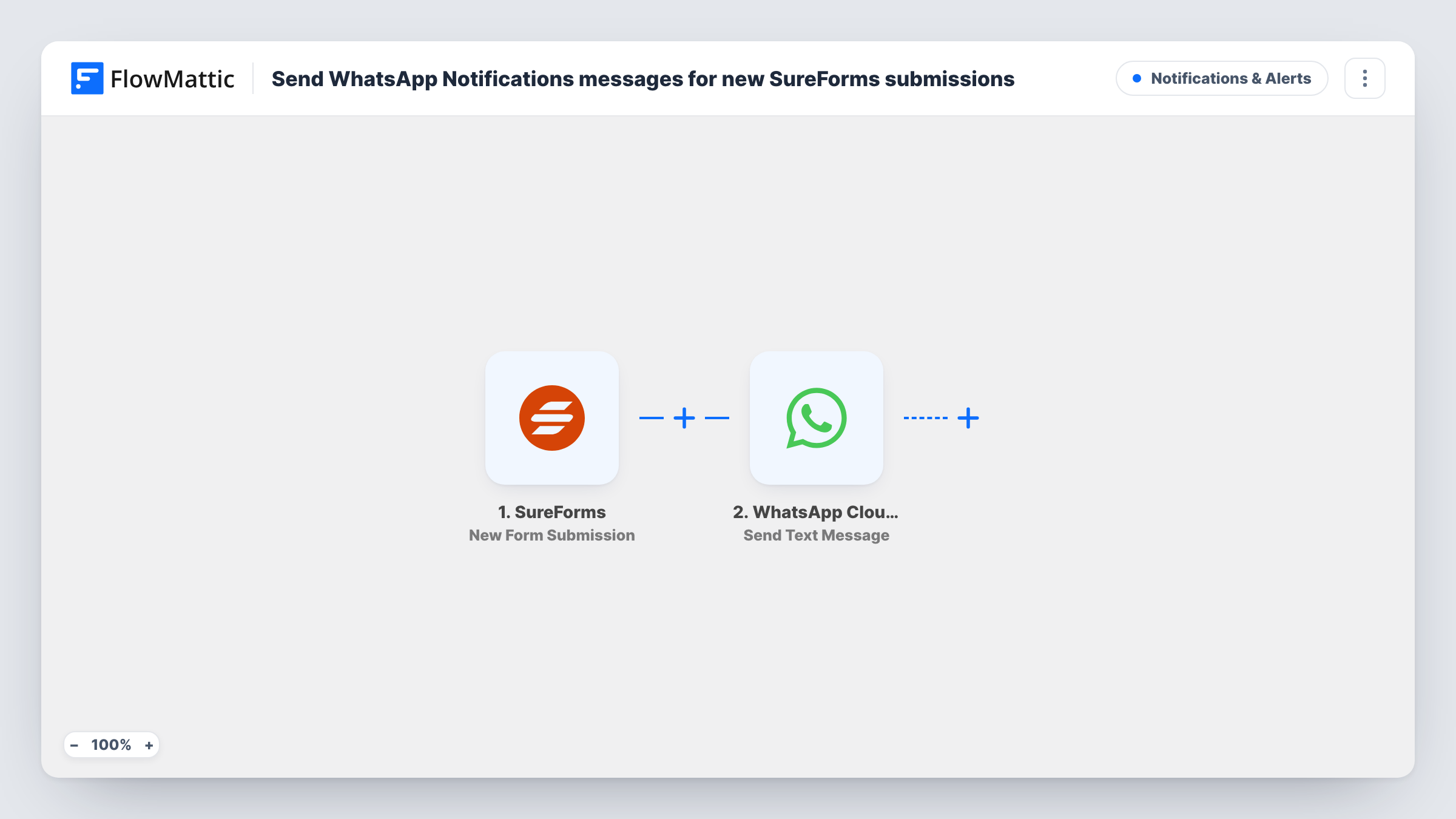
Each new SureForms submission on your WordPress site sends a WhatsApp text message through the WhatsApp Cloud API, to a number you choose, with the form answers in the message.
 SureForms
 WhatsApp Cloud API
2 steps Setup ~5 min Used on 1.1k sites Free to import
What this workflow does
Form notifications by email are easy to miss when you spend the day on your phone. If WhatsApp is where you or your team actually reply to people, a message there gets noticed sooner. Here, each SureForms entry produces a WhatsApp text of its own.
The SureForms trigger fires when a new form submission is received on your site. FlowMattic passes the answers to WhatsApp Cloud API and runs Send Text Message. You set the phone number it goes to and write the message, placing form answers such as the name and enquiry inside it.
There is a catch with plain WhatsApp texts. WhatsApp only delivers free-form text to someone within 24 hours of that person messaging your business number. A teammate who has not written to the number recently, or a new lead who filled in the form, usually won't receive it. For those cases switch the step to Send Template Message and use a template WhatsApp has approved. You can read what WhatsApp answered for each run in Task History.
Booking requests for a salon
A SureForms booking form sends the owner a WhatsApp message with the client's name and preferred time, so they can confirm from their phone.
Callback requests for a tradesperson
A plumber's site uses SureForms for callback requests. Each one arrives on WhatsApp with the address and problem described.
Alerts in a support rota
The person on support duty messages the business number at the start of their shift, so free-form alerts for new SureForms enquiries reach them that day.
How this workflow runs
What happens at each step once the workflow is on, and what you need before you import it.
 SureForms New Form Submission
Fires when SureForms receives a new form submission on your WordPress site. Each answer is passed on so you can place it in the WhatsApp message.
- WhatsApp Cloud API Send Text Message
Passes a plain text message to the WhatsApp Cloud API for delivery. Set the recipient number and write the message with SureForms answers mapped in. Delivery depends on WhatsApp's 24-hour rule.
What you need
- FlowMatticCore
- SureForms PluginPlugin
- WhatsApp Cloud API AccountAccount
After importing, map your own data. To keep the template universal, not every step is pre-filled. Open each step in the builder and connect your accounts and fields (channels, lists, sheets, recipients) before you switch the workflow on.
Make it yours
Changes worth making after you import it.
- To reach people who have not messaged your business number in the last 24 hours, replace this step with Send Template Message and pick a template WhatsApp has approved.
- Add a Filter after the trigger if only one SureForms form, or only certain answers, should send a WhatsApp alert.
- Submit the form yourself after import and check Task History for WhatsApp's response, so you see whether the message was accepted.
Questions about this workflow
Why didn't my WhatsApp message arrive after a SureForms submission?
A plain WhatsApp text only gets through if the recipient wrote to your business number in the previous 24 hours. Outside that window it is not delivered. Use Send Template Message with an approved template instead.
Can I message the person who filled in the SureForms form?
You can map their phone number as the recipient, but a new lead usually hasn't messaged you, so free-form text won't reach them. An approved template message is the way to contact them first.
What WhatsApp setup does the SureForms alert need?
You need WhatsApp Cloud API access set up through Meta, which you connect to FlowMattic. A personal WhatsApp account can't send through the Cloud API.
Does SureForms still store the entry?
Yes. FlowMattic picks up each new entry after it is submitted. It does not change how SureForms handles or saves the entry on your site.
More Notifications & Alerts workflows
Other ready-to-import templates from the same category.




Import this workflow into your WordPress site
Download the JSON, import it from the Workflows screen and connect your accounts. Every run stays on your server, with no per-task fees.
30-day money-back guarantee Unlimited workflows and runs Self-hosted