

When a form submission received, create a new contact and add the subscriber to sequence in FluentCRM
Each Fluent Forms submission creates or updates a FluentCRM contact by email, then enrolls that contact in the FluentCRM email sequence you pick, so follow-up emails start on their own.
 Fluent Forms
 FluentCRM
3 steps Setup ~5 min Used on 3.3k sites Free to import
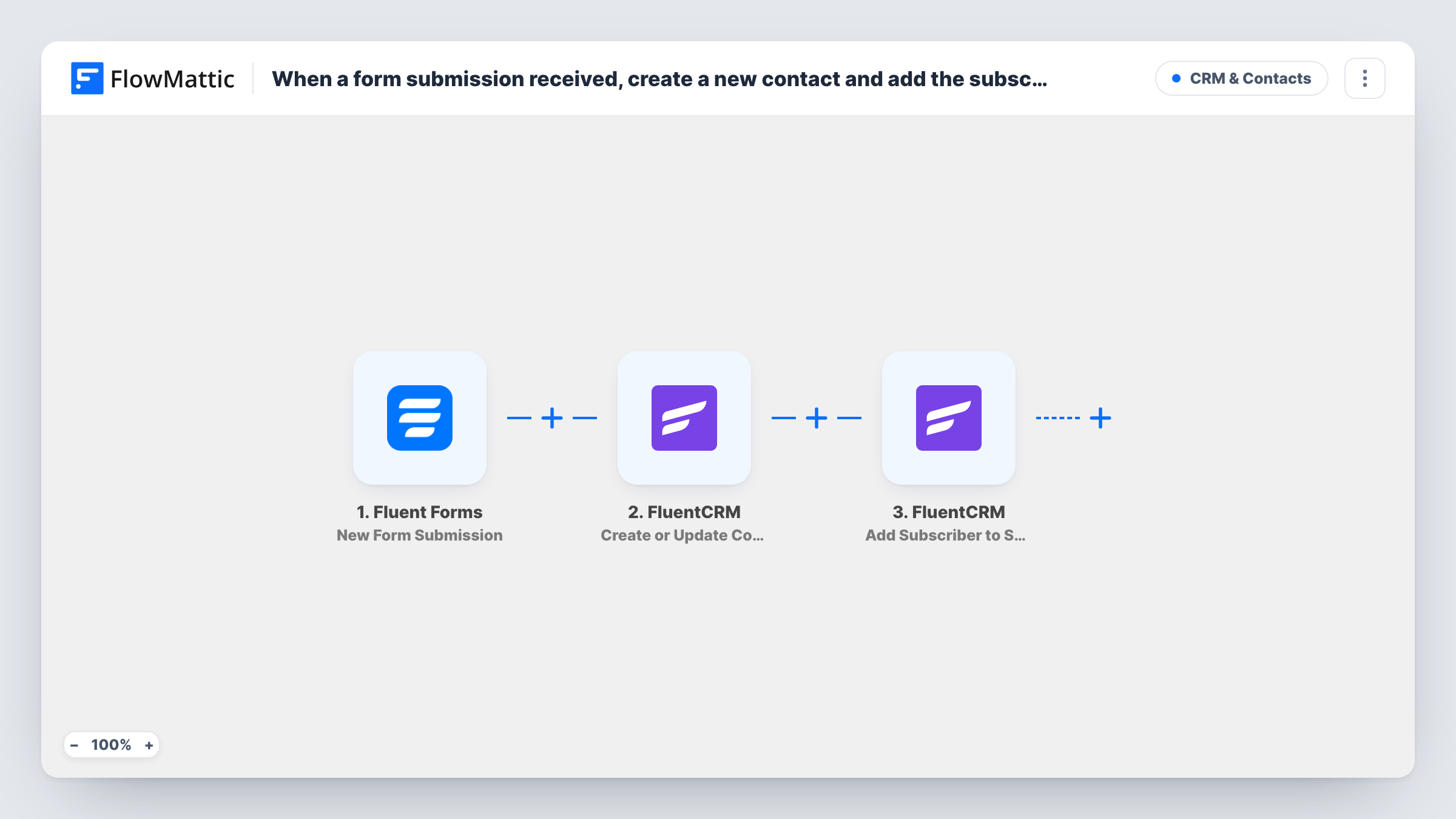
What this workflow does
A form signup is the start of a conversation, but only if someone follows up. With FluentCRM sequences you can write that follow-up once, a welcome today, a guide in a few days, an offer later, and let it run for every new person. This workflow connects your Fluent Forms form to that sequence.
The Fluent Forms trigger runs on each new submission and passes the form's fields to FlowMattic. The first FluentCRM step, Create or Update Contact, matches on email address: a new address becomes a new contact, and an address already in FluentCRM updates that contact. The second step, Add Subscriber to Sequence, enrolls the contact in an email sequence that already exists in FluentCRM.
None of the steps are mapped in the template. After import, pick your form, map its email and name fields into the contact step, then choose the sequence and map the contact from the previous step into the enrollment. Build the sequence in FluentCRM before you set this up.
Someone who fills in the form a second time runs both steps again, so the sequence step tries to enroll them once more. Submit a test entry and check Task History, then look at the contact in FluentCRM to confirm the enrollment.
Lead magnet download
A marketing consultant offers a checklist through a Fluent Forms form, and each person who requests it starts a five-email sequence about her services.
Course waitlist nurture
A course creator adds waitlist signups to FluentCRM and enrolls them in a sequence that shares lessons until the course opens.
Consultation request follow-up
A law firm's consultation form puts each inquirer into a sequence that sends what to prepare and a reminder before the call.
How this workflow runs
What happens at each step once the workflow is on, and what you need before you import it.
 Fluent Forms New Form Submission
Runs each time your Fluent Forms form is submitted. The entry's fields, such as name and email, are passed to the FluentCRM steps.
- FluentCRM Create or Update Contact
Adds the person to FluentCRM, or updates the contact that already has that email address. The step ships unmapped: map the form's email and name fields after import.
- FluentCRM Add Subscriber to Sequence
Enrolls the contact in an existing FluentCRM email sequence. Choose the sequence and map the contact from the previous step; neither is set in the template.
What you need
- FlowMatticCore
- Fluent Forms PluginPlugin
- FluentCRM PluginPlugin
After importing, map your own data. To keep the template universal, not every step is pre-filled. Open each step in the builder and connect your accounts and fields (channels, lists, sheets, recipients) before you switch the workflow on.
Make it yours
Changes worth making after you import it.
- Add a consent checkbox to the form and a Filter between the Fluent Forms trigger and the contact step that continues only when it is ticked. The field name is yours to set.
- Set a list or tag in the Create or Update Contact step too, so contacts from this form are easy to segment later.
- If you use the same form for different offers, put a Router between the contact step and the sequence step, with a route per offer value, each ending in its own Add Subscriber to Sequence step.
Questions about this workflow
Does the FluentCRM sequence need to exist before import?
Yes. Add Subscriber to Sequence enrolls contacts into a sequence you have already built in FluentCRM. Create it first, then select it in the step.
Does a returning Fluent Forms submitter get a duplicate FluentCRM contact?
No. Create or Update Contact matches on email, so the existing contact is updated instead, and the run goes on to the sequence step.
Is a contact enrolled again if they resubmit the Fluent Forms form?
Each submission runs both steps, so the workflow asks FluentCRM to enroll them again. Test with an address that is already in the sequence to see how FluentCRM handles it.
Can I enroll people in different sequences by form answer?
Yes, with a Router between the contact step and the sequence step. Give each route a condition on the answer that can't match another route, and its own sequence step.
More CRM & Contacts workflows
Other ready-to-import templates from the same category.








Import this workflow into your WordPress site
Download the JSON, import it from the Workflows screen and connect your accounts. Every run stays on your server, with no per-task fees.
30-day money-back guarantee Unlimited workflows and runs Self-hosted