

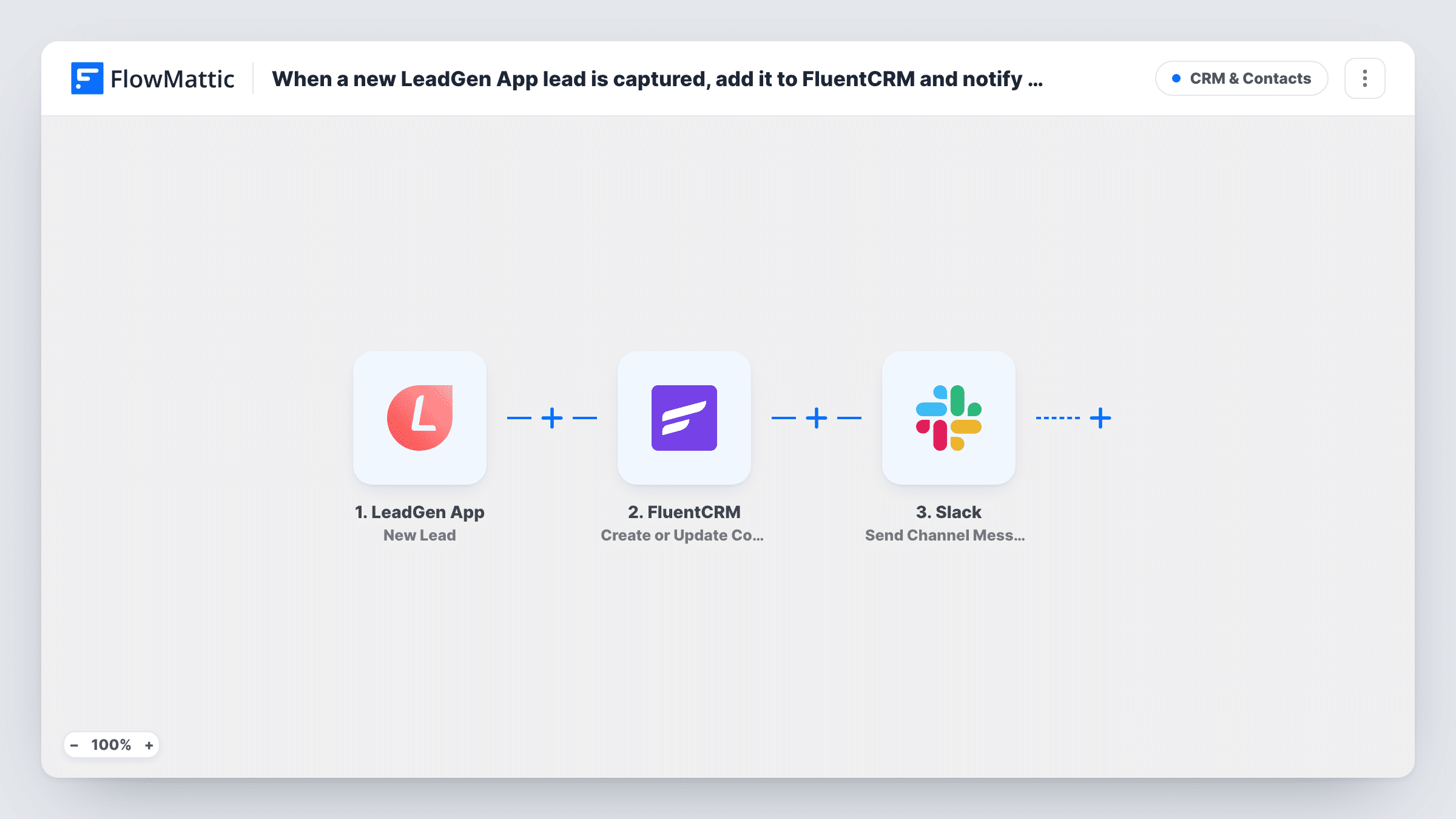
When a new LeadGen App lead is captured, add it to FluentCRM and notify the team in Slack
Each new lead from LeadGen App is created or updated as a contact in FluentCRM, matched by email, and then announced in a Slack channel, so your CRM has the lead and your team knows it arrived.
 LeadGen App
 FluentCRM
 Slack
Slack3 steps Setup ~5 min Used on 3.3k sites Free to import
What this workflow does
LeadGen App forms collect leads on your landing pages, but the leads only help once they reach your CRM and someone follows up. Checking the LeadGen dashboard by hand slows that down. This workflow puts each lead in FluentCRM and tells your team in Slack.
The LeadGen App trigger starts a run as each new lead comes in from your LeadGen form. FlowMattic passes the lead's answers to FluentCRM, where Create or Update Contact creates a contact or updates the existing one based on email address. The run then goes to Slack, and Send Channel Message posts the details you choose to a channel.
The FluentCRM and Slack steps both run on each lead. A lead whose email is already in FluentCRM updates that contact, and the Slack message still goes out, so returning leads are announced too.
Sales alerts for a lead magnet
A LeadGen App form offers a free checklist. Each lead joins FluentCRM for your nurture emails, and #sales sees the name and company in Slack.
Agency landing pages
Leads from several LeadGen App forms on a client's campaign pages land in the client's FluentCRM, while the account team gets a Slack ping for each.
Event interest capture
People register interest in an upcoming event through LeadGen App. FluentCRM keeps them for event emails, and the events channel watches sign-ups in Slack.
How this workflow runs
What happens at each step once the workflow is on, and what you need before you import it.
 LeadGen App New Lead
Fires when LeadGen App receives a new lead from your form. The lead's answers, such as name, email and phone, are passed to FluentCRM and Slack.
- FluentCRM Create or Update Contact
Creates a FluentCRM contact from the lead, or updates the contact that already has this email. Map the email and the name fields, plus any other answers you store.
- Slack Send Channel Message
Posts the new lead to the public Slack channel you choose. Write the message and insert lead details, such as name and email, so the team can see who came in.
What you need
- FlowMatticCore
- LeadGen App AccountAccount
- FluentCRM PluginPlugin
- Slack AccountAccount
After importing, map your own data. To keep the template universal, not every step is pre-filled. Open each step in the builder and connect your accounts and fields (channels, lists, sheets, recipients) before you switch the workflow on.
Make it yours
Changes worth making after you import it.
- Make the email question required in your LeadGen App form. FluentCRM matches contacts by email, and a lead without one can't be added.
- Add tags or lists to the contact with a later FluentCRM step, such as Add Tags to Contact, so you can tell LeadGen leads apart from other sign-ups.
- For a private Slack channel, swap in Send Private Channel Message; to alert one salesperson, use Send Direct Message.
Questions about this workflow
What if the LeadGen App lead is already in FluentCRM?
FluentCRM looks the lead up by email address and updates that contact instead of adding a second one. Map only fields the form fills, since blank values in a new lead can overwrite saved ones.
Does the Slack message go out for returning leads?
Yes. The Slack step runs for every lead the trigger receives, whether FluentCRM created a new contact or updated one.
Is FluentCRM on the same site as FlowMattic required?
Yes. FluentCRM is a WordPress plugin, so it must be installed on the site where FlowMattic runs for the contact step to work.
Can I send LeadGen leads to a different Slack channel per form?
Put a Router after the FluentCRM step with one route per form, matched on a form name or ID the trigger returns, and give each route its own Slack step.
More CRM & Contacts workflows
Other ready-to-import templates from the same category.






Import this workflow into your WordPress site
Download the JSON, import it from the Workflows screen and connect your accounts. Every run stays on your server, with no per-task fees.
30-day money-back guarantee Unlimited workflows and runs Self-hosted