

Look up the buyer's country with ISO and update FluentCRM on each new WooCommerce order
On each new WooCommerce order, FlowMattic looks up the buyer’s billing country with ISO, then creates or updates the buyer in FluentCRM by email, ready for you to store the country details you want.
 WooCommerce
 ISO
ISO
 FluentCRM
3 steps Setup ~5 min Used on 666 sites Free to import
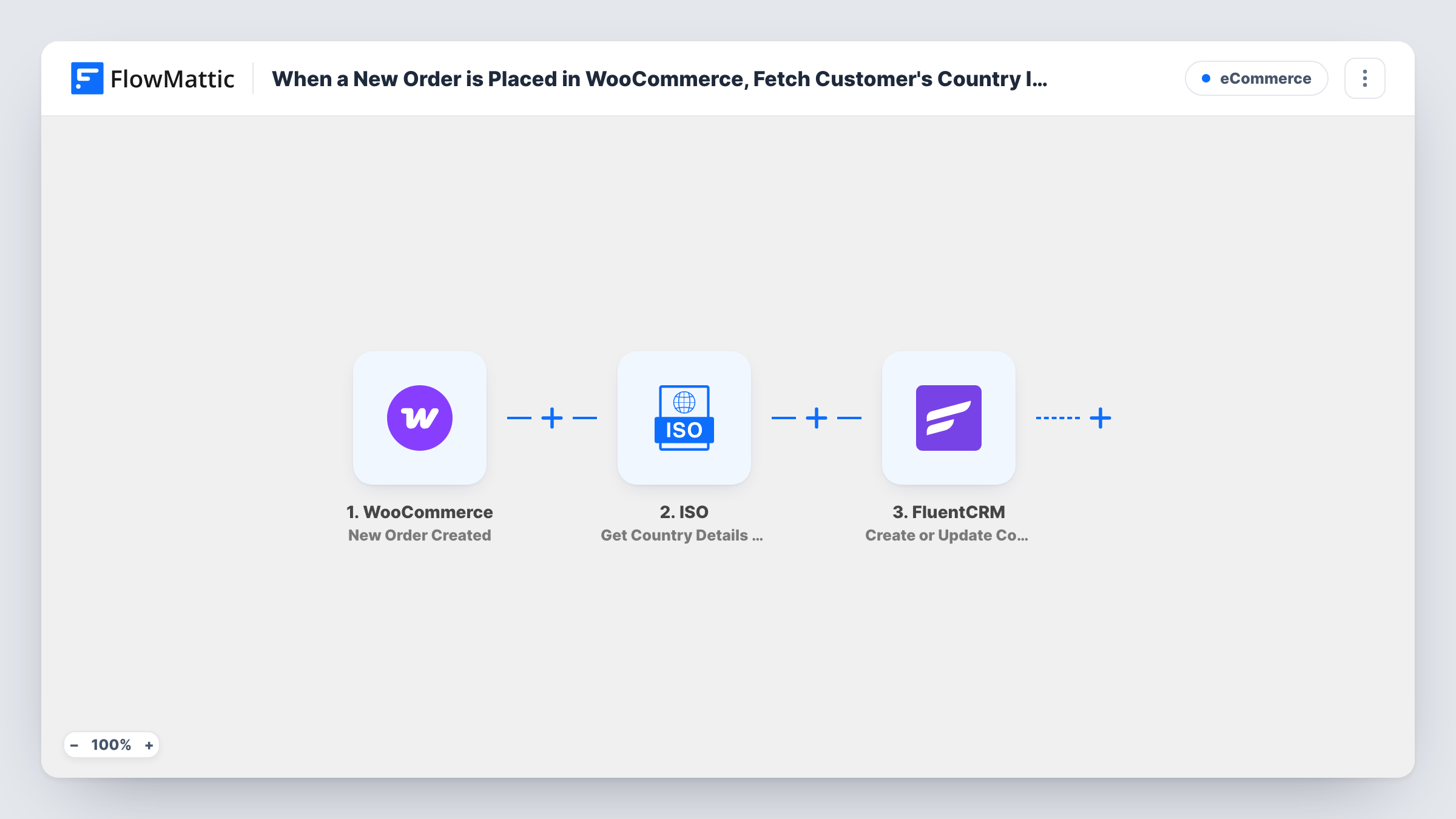
What this workflow does
WooCommerce stores the billing country as a two-letter code, such as DE or US. That is fine for checkout but awkward for segmenting an email list. This workflow turns the code into full country details with the ISO app and keeps the buyer's FluentCRM contact in step with each order.
The WooCommerce trigger starts a run for every order placed in your store. The ISO step then takes the order's billing country code, already mapped in the template, and returns details for that country: FlowMattic describes them as the name, code, capital, region, currency, language and flag.
The last step creates or updates a FluentCRM contact. It matches by email, so a first-time buyer becomes a new contact and a repeat buyer's existing contact is updated. The template maps the billing email and first name. The ISO results are not mapped yet, so as imported nothing from the lookup reaches FluentCRM. After import, map the values you want, such as the country name or region, into the contact, for example into a custom field you create in FluentCRM.
Every order runs all three steps, including repeat orders from the same buyer. Task History shows what ISO returned and how FluentCRM responded.
Country segments for international stores
A shop that ships to many countries stores each buyer's country name in FluentCRM and sends shipping updates only to customers in one region.
Currency-aware email campaigns
A store maps the currency from the ISO lookup into a FluentCRM custom field, then segments its emails by the currency each buyer uses.
Readable country data for reporting
A marketing team filters FluentCRM contacts by full country name instead of two-letter codes when it reviews where customers come from.
How this workflow runs
What happens at each step once the workflow is on, and what you need before you import it.
 WooCommerce New Order Created
Starts when a new order is created in WooCommerce. Every order is one run, and the billing details, including the email, first name and country code, are passed on.
- ISO Get Country Details by Country Code
Looks up the order's billing country code with ISO, already mapped from WooCommerce, and returns the country's name, capital, region, currency, language and flag for the next step.
- FluentCRM Create or Update Contact
Creates or updates the buyer's FluentCRM contact, matched by email. The billing email and first name are mapped; map the ISO country details yourself, as nothing from the lookup is sent as imported.
What you need
- FlowMatticCore
- WooCommerce PluginPlugin
- ISO AccountAccount
- FluentCRM PluginPlugin
After importing, map your own data. To keep the template universal, not every step is pre-filled. Open each step in the builder and connect your accounts and fields (channels, lists, sheets, recipients) before you switch the workflow on.
Make it yours
Changes worth making after you import it.
- Create custom fields in FluentCRM for the values you want to keep, such as region or currency, then map the ISO results into them in the Create or Update Contact step.
- Map the billing last name too, so contacts created from orders carry the buyer's full name in FluentCRM.
- Add a tag or list to the contact in the same step, if it offers one, so you can tell which FluentCRM contacts came from WooCommerce orders.
Questions about this workflow
Does this workflow save the buyer's country in FluentCRM as imported?
No. The ISO step looks the country up, but the FluentCRM step only maps the email and first name. Map the ISO results into the contact after import to store them.
What happens when a repeat customer places another WooCommerce order?
FluentCRM's Create or Update Contact matches by email, so the existing contact is updated instead of a duplicate being created. The ISO lookup runs again for that order.
Why use ISO when WooCommerce already knows the country?
WooCommerce passes the billing country as a short code. The ISO step turns that code into details such as the full name, region and currency, which are easier to use for FluentCRM segments.
What if a WooCommerce order has no billing country?
Then the ISO step gets an empty code and may return an error or no country details. The FluentCRM step still has the email and first name mapped; check Task History on such an order to see what happened.
More E-Commerce workflows
Other ready-to-import templates from the same category.






Import this workflow into your WordPress site
Download the JSON, import it from the Workflows screen and connect your accounts. Every run stays on your server, with no per-task fees.
30-day money-back guarantee Unlimited workflows and runs Self-hosted