

When a new signup occurs in Lightfunnels, register the user in LearnDash
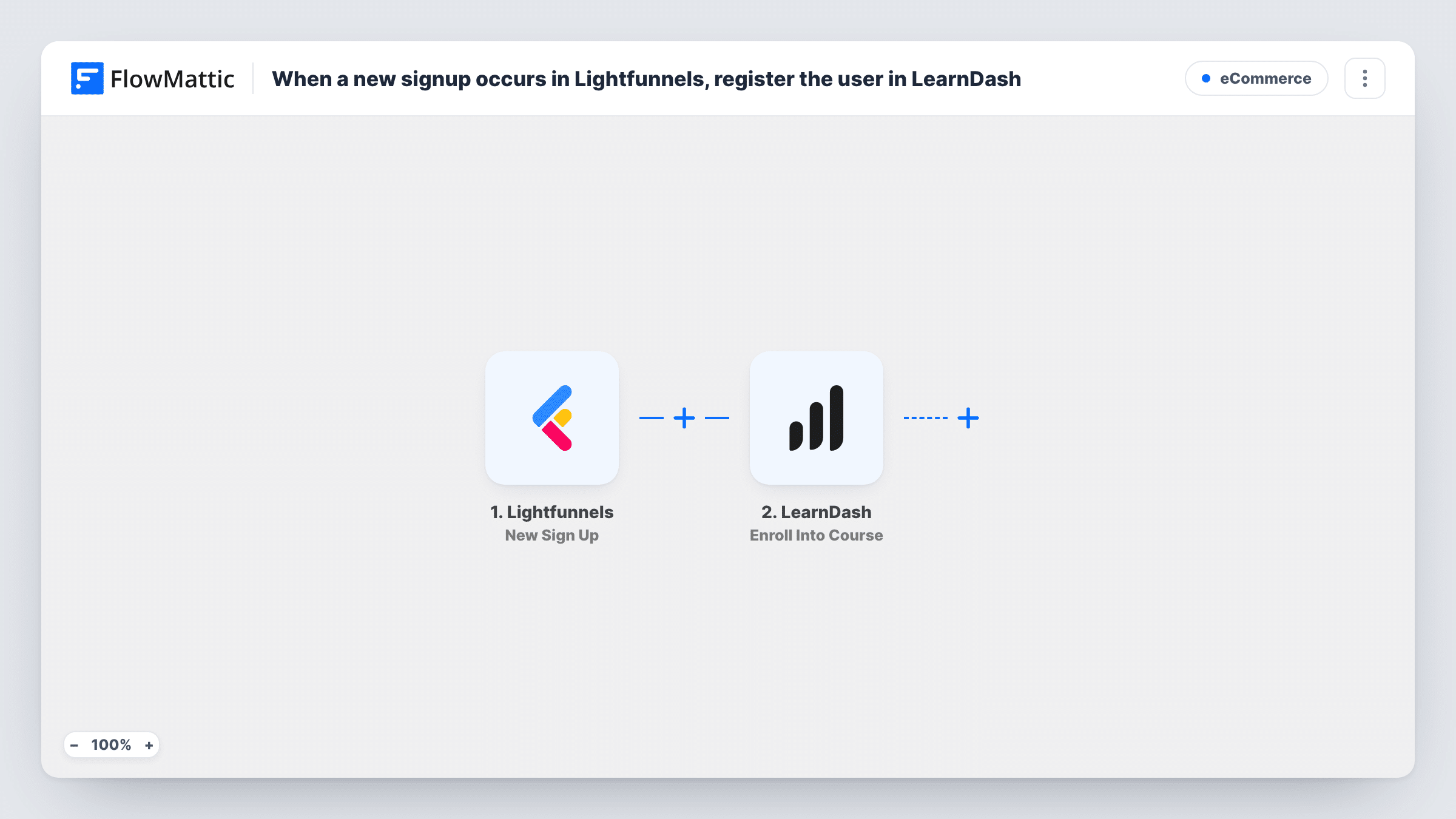
When someone signs up in Lightfunnels, FlowMattic creates a WordPress user for them and enrolls that user into your LearnDash course, so the new sign-up can log in and start learning.
 Lightfunnels
 WordPress
 LearnDash
3 steps Setup ~5 min Used on 2.0k sites Free to import
What this workflow does
If you sell or promote a course through a Lightfunnels funnel but host the lessons in LearnDash on WordPress, every sign-up needs an account and course access on your site. Doing that by hand means people wait. This workflow handles both steps for each new sign-up.
The Lightfunnels trigger fires when a new signup occurs and passes on the person's details, such as their email and name. The WordPress New User step then creates a user account. It ships unmapped, so after import you map the sign-up's email, name and username into it.
The LearnDash step enrolls that user into a course. The user ID from the New User step is already mapped in; you only choose the course. Because LearnDash enrollment needs a WordPress user, the account step comes first.
If the sign-up's email already belongs to a WordPress account, no duplicate account is made. The New User step reports success with the existing user's ID, so that account is the one enrolled, and Task History lists the ID it returned. Send a test sign-up through your funnel and check that the account and enrollment appear in WordPress.
Free mini-course from a funnel opt-in
A fitness coach collects sign-ups on a Lightfunnels page, and each person gets a WordPress login with the LearnDash starter course already open.
Onboarding course for new customers
A software seller's Lightfunnels sign-ups are enrolled into a LearnDash onboarding course that walks them through setup.
Existing students joining another funnel
A returning student signs up through a new Lightfunnels page, and their existing WordPress account is enrolled into the new course rather than a second login being made.
How this workflow runs
What happens at each step once the workflow is on, and what you need before you import it.
 Lightfunnels New Sign Up
Fires when a new signup occurs in Lightfunnels. The person's email, name and other sign-up details are passed on to create their WordPress account.
- WordPress New User
Creates a WordPress user for the sign-up. The step ships unmapped: map the email, username and name from Lightfunnels. An email that's already registered returns that existing user's ID.
- LearnDash Enroll Into Course
Enrolls the WordPress user from step 2 into a LearnDash course. The user ID is mapped in the template; choose the course after import and check a test enrollment.
What you need
- FlowMatticCore
- Lightfunnels AccountAccount
- LearnDash PluginPlugin
After importing, map your own data. To keep the template universal, not every step is pre-filled. Open each step in the builder and connect your accounts and fields (channels, lists, sheets, recipients) before you switch the workflow on.
Make it yours
Changes worth making after you import it.
- To tell people how to get in, add an Email step after the LearnDash step with your login page address and the course link, mapped to the Lightfunnels email.
- If one funnel should lead to several courses, add a second Enroll Into Course step after the first and map the same user ID from step 2.
- Map the sign-up's email as the username too, which keeps logins easy for students to remember.
Questions about this workflow
What if the Lightfunnels sign-up already has a WordPress account?
No duplicate account is made for an email WordPress already has. The New User step returns the existing user's ID instead, and LearnDash enrolls that account. You can see the returned ID for each run in Task History.
Which LearnDash course are Lightfunnels sign-ups enrolled in?
The course you pick in the Enroll Into Course step after import. The template maps the user ID but leaves the course for you to choose.
Does the new user get an email with their login?
This workflow doesn't send one. Add an Email or Gmail step at the end if you want to send the course link and login instructions.
Do I need LearnDash on the same site as FlowMattic?
Yes. Both the user account and the enrollment are created on the WordPress site where FlowMattic runs, so LearnDash must be installed and active there.
More E-Commerce workflows
Other ready-to-import templates from the same category.






Import this workflow into your WordPress site
Download the JSON, import it from the Workflows screen and connect your accounts. Every run stays on your server, with no per-task fees.
30-day money-back guarantee Unlimited workflows and runs Self-hosted