

Tag new Typeform submitters in Autonami with a different tag based on the Counter number
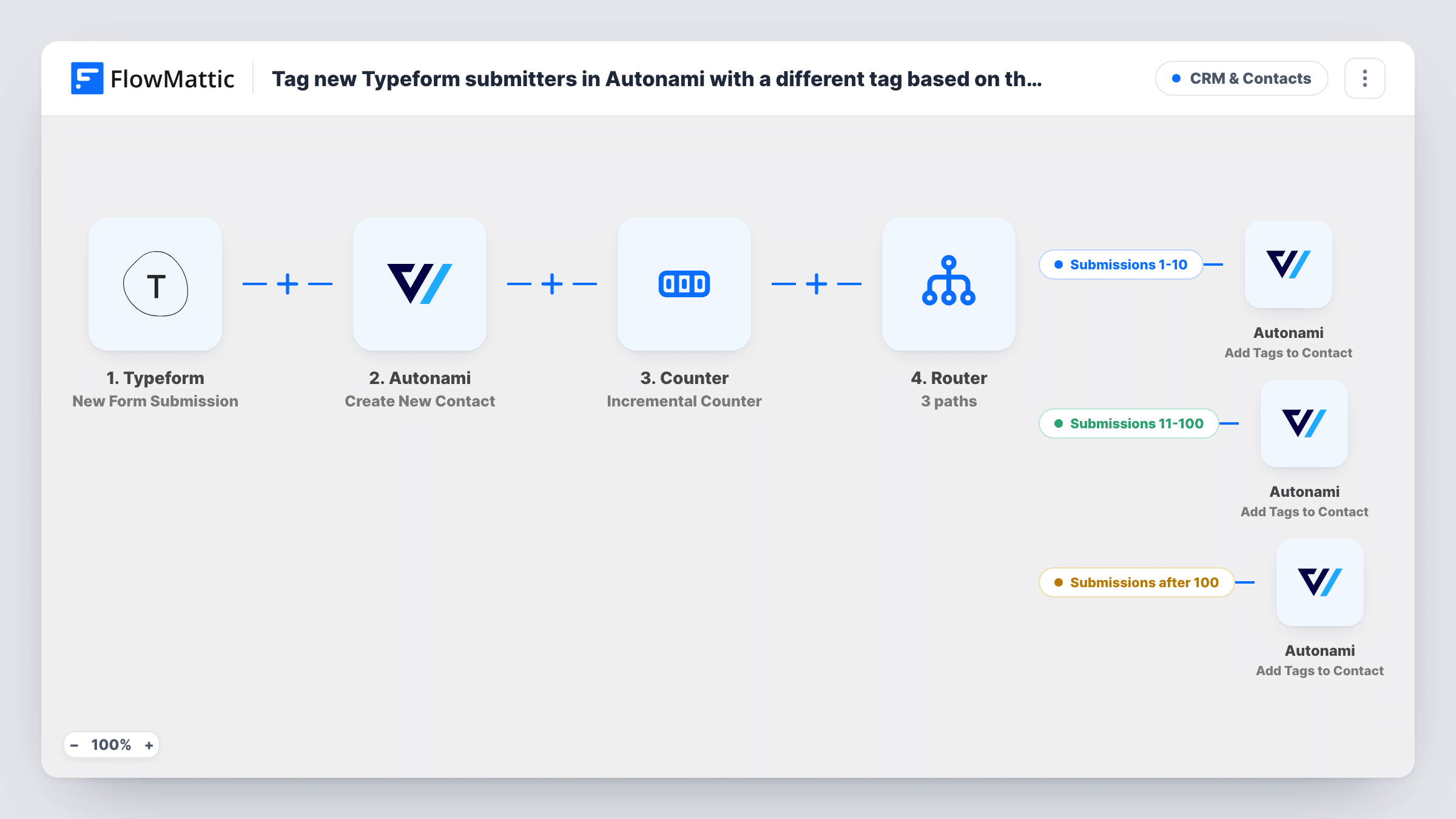
Each Typeform submission creates the person as a contact in Autonami, moves a FlowMattic Counter up by one, and a Router tags them by position: the first 10, numbers 11 to 100, or everyone after 100.
 Typeform
 Autonami
 Counter
 Router
7 steps Setup ~12 min Used on 747 sites Free to import
What this workflow does
You may want to treat people differently by how early they signed up: a launch offer for the first few, a standard welcome for the next group, and a waitlist message later on. This workflow sorts Typeform respondents into those groups inside FunnelKit Automations (Autonami), so your automations there can pick up each tag.
The Typeform trigger begins a run whenever someone completes your form. The first Autonami step then creates a contact from it. That step ships unmapped, so after import you map the respondent's email and name from the Typeform answers.
Next, the Counter step adds 1 to a number stored for this workflow. It starts at 0 and never resets, so the first submission gets 1, the second 2, and so on. A Router compares that number on three routes: less than 11, greater than 10 and less than 101, and greater than 100. The ranges don't overlap, so each contact follows one route.
Every route ends in an Add Tags to Contact step, and all three ship empty. Pick the contact created in step 2 and the tag for that group in each one. The counter counts runs, not unique people, so someone who submits twice is counted twice.
Founding member offer
A course creator tags the first 10 Typeform sign-ups as founding members, and an Autonami automation sends them a lifetime discount.
Beta access in waves
A software team invites sign-ups 11 to 100 to the beta through a second tag, while later respondents get a waitlist tag and a holding email.
Event seats with an overflow list
A workshop with 100 seats tags respondents up to 100 as confirmed and everyone after that as overflow, so each group gets the right follow-up.
How this workflow runs
What happens at each step once the workflow is on, and what you need before you import it.
 Typeform New Form Submission
Starts the workflow whenever someone submits your Typeform. The answers, such as the email and name, are passed on to create the Autonami contact.
- Autonami Create New Contact
Creates a contact in FunnelKit Automations (Autonami). The step ships unmapped: after import, map the email address and any name fields from the Typeform answers.
- Counter Incremental Counter
Raises the workflow's stored count by 1 and returns the new total as final_value. It starts at 0 with no reset, so the first submission returns 1 and the count keeps rising.
- Router 3 paths
Checks the counter on three routes: Submissions 1-10 continues below 11, Submissions 11-100 needs more than 10 and less than 101, and Submissions after 100 needs more than 100. Only one can match.
- Autonami Add Tags to Contact
Tags contacts on the Submissions 1-10 route. The step arrives empty, so select the contact from step 2 and choose the tag for your first ten respondents.
- Autonami Add Tags to Contact
Applies the tag for submissions 11 to 100. Map the contact created in step 2 and pick the Autonami tag you use for this middle group.
- Autonami Add Tags to Contact
Tags everyone who arrives after the hundredth submission. Choose the tag for this group, such as a waitlist tag, and map the same contact from step 2.
What you need
- FlowMatticCore
- Typeform AccountAccount
- FunnelKit Automations ( Autonami ) PluginPlugin
After importing, map your own data. To keep the template universal, not every step is pre-filled. Open each step in the builder and connect your accounts and fields (channels, lists, sheets, recipients) before you switch the workflow on.
Make it yours
Changes worth making after you import it.
- Create the three tags in FunnelKit Automations before you set up the routes, so you can pick them in each Add Tags to Contact step.
- Build an Autonami automation that starts when each tag is added, so the first ten, the next ninety and later contacts each get their own email.
- Change the numbers in the route conditions to fit your offer, for example 50 instead of 10, and keep the ranges from overlapping so a contact never gets two tags.
- Map the counter's final_value into a custom field on the Autonami contact if you want to see each person's sign-up position later.
Questions about this workflow
Does a person who submits the Typeform twice count twice?
Yes. The Counter rises on every run, whoever submits. A repeat respondent moves the count on and can land in a different group the second time.
Can a contact end up with more than one of the three tags?
Not from one submission. A Router runs every route whose conditions match, but the three ranges are separate, so each count matches only one route.
What if the email is already a contact in Autonami?
Autonami decides how Create New Contact handles an existing email. Test with a known address and check what the step returned in Task History before relying on the tag steps.
How do I start the count again for a new campaign?
The Counter step in this template has no reset value, so it keeps counting. Set a reset in the Counter step, or import a fresh copy of the workflow for each campaign.
More CRM & Contacts workflows
Other ready-to-import templates from the same category.






Import this workflow into your WordPress site
Download the JSON, import it from the Workflows screen and connect your accounts. Every run stays on your server, with no per-task fees.
30-day money-back guarantee Unlimited workflows and runs Self-hosted