

When a payment is successful in QuestionScout, check if the amount is greater than amount using Filters, and add contact in FluentCRM
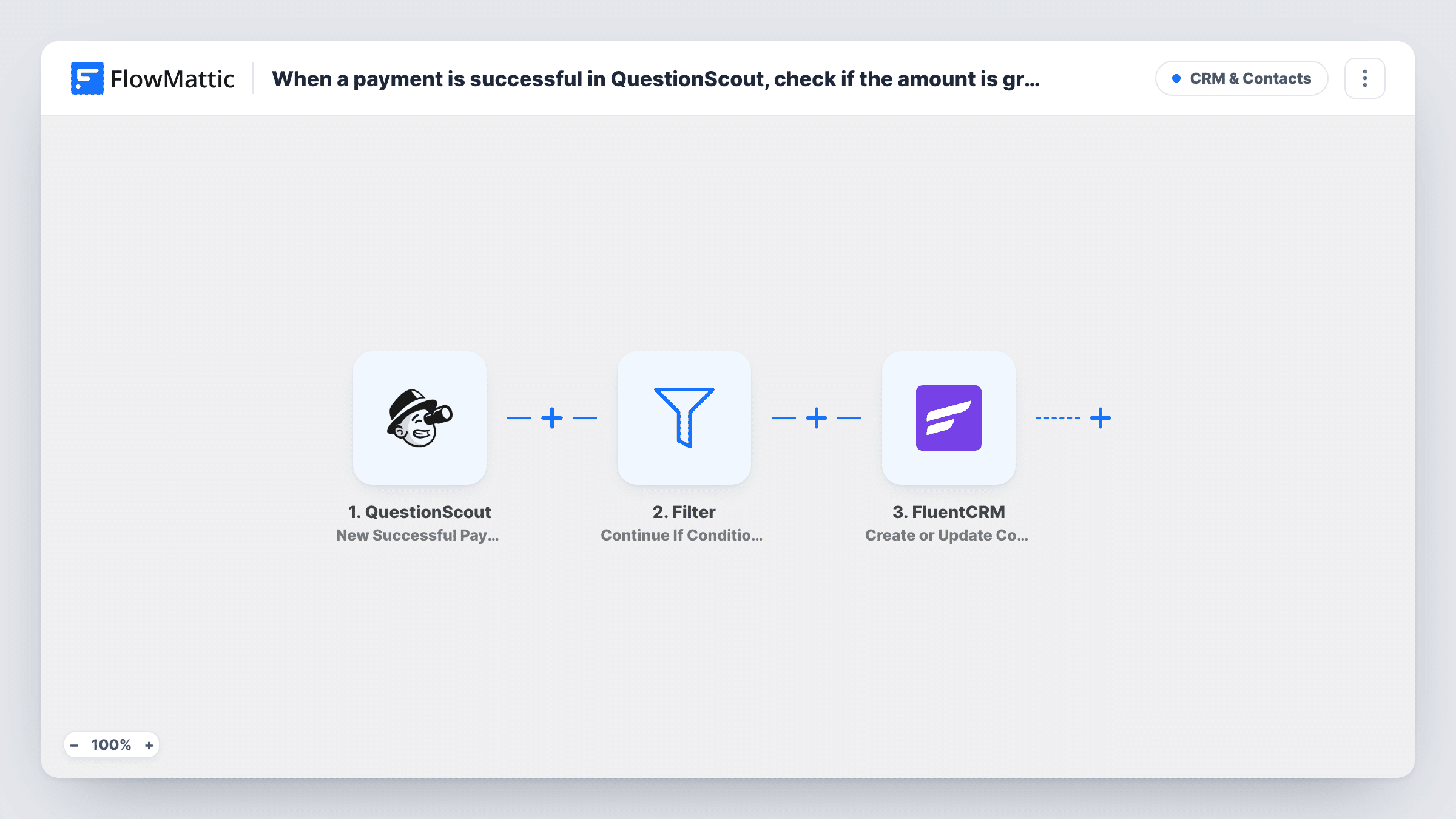
When a QuestionScout payment succeeds, a Filter checks whether the amount is above a threshold you set, and payers who pass are created or updated as contacts in FluentCRM.
 QuestionScout
 Filter
 FluentCRM
3 steps Setup ~5 min Used on 3.1k sites Free to import
What this workflow does
A paid QuestionScout form can take everything from small deposits to full package fees. You may want only the larger payers in your FluentCRM list, for example to send them onboarding emails meant for full customers. This workflow puts an amount check between the payment and your CRM.
The QuestionScout trigger, New Successful Payment, fires when a payment on one of your forms succeeds. Next comes a Filter with Continue If. The idea is to compare the payment amount against your threshold with a greater-than condition. Payments that pass go to FluentCRM, where Create or Update Contact adds the payer, or updates them if a contact with that email already exists.
Important: the Filter ships with no condition. As imported it stops every run, so nobody reaches FluentCRM until you add the amount rule. Greater-than compares whole numbers, so 49.99 is checked as 49, and a blank amount counts as 0 and fails.
Separate deposits from full payments
A course booking form takes either a deposit or the full fee. Set the Filter above the deposit amount so only full payers become FluentCRM contacts.
VIP list for larger donations
A QuestionScout donation form feeds FluentCRM only when the gift is above your chosen figure, so your thank-you sequence goes to major donors.
Keeping test payments out of the CRM
Small test charges made while building the form stay below the threshold and never create contacts.
How this workflow runs
What happens at each step once the workflow is on, and what you need before you import it.
 QuestionScout New Successful Payment
Fires when a payment on a QuestionScout form succeeds. The payment data and form answers are passed on; make sure your form asks for an email so FluentCRM has one to use.
- Filter Continue If
Compares the payment amount with your threshold once you add the condition. It ships empty, and an empty Filter stops every run. Set a greater-than rule on the amount before you switch the workflow on.
- FluentCRM Create or Update Contact
Creates a FluentCRM contact for the payer, or updates the existing contact with that email. Map the email and name from the QuestionScout payment, and confirm with a test payment.
What you need
- FlowMatticCore
- QuestionScout AccountAccount
- FluentCRM PluginPlugin
After importing, map your own data. To keep the template universal, not every step is pre-filled. Open each step in the builder and connect your accounts and fields (channels, lists, sheets, recipients) before you switch the workflow on.
Make it yours
Changes worth making after you import it.
- Set the Filter condition first: map the payment amount on the left, choose greater than, and type your threshold as a whole number.
- Add FluentCRM Add Tags to Contact after the contact step so qualifying payers carry a tag you can target in campaigns.
- Want lower payers recorded too? Swap the Filter for a Router with a greater-than route and a less-than route that can't both match, each leading to its own FluentCRM step.
- Run a test payment above and one below your threshold, then check Task History to see where each run stopped.
Questions about this workflow
Why does no QuestionScout payer reach FluentCRM after import?
The Filter has no condition when imported, and an empty Filter stops every run. Add your amount rule to the Filter and the qualifying payments will continue.
How are decimal QuestionScout amounts compared?
Greater-than and less-than compare whole numbers, so the decimal part is dropped. A payment of 100.50 is treated as 100, which matters if your threshold sits right on that line.
What if the payer is already in FluentCRM?
Create or Update Contact matches by email, so the existing contact is updated with the mapped details rather than duplicated.
Does a failed QuestionScout payment start the workflow?
No. The trigger is New Successful Payment, so only payments that succeed start a run.
More CRM & Contacts workflows
Other ready-to-import templates from the same category.






Import this workflow into your WordPress site
Download the JSON, import it from the Workflows screen and connect your accounts. Every run stays on your server, with no per-task fees.
30-day money-back guarantee Unlimited workflows and runs Self-hosted