

When a poll is submitted in WP-Polls, add a tag to the user in FunnelKit Automations (Autonami)
Each WP-Polls vote creates a contact in FunnelKit Automations (Autonami) for the voter and then adds the tag you pick, so you can start follow-up automations for people who took part.
 WP Polls
 Autonami
3 steps Setup ~5 min Used on 1.3k sites Free to import
What this workflow does
If you run your email automations in FunnelKit Automations, a poll on your WordPress site is an easy way to learn what people want and then act on it. This workflow turns each WP-Polls vote into a tagged Autonami contact, ready for an automation that starts on that tag.
The WP-Polls User Submits a Poll trigger runs when a poll is submitted by a user. Autonami needs an email address to create a contact, and a vote from someone who isn't logged in may arrive without one. Vote once logged in and once logged out after import and look at the trigger data to see what you get.
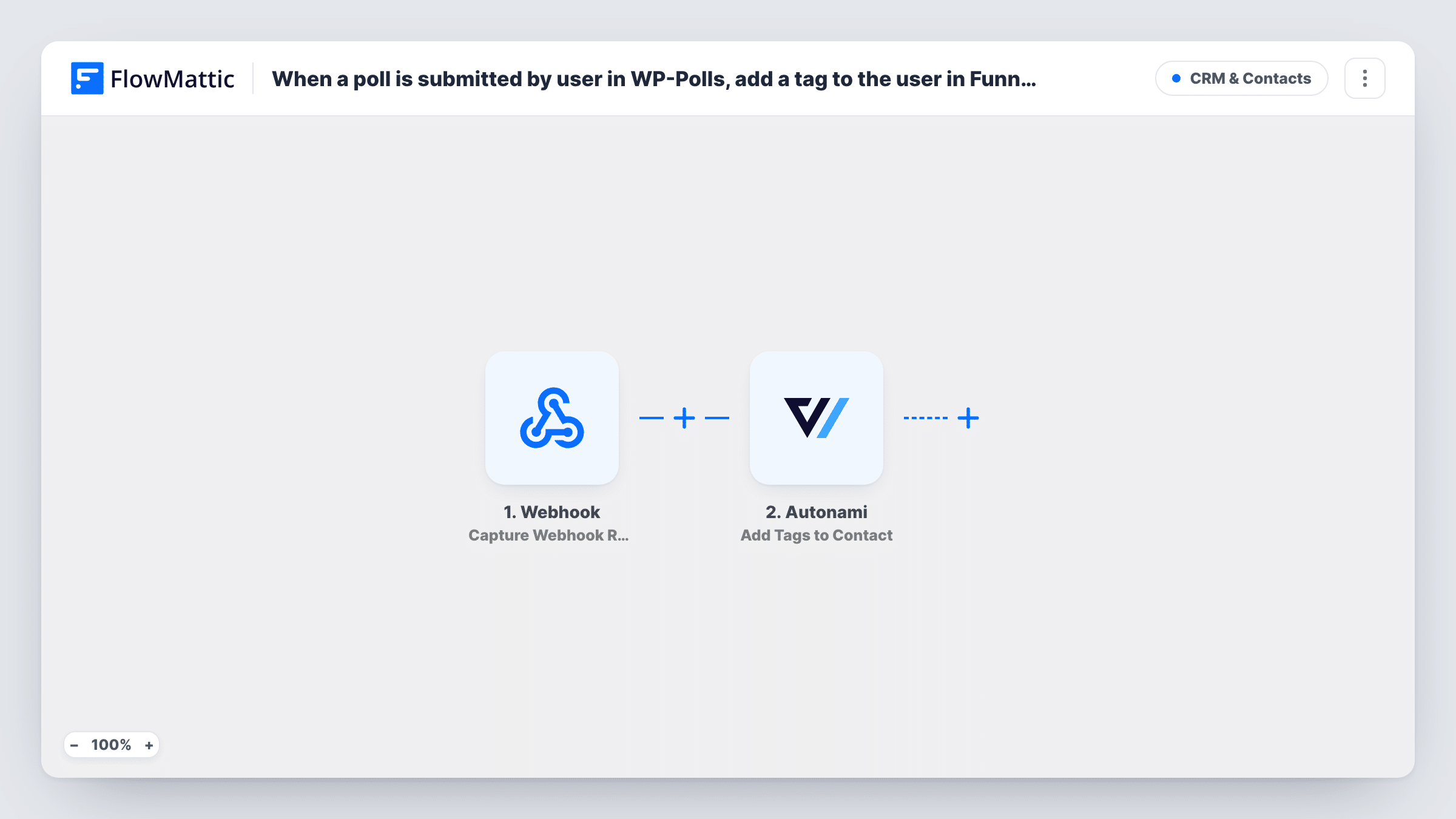
The first Autonami step, Create New Contact, adds the voter as a contact. The second, Add Tags to Contact, puts your tag on that contact. Neither step comes mapped: map the voter's email and name into Create New Contact, then map the contact it returns into the tag step and choose the tag.
The template creates contacts rather than looking them up, so a voter who is already in FunnelKit may be handled differently from a new one. Vote with an email that already exists and compare what Task History shows for both Autonami steps.
Course topic poll for an online academy
An academy asks logged-in students which course they want next, and FunnelKit sends a waitlist email to everyone tagged from the poll.
Feedback poll after a launch
A WooCommerce store polls customers about a new product line and tags voters, so a FunnelKit automation can send them an early discount.
Event planning with members
A club lets members vote on the next meetup date, and voters get the tag that triggers the event announcement in FunnelKit Automations.
How this workflow runs
What happens at each step once the workflow is on, and what you need before you import it.
 WP Polls User Submits a Poll
Runs when a user submits a WP-Polls poll on your site. The vote and whatever user details come with it are passed to FunnelKit Automations.
- Autonami Create New Contact
Adds the voter to FunnelKit Automations (Autonami) as a new contact. Nothing is mapped yet: map the email address, and the name if the trigger provides it.
- Autonami Add Tags to Contact
Puts the tag you choose on the contact created in the previous step. Map that contact into the step and select the tag, such as one named after the poll.
What you need
- FlowMatticCore
- WP-Polls PluginPlugin
- FunnelKit Automations ( Autonami ) PluginPlugin
After importing, map your own data. To keep the template universal, not every step is pre-filled. Open each step in the builder and connect your accounts and fields (channels, lists, sheets, recipients) before you switch the workflow on.
Make it yours
Changes worth making after you import it.
- Build a FunnelKit automation that starts when the poll tag is added, so the tag step sets off your follow-up emails.
- Restrict voting in WP-Polls to registered users if you need an email for every vote that reaches FunnelKit.
- Add a Filter between the WP-Polls trigger and Create New Contact that lets a run continue only when the email isn't empty, so logged-out votes end before the Autonami steps.
- If many voters already exist in FunnelKit, try Autonami's Get Contact by Email action between the WP-Polls trigger and Create New Contact and compare the results in a test.
Questions about this workflow
What happens when the WP-Polls voter is already a FunnelKit contact?
The template calls Create New Contact for every vote. How FunnelKit treats an email it already has decides the result, so test with an existing contact and check both Autonami steps in Task History.
Does every WP-Polls vote become a FunnelKit contact?
Every vote starts a run, but Autonami can only create a contact when the vote carries an email. Votes from logged-out visitors may not, so look at a few in Task History.
Can each poll answer get its own Autonami tag?
Not as imported. For that, replace the tag step with a Router after Create New Contact, giving each answer its own route and Add Tags to Contact step, with conditions that never overlap.
More CRM & Contacts workflows
Other ready-to-import templates from the same category.




Import this workflow into your WordPress site
Download the JSON, import it from the Workflows screen and connect your accounts. Every run stays on your server, with no per-task fees.
30-day money-back guarantee Unlimited workflows and runs Self-hosted