

When an Apptoto booking request is completed, create a Google Calendar event and notify the team in Slack
When a client finishes an Apptoto booking request, this workflow creates a matching Google Calendar event and then posts a note in a Slack channel, so the booking reaches your calendar and your team together.
 Apptoto
 Google Calendar
 Slack
3 steps Setup ~5 min Used on 512 sites Free to import
What this workflow does
Apptoto handles the client side of a booking, but your staff may plan their day in Google Calendar and talk in Slack. Copying each finished booking into both places by hand is slow, and a missed one means nobody turns up. Here FlowMattic copies each finished booking into both places.
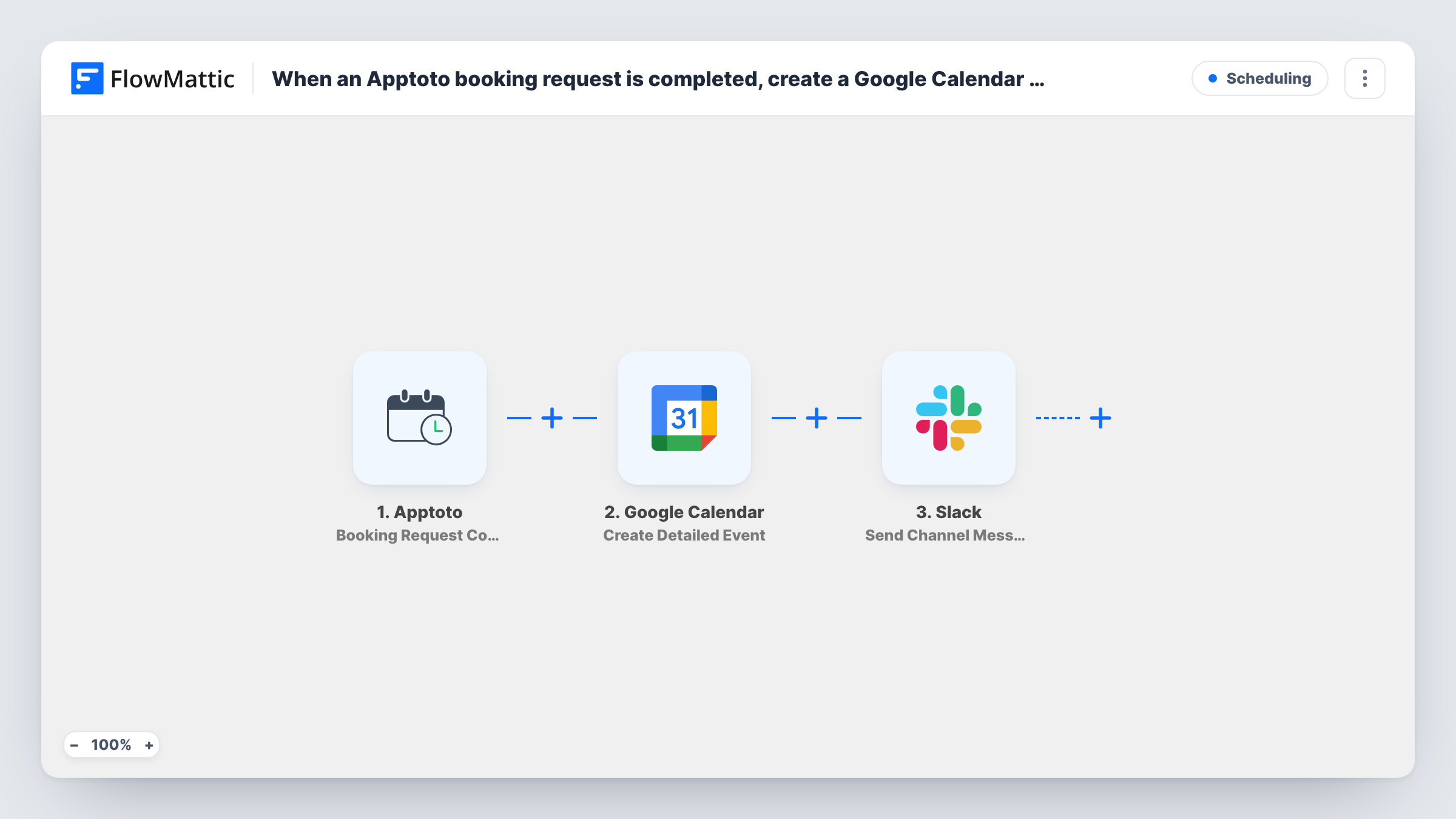
The Apptoto trigger, Booking Request Completed, fires when the whole booking process a client started is finalized. FlowMattic takes the booking data and passes it to Google Calendar, where Create Detailed Event adds a new event to the calendar you connect. You map the booking time, title and any notes into that event.
The run then moves to Slack and posts a message in the channel you pick. Because the calendar step runs first, its result can be used in the Slack text too, next to the booking details from Apptoto. Every completed request runs all three steps; nothing filters them out.
Shared calendar for a small clinic
Each booking a patient completes in Apptoto appears on the clinic's shared Google Calendar, and the front desk sees a Slack note before the patient arrives.
Consultants booked by clients
A client finishes booking a consultation. The session lands on the consultant's Google Calendar and the team channel hears who booked and when.
Field service visits
Completed Apptoto bookings for home visits become calendar events the dispatcher can see, while the crew channel in Slack gets the address and time.
How this workflow runs
What happens at each step once the workflow is on, and what you need before you import it.
 Apptoto Booking Request Completed
Fires when a client's Apptoto booking request is completed, meaning the whole booking process they started is finalized. The booking data is passed on for the next two steps.
- Google Calendar Create Detailed Event
Creates a new event in the Google Calendar you connect, built from the Apptoto booking. Map the start and end time, a title and any description you want staff to see, then test with a real booking.
- Slack Send Channel Message
Posts a message to a Slack channel you pick, announcing the new booking. Insert values from Apptoto, and from the Google Calendar step if you want, into the message text.
What you need
- FlowMatticCore
- Apptoto AccountAccount
- Google Calendar AccountAccount
- Slack AccountAccount
After importing, map your own data. To keep the template universal, not every step is pre-filled. Open each step in the builder and connect your accounts and fields (channels, lists, sheets, recipients) before you switch the workflow on.
Make it yours
Changes worth making after you import it.
- Map the Apptoto booking's start and end times carefully, and check the time zone of the event Google Calendar creates during your first test booking.
- If your team uses a private Slack channel, replace the action with Slack's Send Private Channel Message. To tell one staff member directly, use Send Direct Message.
- Add a Filter after the trigger if only some bookings should reach this calendar, for example a condition on the service or staff member the booking names.
Questions about this workflow
Does this create the Google Calendar event before the Slack message?
Yes. The steps run in order: Apptoto trigger, then Google Calendar, then Slack. That order lets you use the calendar step's result in the Slack message.
What happens if a client reschedules an Apptoto booking?
The workflow only listens for completed booking requests and only creates events. It doesn't move or delete an existing Google Calendar event, so update that one yourself or build a separate workflow.
Which Google Calendar does the Apptoto event go to?
The calendar the Create Detailed Event step is set to use, from the Google account you connect. Run one test booking to confirm where the event lands before going live.
Will Apptoto bookings that are still in progress reach Slack?
No. Booking Request Completed fires only once the client has finished the booking process, so half-finished requests don't start a run.
More Scheduling workflows
Other ready-to-import templates from the same category.



Import this workflow into your WordPress site
Download the JSON, import it from the Workflows screen and connect your accounts. Every run stays on your server, with no per-task fees.
30-day money-back guarantee Unlimited workflows and runs Self-hosted