

When an email received in Mail Parser, create new affiliate in Thrivecart and add tag to the user in FunnelKit Automations ( Autonami )
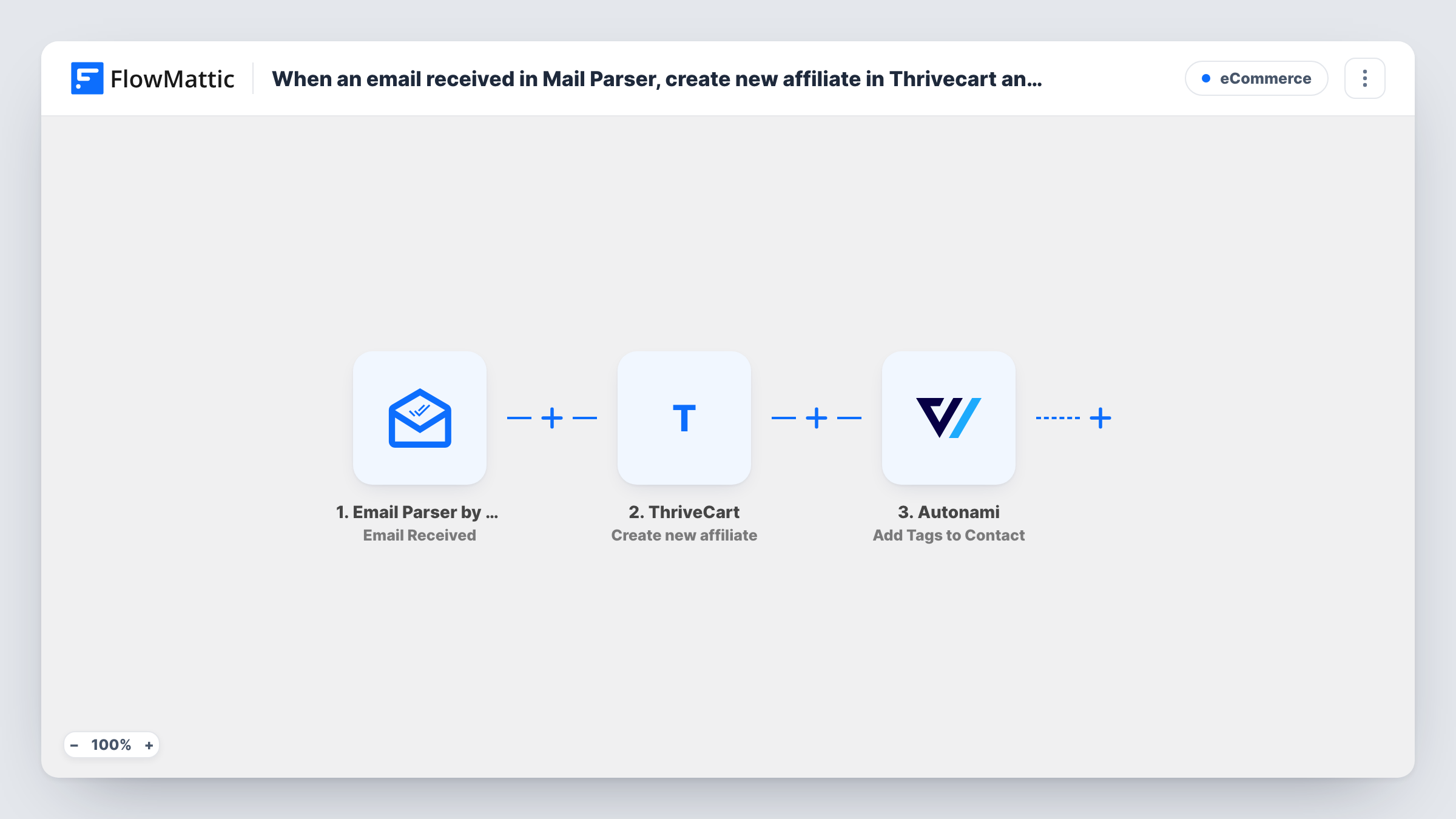
When an email reaches your FlowMattic Email Parser address, this workflow creates a ThriveCart affiliate from its details and adds a tag to that person in FunnelKit Automations, so new partners are set up in both tools.
 Email Parser by FlowMattic
 ThriveCart
 Autonami
3 steps Setup ~5 min Used on 2.0k sites Free to import
What this workflow does
Affiliate applications often arrive by email, from a sign-up form notification or a partner who writes in. Setting each one up means creating the affiliate in ThriveCart and then marking them in your CRM. This workflow does both from the email itself.
The Email Parser by FlowMattic trigger fires when an email is received at your parser address. You forward or send the application emails there, and the parsed content, such as the sender and the text in the body, becomes data you can map.
Next, ThriveCart runs Create new affiliate, using the name and email you map from the message. Then the Autonami step, part of FunnelKit Automations, runs Add Tags to Contact with the same email, so you can segment affiliates or start a FunnelKit automation for them.
Every email that reaches the parser address starts a run, so use that address only for affiliate applications. One email creates one affiliate. Test with an address that isn't in FunnelKit yet, and check Task History to see how the tag step handles a new person.
Course creator recruiting affiliates
Applications from a partner page are emailed to the parser address, and each applicant becomes a ThriveCart affiliate tagged for the affiliate welcome sequence.
Software launch partner program
During a launch, partner sign-up emails create affiliates in ThriveCart and tag them in FunnelKit so launch updates reach only partners.
Moving approvals out of the inbox
An assistant forwards approved affiliate requests to the parser address instead of entering them in ThriveCart and the CRM by hand.
How this workflow runs
What happens at each step once the workflow is on, and what you need before you import it.
 Email Parser by FlowMattic Email Received
Starts a run for each application email delivered to your parser inbox. The sender, subject and parsed body content are passed on for mapping.
- ThriveCart Create new affiliate
Registers the applicant as a ThriveCart affiliate. Map the applicant's name and email from the parsed message, then check a test run to confirm the affiliate appears.
- Autonami Add Tags to Contact
Adds a tag to the person in FunnelKit Automations (Autonami). Map the email from the parsed message and choose the tag that marks them as an affiliate.
What you need
- FlowMatticCore
- ThriveCart AccountAccount
- FunnelKit Automations ( Autonami ) PluginPlugin
After importing, map your own data. To keep the template universal, not every step is pre-filled. Open each step in the builder and connect your accounts and fields (channels, lists, sheets, recipients) before you switch the workflow on.
Make it yours
Changes worth making after you import it.
- Make the application emails follow a fixed layout, such as Name: and Email: lines, so the parser picks out the same values every time.
- If your test shows the tag step needs an existing contact, add Autonami's Create New Contact step before it with the same email.
- Want to approve applicants first? Add a Human in the Loop step after the trigger and set its timeout action to End Workflow, so no affiliate is created without a yes.
Questions about this workflow
Which emails trigger the ThriveCart affiliate step?
Every email received at your Email Parser address. Keep that address for affiliate applications only, or add a Filter on the subject line so other mail stops at the start.
Does the applicant need to be a FunnelKit contact already?
Test this with a new address. If the tag step doesn't add a new person, put Autonami's Create New Contact step before it.
Can one email create several ThriveCart affiliates?
No. Each email starts one run, which creates one affiliate. Send separate emails for separate applicants.
Does ThriveCart email the new affiliate?
The workflow doesn't send anything itself. Whether the affiliate hears from ThriveCart depends on your ThriveCart affiliate settings.
More E-Commerce workflows
Other ready-to-import templates from the same category.







Import this workflow into your WordPress site
Download the JSON, import it from the Workflows screen and connect your accounts. Every run stays on your server, with no per-task fees.
30-day money-back guarantee Unlimited workflows and runs Self-hosted