

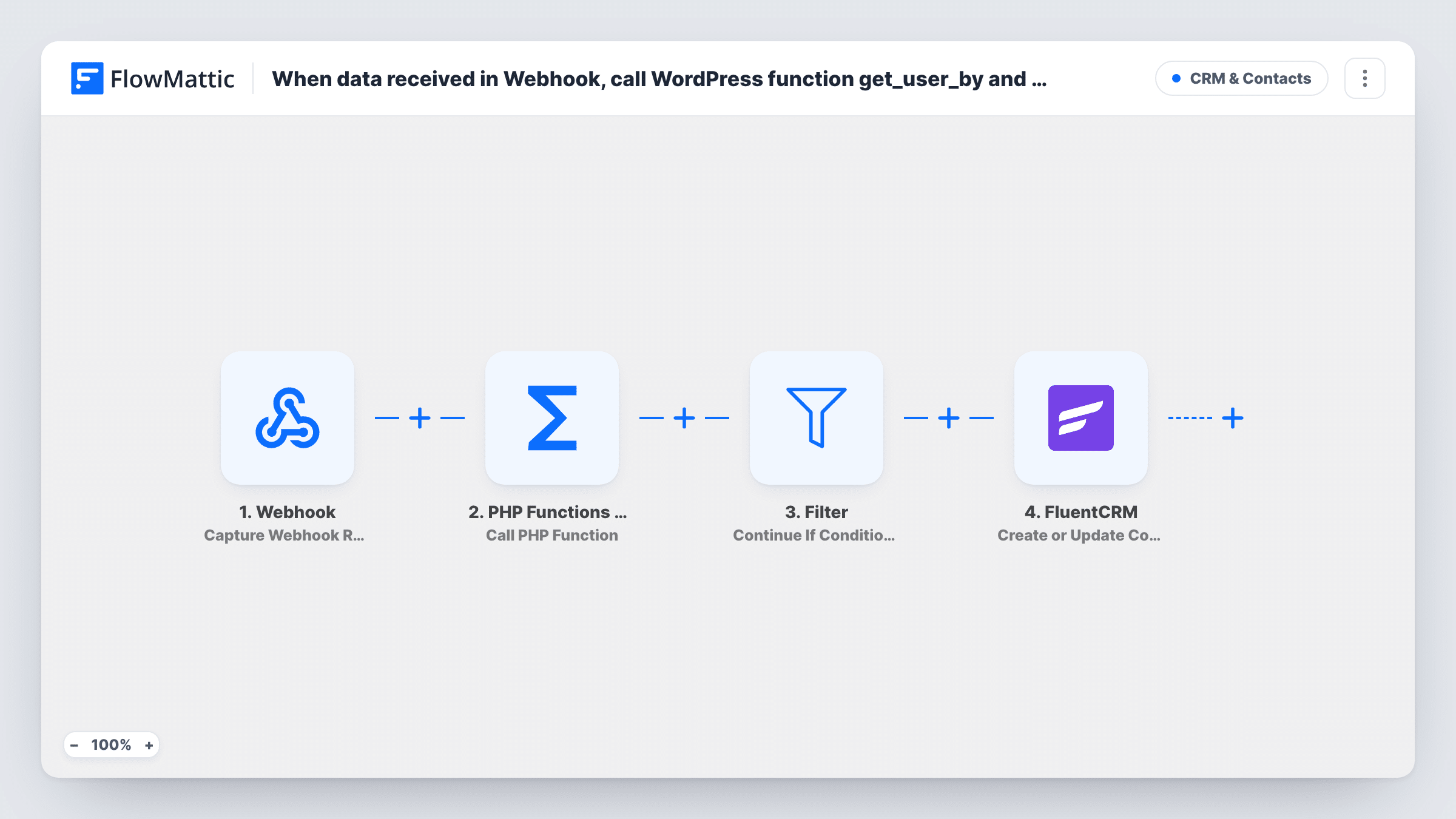
When data received in Webhook, call WordPress function get_user_by and pass parameters "by => email" and "email => email_id" to get user details, then check if check if the user exists, and create a new contact in FluentCRM
Data posted to a FlowMattic webhook is used to look up a WordPress user by email with get_user_by, a Filter checks that the user was found, and the person is then created or updated as a FluentCRM contact.
 Webhook
 PHP Functions by FlowMattic
 Filter
 FluentCRM
4 steps Setup ~8 min Used on 3.0k sites Free to import
What this workflow does
Sometimes another system sends you an email address and you only want it in FluentCRM when that person already has an account on your WordPress site. A plain webhook-to-CRM flow can't tell the difference. This workflow asks WordPress first, using its own get_user_by function, and only goes on to FluentCRM when a user comes back.
The Webhook trigger gives you a URL that receives data from any app or script. The PHP Functions step then calls get_user_by with the email from that payload. Next, a Filter decides whether the run continues. Last, FluentCRM creates a contact, or updates the one that already uses that email address.
Know one thing first: the template arrives unconfigured. The PHP step has no function or parameters set, and the Filter has no condition. As imported, the empty Filter stops every run, so no contact is created until you fill in both steps and add a condition that the user lookup returned a result.
Sync only registered members from an outside form
An external sign-up tool posts every lead to your webhook. Only those whose email belongs to a WordPress account become FluentCRM contacts, so your member list stays separate from cold leads.
Course platform sends student emails
A course or event system posts attendee emails to the webhook. Attendees who already have a site account are added to FluentCRM for member updates.
Back-office script checks site accounts
A script you run against your order database posts each email to the webhook, and FluentCRM ends up holding the ones that match a registered WordPress user.
How this workflow runs
What happens at each step once the workflow is on, and what you need before you import it.
 Webhook Capture Webhook Response
Gives you a webhook URL that starts a run whenever data is posted to it. Send a sample payload with an email field after import so FlowMattic can capture the fields for mapping.
- PHP Functions by FlowMattic Call PHP Function
Calls a PHP function on your WordPress site and passes it data from the workflow. The template leaves this step empty; set it to call get_user_by with the email from the webhook, then confirm the returned user data with a test run.
- Filter Continue If Condition Meet
Continues the run only when its condition is met. It ships with no condition, which stops every run here. Add a rule that the get_user_by result is not empty, so only emails with a WordPress account continue.
- FluentCRM Create or Update Contact
Creates a contact in FluentCRM, or updates the contact that already has the same email address. Map the email from the webhook, plus any name or user data the lookup returned.
What you need
- FlowMatticCore
- FluentCRM PluginPlugin
After importing, map your own data. To keep the template universal, not every step is pre-filled. Open each step in the builder and connect your accounts and fields (channels, lists, sheets, recipients) before you switch the workflow on.
Make it yours
Changes worth making after you import it.
- Turn on "Require authentication on incoming requests" in the Webhook trigger and have the sender include the key, so only your own systems can start a run.
- After you set the PHP step, post one email that belongs to a site user and one that doesn't. Task History then shows what get_user_by returned for each, which tells you what to check in the Filter.
- Add a FluentCRM step after Create or Update Contact that adds a tag such as Site Member, so these contacts are easy to find later.
Questions about this workflow
Why does nothing reach FluentCRM after I import it?
The Filter ships with no condition, and an empty Filter stops every run. Set the PHP step to call get_user_by, then give the Filter a condition on its result before you turn the workflow on.
What happens if the webhook email already has a FluentCRM contact?
The Create or Update Contact action matches by email, so that contact is updated instead of a second one being created.
Can anyone with the webhook URL start this workflow?
Yes, unless authentication is on. Use the Webhook trigger's "Require authentication on incoming requests" setting so only callers with the key can post data.
Does the workflow create WordPress users for unknown emails?
No. It only looks users up. Emails with no WordPress account stop at the Filter once you set its condition, and no user or contact is created for them.
More CRM & Contacts workflows
Other ready-to-import templates from the same category.





Import this workflow into your WordPress site
Download the JSON, import it from the Workflows screen and connect your accounts. Every run stays on your server, with no per-task fees.
30-day money-back guarantee Unlimited workflows and runs Self-hosted