

When a Fluent Forms submission is received, make a Listnr audio welcome and send it on WhatsApp
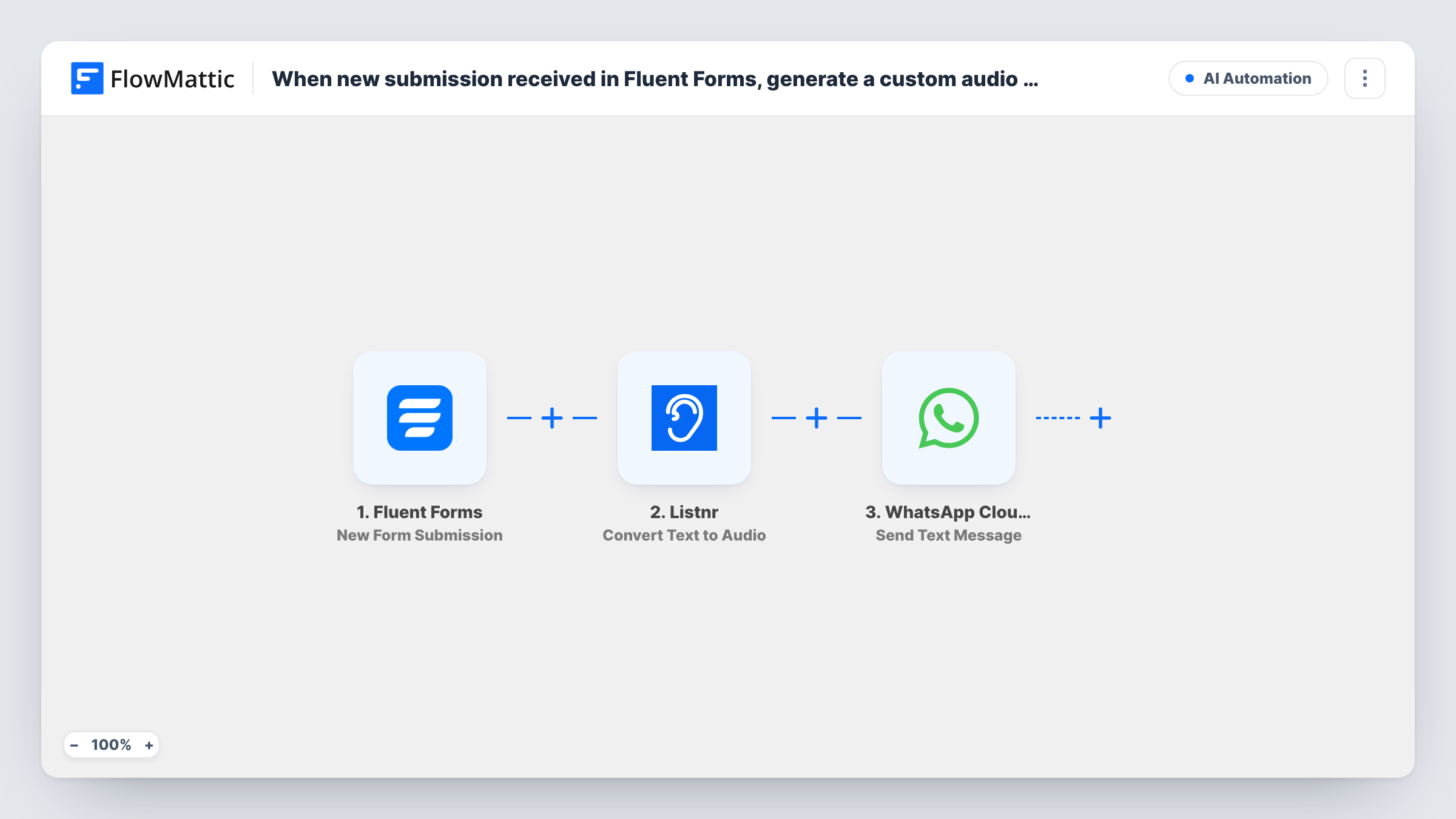
Each new Fluent Forms submission becomes a short spoken welcome: Listnr converts your message text to audio, and WhatsApp Cloud API sends the audio file to the person’s phone as a document message.
 Fluent Forms
 Listnr
 WhatsApp Cloud API
3 steps Setup ~5 min Used on 781 sites Free to import
What this workflow does
A spoken welcome feels more personal than another confirmation email, and it reaches people on the app they already check. This workflow writes one for each person who fills in your form, using their name in the text, and delivers it over WhatsApp.
The Fluent Forms trigger fires when a form receives a new submission. The answers, such as the person's name and phone number, are passed on. The Listnr step then converts text to audio. It ships unmapped: after import you write the welcome text, mapping in the name or other answers, and set up the rest of the step, then run a test to see the audio link Listnr returns.
The last step uses WhatsApp Cloud API to send a document message. Map the phone number from the form and the audio link from Listnr into it. WhatsApp decides which file types it accepts as documents, so send a test to your own phone and check that the audio arrives and plays.
There is a bigger limit too. WhatsApp only delivers free-form messages like this one within 24 hours of the person writing to your business number, and most people who fill in a form never have. As imported, many new submitters won't receive the audio. To reach them, switch to an approved message with Send Template Message, or ask people to message you first.
Welcome note for chat-first customers
A salon's booking form asks clients to message its WhatsApp number first, then sends each one a spoken welcome with their name and what to expect.
Audio confirmation for event sign-ups
A community event collects registrations with Fluent Forms and sends registrants who have already chatted with the organiser an audio message confirming their place.
Spoken onboarding for a coaching programme
A coach whose clients start by messaging on WhatsApp has the intake form trigger a short recorded-style welcome explaining the first session.
How this workflow runs
What happens at each step once the workflow is on, and what you need before you import it.
 Fluent Forms New Form Submission
Fires when your selected Fluent Forms form receives a new submission. The answers, including the name and phone number fields you add to the form, are passed to the next steps.
- Listnr Convert Text to Audio
Converts the text you write into audio with Listnr. Nothing is filled in yet, so write the welcome, mapping in the person's name from the form, then check a test run for the audio link it returns.
- WhatsApp Cloud API Send Document Message
Sends the Listnr audio to the person's WhatsApp number as a document message. Both the phone number from the form and the audio link from the Listnr step still need mapping.
What you need
- FlowMatticCore
- Fluent Forms PluginPlugin
- Listnr AccountAccount
- WhatsApp Cloud API AccountAccount
After importing, map your own data. To keep the template universal, not every step is pre-filled. Open each step in the builder and connect your accounts and fields (channels, lists, sheets, recipients) before you switch the workflow on.
Make it yours
Changes worth making after you import it.
- Collect phone numbers with the country code on the form, because WhatsApp needs the full international number to deliver the message.
- Ask people on the form's thank-you message to say hello on WhatsApp, and put a Delay between the Fluent Forms trigger and the Listnr step so they have time to write first.
- Put a Filter between the Fluent Forms trigger and the Listnr step that continues only when the phone field is not empty, so entries without a number don't use a Listnr conversion.
Questions about this workflow
Will every Fluent Forms submitter get the WhatsApp audio?
No. WhatsApp only delivers a free-form document like this inside the 24-hour window after the person messaged your business number. People who haven't usually won't receive it, so check the response in Task History.
Is the welcome sent as a WhatsApp voice note?
No. The template uses Send Document Message, so the audio arrives as a file attachment rather than a voice note. Test it on your own phone to see how it looks.
Who writes the text that Listnr turns into audio?
You do, in the Convert Text to Audio step after import. Map form answers such as the first name into it so each welcome is personal.
Do I need a Listnr account and WhatsApp Cloud API set up first?
Yes. Both steps use your own accounts: connect Listnr for the audio, and a WhatsApp Business number on WhatsApp Cloud API for sending.
More AI Automation workflows
Other ready-to-import templates from the same category.







Import this workflow into your WordPress site
Download the JSON, import it from the Workflows screen and connect your accounts. Every run stays on your server, with no per-task fees.
30-day money-back guarantee Unlimited workflows and runs Self-hosted