

Turn a Fluent Forms submission into OpenAI content, Listnr audio and a WhatsApp file
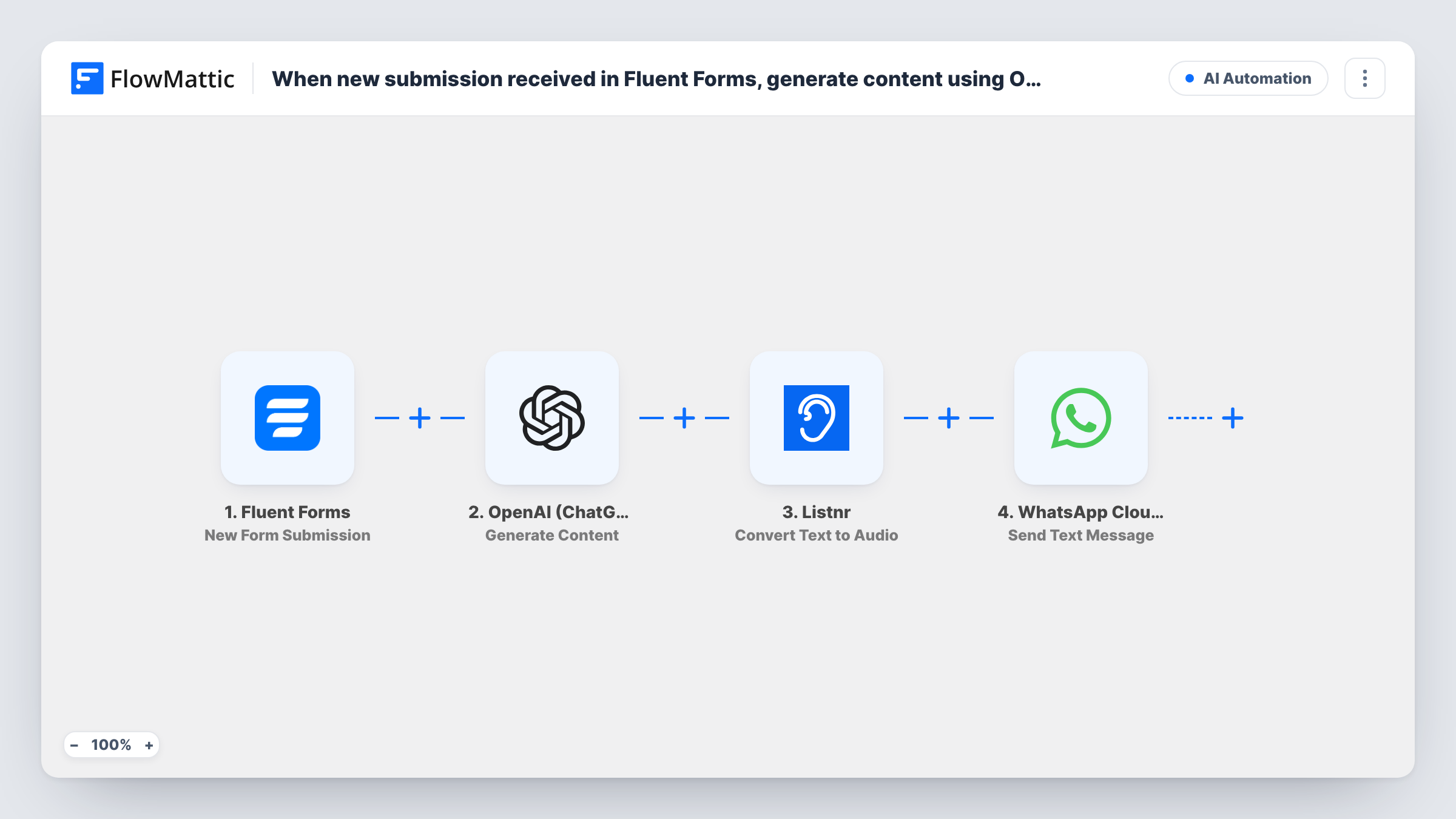
A Fluent Forms submission is turned into text by OpenAI, Listnr reads that text aloud as an audio file, and WhatsApp Cloud API sends the file to the person as a document message.
 Fluent Forms
 OpenAI (ChatGPT)
 Listnr
 WhatsApp Cloud API
4 steps Setup ~8 min Used on 1.8k sites Free to import
What this workflow does
Some answers are easier to listen to than to read: a personal tip sheet, a short lesson or a summary of what someone asked for. This workflow takes what a visitor types into your form, has AI write a reply, turns that reply into speech and sends the recording to their phone.
The Fluent Forms trigger starts a run for each new submission and passes every answer on. The OpenAI Generate Content step writes text from a prompt, and the Listnr Convert Text to Audio step converts that text to audio. Both ship unmapped: after import you write the OpenAI prompt with the form answers mapped in, then map OpenAI's result into the Listnr step.
The last step uses WhatsApp Cloud API Send Document Message to deliver the audio as a file. Map the phone number from the form and the audio link from the Listnr step; run a test to see what Listnr returns.
WhatsApp only delivers a document like this within 24 hours of the person last messaging your business number. Most people filling in a website form haven't, so they won't receive it unless they messaged you first. Task History shows what OpenAI wrote, what Listnr returned and WhatsApp's reply for every submission.
Audio coaching tips
A fitness coach's intake form asks about goals, and members who chat with the coach on WhatsApp get a short spoken plan to listen to on a walk.
Listen-later answers for a support chat
A software vendor's WhatsApp users fill in a question form from a chat link and get an AI-written walkthrough as audio in the same thread.
Spoken summaries for language learners
A tutor's students submit a topic, and the reply arrives as an audio file in the target language that they can replay for listening practice.
How this workflow runs
What happens at each step once the workflow is on, and what you need before you import it.
 Fluent Forms New Form Submission
Starts a run for each new Fluent Forms submission on the form you pick. Its answers reach the next steps; the form needs a phone field for the WhatsApp step.
- OpenAI (ChatGPT) Generate Content
Generates text with OpenAI from a prompt you write after import. Map the form answers into the prompt so the content fits each person.
- Listnr Convert Text to Audio
Converts the OpenAI text into audio with Listnr. The step ships unmapped, so map the content from step 2, then check a test run for the audio link it returns.
- WhatsApp Cloud API Send Document Message
Sends the audio to the person as a WhatsApp document. Map the form's phone number with country code and the Listnr audio link; WhatsApp only delivers it inside the 24-hour customer window.
What you need
- FlowMatticCore
- Fluent Forms PluginPlugin
- OpenAI (ChatGPT) AccountAccount
- Listnr AccountAccount
- WhatsApp Cloud API AccountAccount
After importing, map your own data. To keep the template universal, not every step is pre-filled. Open each step in the builder and connect your accounts and fields (channels, lists, sheets, recipients) before you switch the workflow on.
Make it yours
Changes worth making after you import it.
- Put a link on your form page that opens a WhatsApp chat with your business number, and ask people to send a message before they submit, so the 24-hour window is open.
- Ask OpenAI for a short answer in your prompt, for example under 200 words, so the recording stays short enough to play in one sitting.
- For people outside the 24-hour window, add a Send Template Message step with an approved WhatsApp template before the document step. Test whether your template and the document both arrive.
Questions about this workflow
Will everyone who fills in the Fluent Forms form receive the WhatsApp audio?
No. WhatsApp only delivers a document message to someone who messaged your business number in the last 24 hours. Other submitters get nothing, and Task History shows WhatsApp's response.
Do I need accounts with OpenAI, Listnr and WhatsApp Cloud API?
Yes. Each step connects to its own account: OpenAI writes the text, Listnr creates the audio, and your WhatsApp Cloud API business number sends the file.
Why is the audio sent as a document and not a voice note?
FlowMattic's WhatsApp Cloud API integration has Send Document, Image and Video Message actions and no audio action, so the file goes out as a document the person can open and play.
Can I check the AI text before it is sent?
Not as imported. To review it first, add a Human in the Loop step between OpenAI and Listnr and set its timeout action to End Workflow, so nothing is sent without approval.
More AI Automation workflows
Other ready-to-import templates from the same category.








Import this workflow into your WordPress site
Download the JSON, import it from the Workflows screen and connect your accounts. Every run stays on your server, with no per-task fees.
30-day money-back guarantee Unlimited workflows and runs Self-hosted