

When tracking email opened in Groundhogg, get the contact details, and send WhatsApp template message
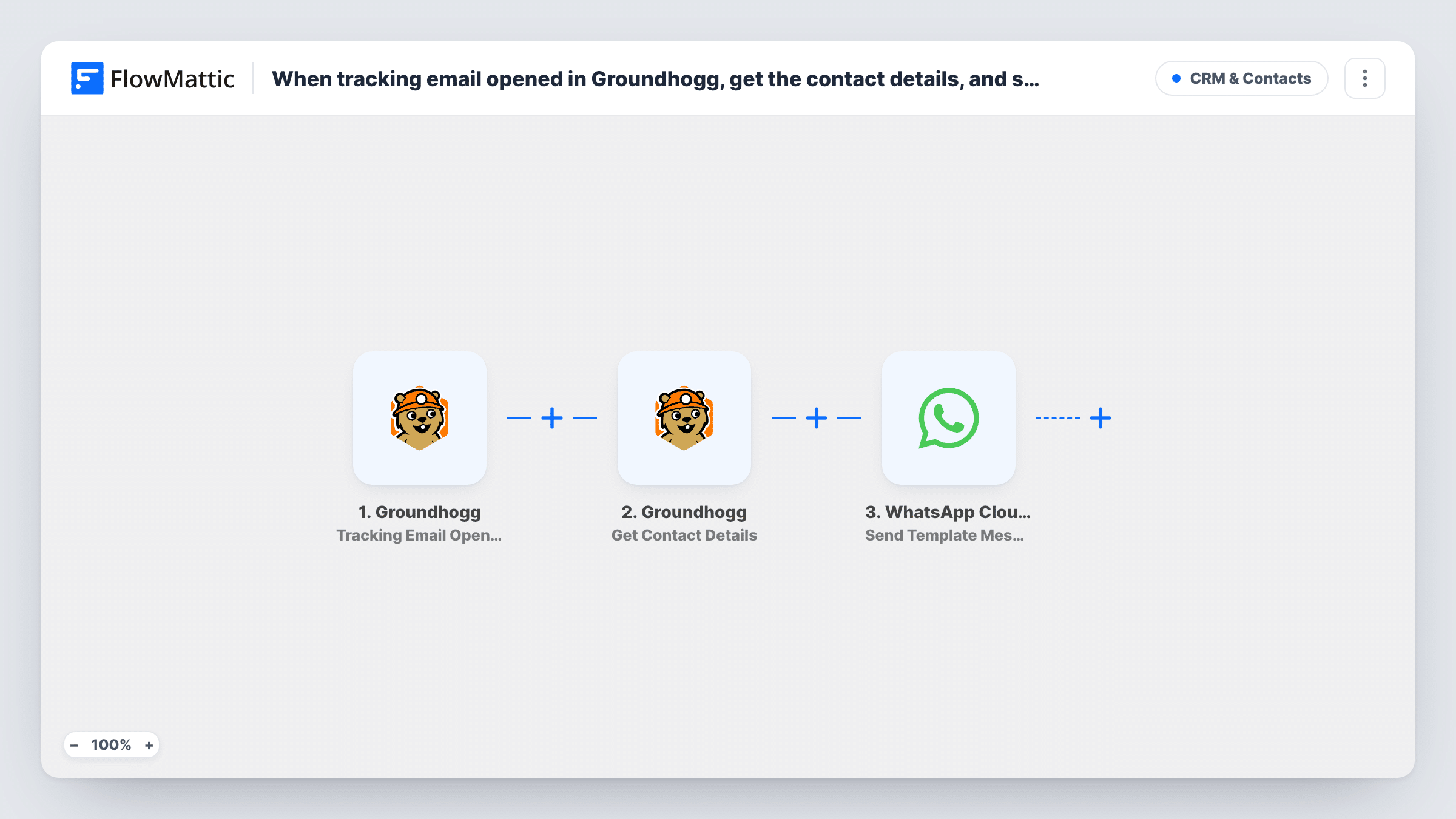
When a contact opens a tracked Groundhogg email, FlowMattic fetches that contact’s details from Groundhogg and then sends them an approved WhatsApp template message through WhatsApp Cloud API.
 Groundhogg
 WhatsApp Cloud API
3 steps Setup ~5 min Used on 619 sites Free to import
What this workflow does
An email open is a sign someone is paying attention right now. This workflow follows up on that moment in a second channel: as soon as Groundhogg records the open, the contact gets a WhatsApp template from your business, such as a reminder, an offer or a booking link.
The Groundhogg trigger fires when an email with tracking is opened. The open event identifies the contact, but it isn't where their phone number lives, so the next step looks them up.
The Groundhogg Get Contact Details step retrieves the contact's record, with the contact ID already mapped from the open event. That gives you their name, email, phone and other saved fields to use next.
The final step sends an approved template through WhatsApp Cloud API. It ships unmapped: pick your template, map the phone number from the contact details and fill any template variables, such as the first name. Every tracked open starts a run, including opens of different emails by the same person, so think about how often you want a contact to hear from you on WhatsApp.
Webinar reminder after the invite is opened
A coach sends a webinar invitation through Groundhogg, and contacts who open it get a WhatsApp template with the joining link.
Offer follow-up for a local shop
A store emails a weekend discount, and anyone who opens it gets a short WhatsApp template with the code and opening hours.
Appointment nudge for a clinic
A dental clinic emails recall notices, and patients who open one receive a WhatsApp template inviting them to book a check-up.
How this workflow runs
What happens at each step once the workflow is on, and what you need before you import it.
 Groundhogg Tracking Email Opened
Fires when a contact opens a Groundhogg email that has tracking. The event includes the contact ID, which the next step uses to look the contact up.
- Groundhogg Get Contact Details
Retrieves the contact's full Groundhogg record, using the contact ID from the open event. The phone number and name it returns are what the WhatsApp step needs.
- WhatsApp Cloud API Send Template Message
Sends an approved WhatsApp template to the contact. Choose the template, map the phone number from the contact details and set any variables after import.
What you need
- FlowMatticCore
- Groundhogg PluginPlugin
- WhatsApp Cloud API AccountAccount
After importing, map your own data. To keep the template universal, not every step is pre-filled. Open each step in the builder and connect your accounts and fields (channels, lists, sheets, recipients) before you switch the workflow on.
Make it yours
Changes worth making after you import it.
- To follow up on one campaign only, put a Filter between the Groundhogg trigger and the Get Contact Details step on a value that identifies that email, such as its ID or subject if the open event sends one. Check a test run first.
- Add a Filter between the Get Contact Details step and the WhatsApp step that continues only when the phone field is not empty, so contacts without a number stop before the send.
- Store phone numbers in Groundhogg with the country code, since WhatsApp needs the full international number.
Questions about this workflow
Why does this workflow look up the Groundhogg contact first?
The email-opened event identifies the contact by ID. Get Contact Details turns that ID into the full record, including the phone number the WhatsApp step sends to.
Will a contact get a WhatsApp message for every Groundhogg email they open?
As imported, every tracked open starts a run. To limit it to one email or campaign, add a Filter between the Groundhogg trigger and Get Contact Details.
Do I need an approved WhatsApp template?
Yes. The step sends template messages, which WhatsApp must approve for your business account first. Templates are also the message type that can reach contacts who haven't written to you recently.
More CRM & Contacts workflows
Other ready-to-import templates from the same category.






Import this workflow into your WordPress site
Download the JSON, import it from the Workflows screen and connect your accounts. Every run stays on your server, with no per-task fees.
30-day money-back guarantee Unlimited workflows and runs Self-hosted