

Score leads with AI and route hot ones into your CRM
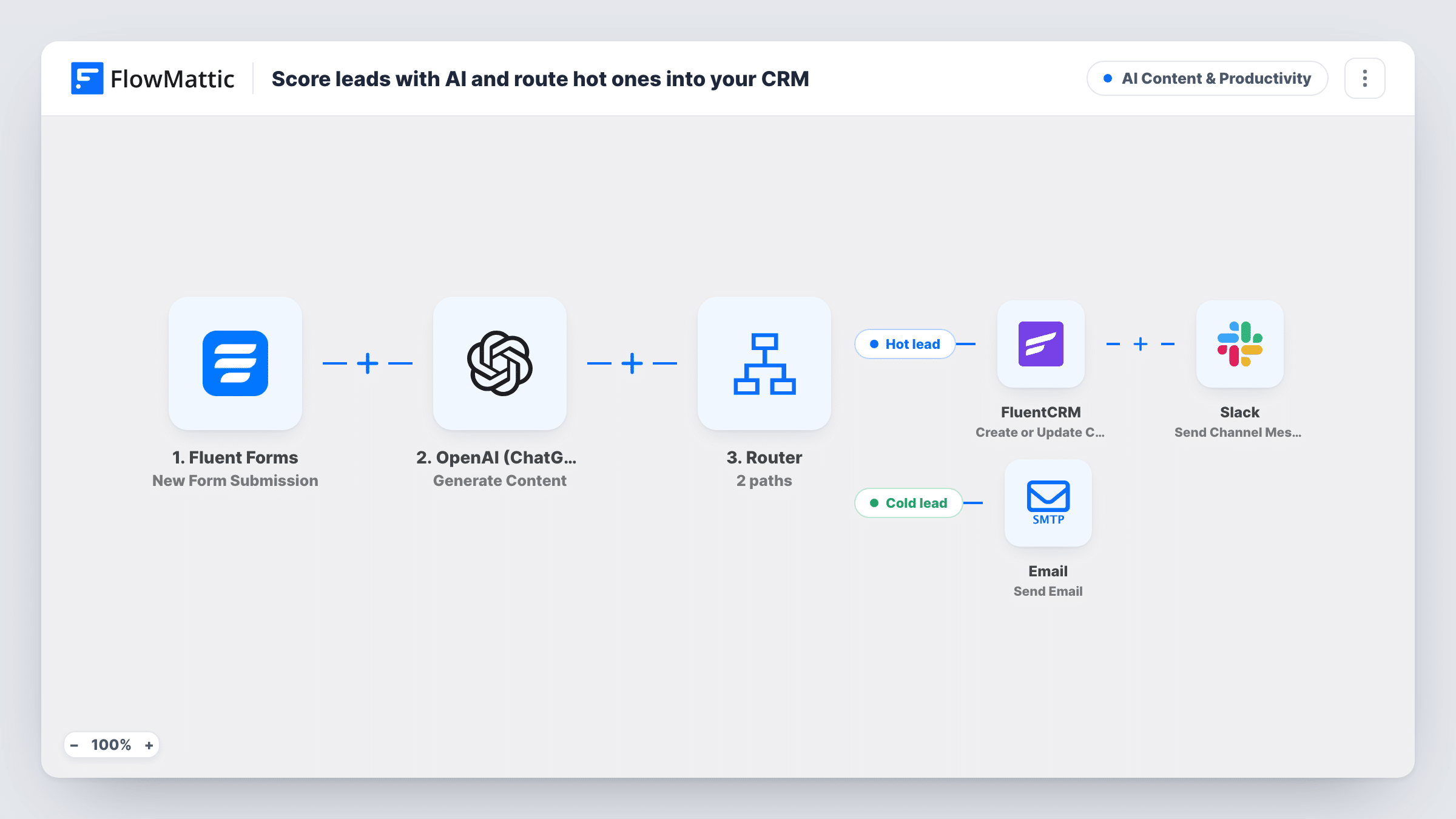
OpenAI reads each Fluent Forms lead’s message and budget and answers HOT or COLD. Hot leads are saved to FluentCRM and posted to Slack; cold leads are sent to your team by email instead.
 Fluent Forms
 OpenAI (ChatGPT)
 Router
 FluentCRM
 Slack
 Email
6 steps Setup ~12 min Used on 963 sites Content Ops Free to import
What this workflow does
Not every enquiry deserves an immediate sales call, but someone still has to read each one to decide. This workflow lets OpenAI make that first call from what the lead wrote and the budget they gave, so the leads it rates as hot reach your CRM and your team's Slack right away.
Every enquiry sent through your Fluent Forms form starts a run. The OpenAI Generate Content step sends the form's message and budget fields to GPT-4o and asks for exactly one word, HOT or COLD, based on intent and budget.
A Router then checks the reply. One route runs when it contains HOT, the other when it contains COLD, in any mix of capitals. A one-word reply can't contain both, so each lead follows one route. Hot leads are created or updated in FluentCRM by email, with the name field as the first name, and Slack gets a message with the lead's name and company. Cold leads aren't added anywhere: FlowMattic's Email module sends their name and email to [email protected], an address you replace with your own.
A lower-case answer is fine, since capitals are ignored. A longer sentence is the risk: hot also sits inside words like though or photo, so a reply that explains itself could run both routes. Test with a few sample enquiries and read the replies in Task History before you rely on it.
Agency enquiry form
A design agency's sales lead sees promising project enquiries in Slack within minutes, while small requests arrive as an email to review later.
B2B demo requests
A software company adds only the demo requests OpenAI rates hot to FluentCRM, so its pipeline holds only the leads rated hot.
Consultant intake
A freelance consultant reads cold enquiries in a shared inbox once a week and replies to hot ones the same day from the Slack alert.
How this workflow runs
What happens at each step once the workflow is on, and what you need before you import it.
 Fluent Forms New Form Submission
Starts each time a Fluent Forms enquiry is submitted. The message, budget, name, company and email fields are used by the later steps.
- OpenAI (ChatGPT) Generate Content
Asks OpenAI's GPT-4o to rate the lead from its message and budget and reply with exactly one word, HOT or COLD.
- Router 2 paths
Has two routes: Hot lead runs when OpenAI's reply contains HOT, Cold lead when it contains COLD. Capitals don't matter, so hot or Hot takes the Hot lead route too.
- FluentCRM Create or Update Contact
On the Hot lead route, creates the lead as a FluentCRM contact, or updates the contact with the same email, using the name field as the first name.
- Slack Send Channel Message
Still on the Hot lead route, posts a Slack message with the lead's name and company. Pick the channel your sales team reads when you connect Slack.
 Email Send Email
On the Cold lead route, emails [email protected] with the lead's name and email. Replace that address with the inbox your team checks.
What you need
- FlowMatticCore
- Fluent Forms PluginPlugin
- OpenAI (ChatGPT) AccountAccount
- FluentCRM PluginPlugin
- Slack AccountAccount
After importing, map your own data. To keep the template universal, not every step is pre-filled. Open each step in the builder and connect your accounts and fields (channels, lists, sheets, recipients) before you switch the workflow on.
Make it yours
Changes worth making after you import it.
- Spell out in the OpenAI prompt what makes a lead hot for you, such as a budget above a figure or a start date this quarter, so the rating follows your own rules.
- Add FluentCRM's Create or Update Contact on the Cold lead route too, before its email step, if you want every lead in the CRM with a tag that marks it cold.
- Add the lead's email to the Slack message, so whoever picks up a hot lead can reply without opening FluentCRM.
- Lower the OpenAI step's max tokens, since the reply only needs to be one word.
Questions about this workflow
Are cold leads saved in FluentCRM?
No. Only the Hot lead route creates or updates a FluentCRM contact. Cold leads are emailed to the address in the last step and nowhere else.
What if OpenAI answers with something other than HOT or COLD?
Neither route runs, so the lead isn't saved, posted or emailed. Capital letters aren't the cause, since the check ignores them, so read the replies in Task History and make the prompt stricter if that happens.
Which Fluent Forms fields does the AI lead scoring use?
The prompt reads fields named message and budget. The later steps use name, company and email. Remap them in each step if your form uses other field names.
Can a hot lead already in FluentCRM be duplicated?
No. Create or Update Contact matches by email, so a returning lead updates their existing contact instead of creating a second one.
More AI Content & Productivity workflows
Other ready-to-import templates from the same category.






Import this workflow into your WordPress site
Download the JSON, import it from the Workflows screen and connect your accounts. Every run stays on your server, with no per-task fees.
30-day money-back guarantee Unlimited workflows and runs Self-hosted