

Send every Contact Form 7 enquiry back as a PDF copy
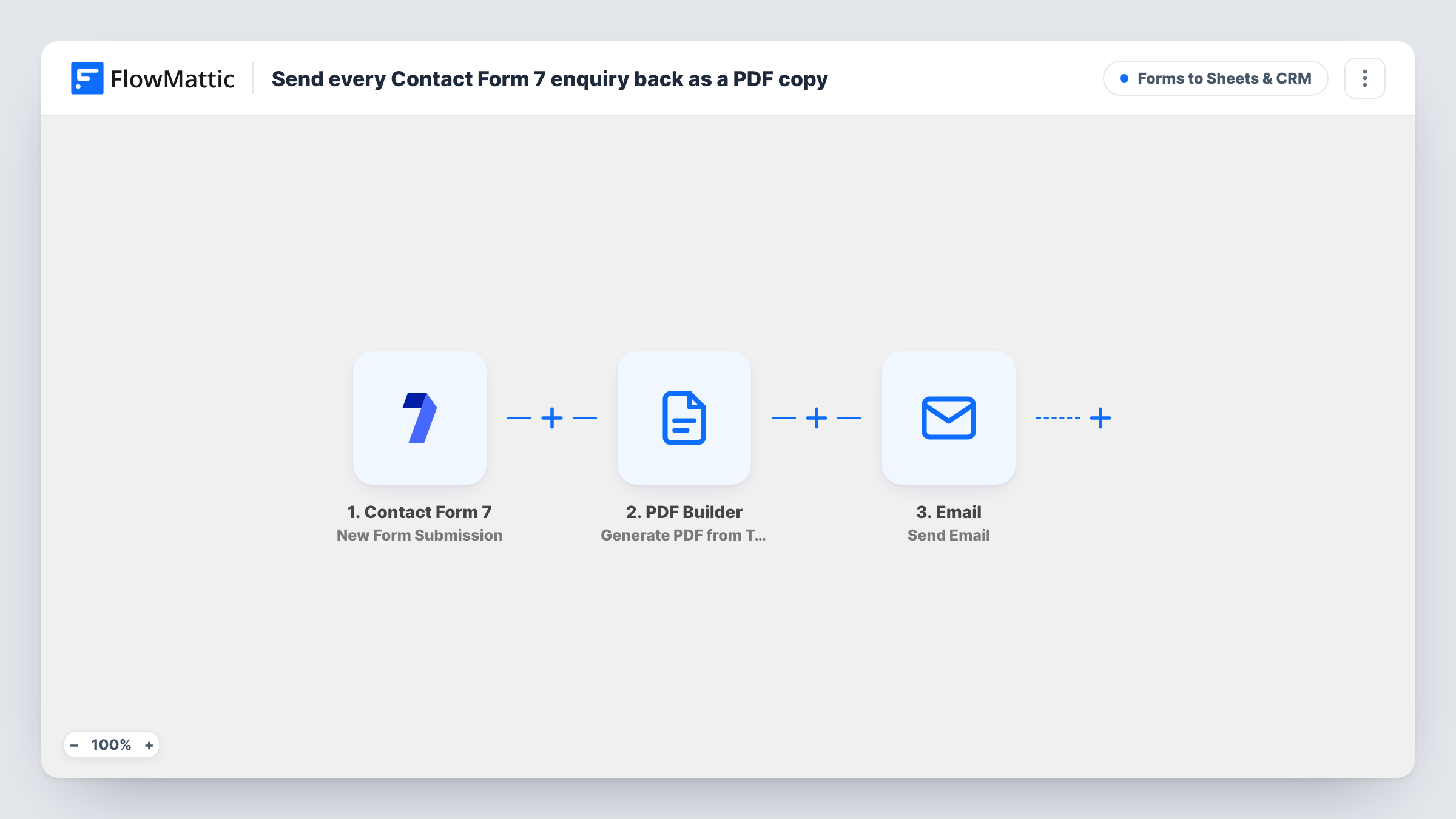
Each Contact Form 7 enquiry is rendered into a PDF from your PDF Builder template, and the sender receives an email with a link to that PDF as a copy of what they submitted.
 Contact Form 7
 PDF Builder
 Email
3 steps Setup ~5 min Used on 987 sites Lead Capture Free to import
What this workflow does
Contact Form 7 doesn't give the person who wrote to you any record of their message. For quotes, complaints or applications, a copy they can keep is useful to both sides. This workflow turns each enquiry into a tidy PDF and emails it back to the sender.
The Contact Form 7 trigger fires for every submission. PDF Builder then renders a PDF from a saved template, using the form data you map into it, and saves it to the Media Library with the sender's name in the file name. The Email step writes to the address on the form, with their name in the subject and a link to the PDF in the body.
Two things to set after import. The PDF Builder step points at template 12, an ID from the author's site, so pick your own. And the trigger fields are read as name and email, while a default Contact Form 7 form uses your-name and your-email, so rename your tags or remap both steps. The PDF is a Media Library file, so anyone with the link can open it.
Quote requests with a written record
A builder's website takes job descriptions through Contact Form 7. Each customer gets back a PDF of the job they described, which both sides can refer to later.
Formal complaints
A service business sends people a dated PDF copy of the complaint they filed, so there is no doubt about what was reported.
Applications and registrations
Applicants for a course or programme receive a PDF of their submitted answers to keep with their own paperwork.
How this workflow runs
What happens at each step once the workflow is on, and what you need before you import it.
 Contact Form 7 New Form Submission
Runs for every Contact Form 7 submission on your site. The template reads the sender's fields as name and email, so match your form tags or remap them.
- PDF Builder Generate PDF from Template
Renders a PDF from your saved PDF Builder template with the submitted answers mapped in, and stores it in the Media Library as enquiry- plus the sender's name. Replace the shipped template ID 12 with yours.
 Email Send Email
Emails the sender at the address they entered, with their name in the subject and the PDF's link in the message. It uses WordPress mail or an SMTP account you add to the step.
What you need
- FlowMatticCore
- Contact Form 7 PluginPlugin
After importing, map your own data. To keep the template universal, not every step is pre-filled. Open each step in the builder and connect your accounts and fields (channels, lists, sheets, recipients) before you switch the workflow on.
Make it yours
Changes worth making after you import it.
- Attach the PDF instead of linking to it. FlowMattic's Email step can attach files stored on your WordPress site, and PDF Builder has already saved the file to the Media Library.
- Make the email field required in the form with an email* tag, so every enquiry has an address to send the copy to.
- Add a second Email step addressed to your team with the same PDF link, so staff get the formatted copy alongside the plain Contact Form 7 notification.
Questions about this workflow
Is the PDF attached to the email or linked?
Linked, as imported. The message points the sender to the enquiry PDF's address in your Media Library. You can switch to an attachment in the Email step, since it can attach files stored on your site.
Can other people open the enquiry PDFs?
The file is saved in your Media Library, so anyone who has its URL can open it. If enquiries hold sensitive details, attach the file and consider how long you keep it.
What PDF Builder template does the enquiry copy use?
Yes. The step refers to template 12 from the author's site. Build a template for your enquiry layout in PDF Builder, select it, and map the Contact Form 7 fields into it.
Will I still get Contact Form 7's usual email about the enquiry?
Yes. The workflow runs alongside your form's mail settings and does not change them, so you keep receiving the usual notification email.
More Forms to Sheets & CRM workflows
Other ready-to-import templates from the same category.





Import this workflow into your WordPress site
Download the JSON, import it from the Workflows screen and connect your accounts. Every run stays on your server, with no per-task fees.
30-day money-back guarantee Unlimited workflows and runs Self-hosted