

Thank customers on subscription renewal and log it to Google Sheets
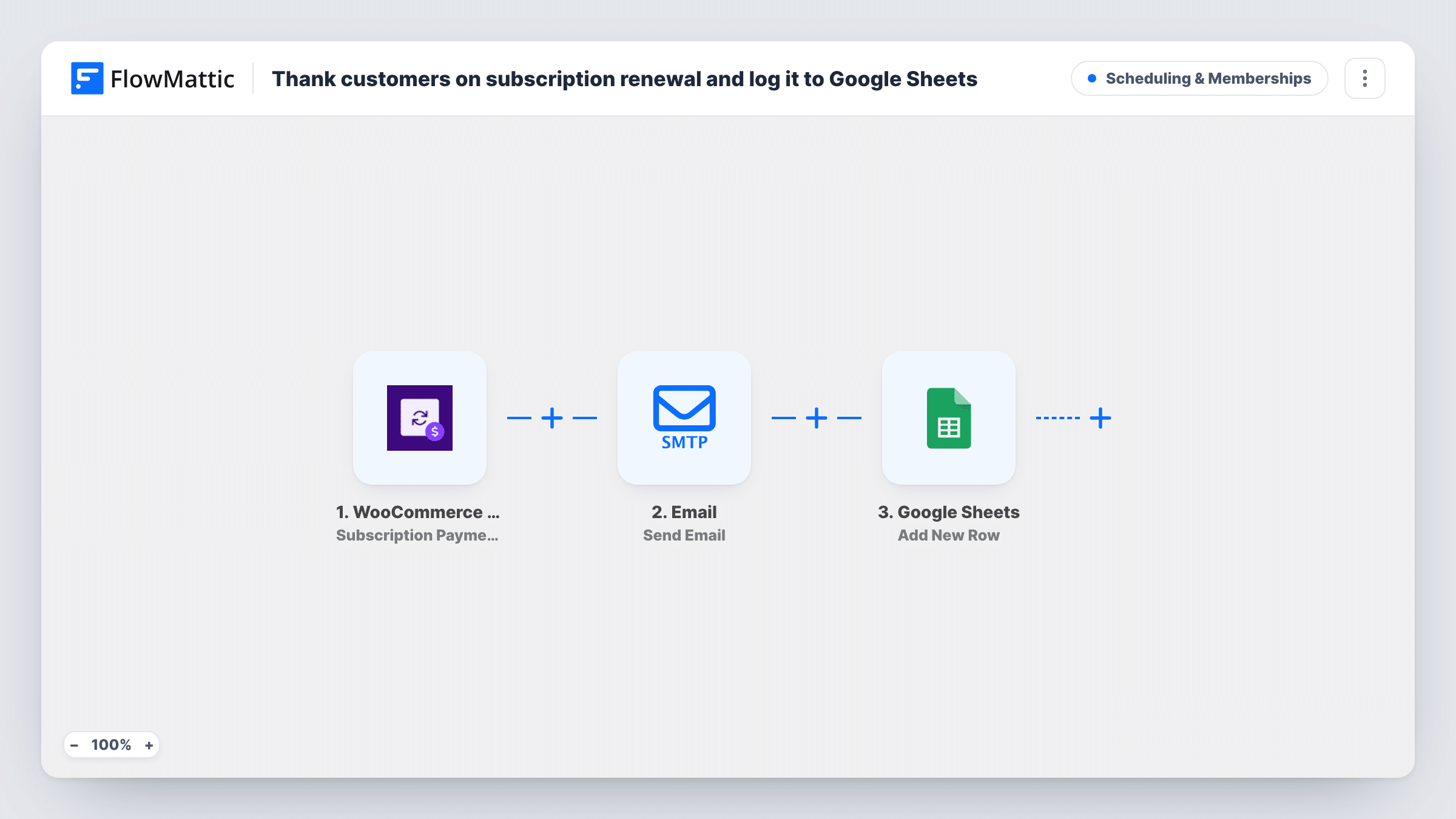
Each time a WooCommerce Subscriptions payment completes, the customer receives a short thank-you email for renewing and the payment is added as a new row in Google Sheets for your records.
 WooCommerce Subscriptions
 Email
Email
 Google Sheets
3 steps Setup ~5 min Used on 673 sites Community Free to import
What this workflow does
Renewals happen quietly. The money arrives, but the customer hears nothing from you unless something goes wrong, and you only see the pattern if you dig through orders. This workflow adds a small thank-you at the moment of payment and keeps a running list you can read in a spreadsheet.
When a subscription payment completes in WooCommerce Subscriptions, FlowMattic sends an email to the customer's billing address. It has the subject Thanks for renewing, greets them by first name and says their subscription has renewed. The workflow then adds a row to Google Sheets holding whichever details from the payment you choose to map into its columns.
The email goes out through your Email (SMTP) connection, separate from the emails WooCommerce sends itself. Check one thing before you rely on it: the trigger is a completed subscription payment, so place a test sign-up and confirm whether a brand new subscriber's first payment also runs the workflow in your store.
Monthly coffee subscription
Every month a regular customer's payment goes through. They get a friendly note from you, and the sheet shows how many renewals you processed.
Membership site on annual plans
A yearly renewal is a good moment to say thanks. The spreadsheet gives you a dated list of renewing members to share with whoever handles retention.
Software licence renewals
Customers who renew a licence get a personal thank-you, and the sheet becomes a simple log your accountant can read without a WordPress login.
How this workflow runs
What happens at each step once the workflow is on, and what you need before you import it.
 WooCommerce Subscriptions Subscription Payment Complete
Runs when a subscription payment completes in WooCommerce Subscriptions. The customer's billing email, first name and payment details are passed to the next two steps.
 Email Send Email
Emails the customer at their billing address with the subject Thanks for renewing, greeting them by first name. Edit the text to sound like your brand.
- Google Sheets Add New Row
Adds a new row to the Google Sheets spreadsheet you connect. Map the trigger data you want to keep for each renewal into its columns after a test run.
What you need
- FlowMatticCore
- WooCommerce Subscriptions PluginPlugin
- Google Sheets AccountAccount
After importing, map your own data. To keep the template universal, not every step is pre-filled. Open each step in the builder and connect your accounts and fields (channels, lists, sheets, recipients) before you switch the workflow on.
Make it yours
Changes worth making after you import it.
- Add a Delay before the thank-you email, for example an hour, so it doesn't arrive in the same minute as WooCommerce's own receipt.
- Include a reason to come back in the email, such as a link to new products or a referral offer, rather than a thank-you alone.
- Send one test payment after import so FlowMattic captures what the trigger provides, then decide which of those values deserve their own column in the sheet.
Questions about this workflow
Does the thank-you also go out on a new subscriber's first payment?
The trigger fires on a completed subscription payment. Place a test sign-up after import and check Task History to see whether the first payment runs it in your store, then adjust the email wording if needed.
Will customers get two emails for each renewal?
WooCommerce Subscriptions may send its own renewal emails as well, and this workflow adds a separate thank-you. If that feels like too much, delay the thank-you or turn off the store email you don't need.
Are past subscription renewals added to the Google Sheet?
No. The workflow only records payments that complete after you turn it on, so the sheet starts from that day.
More Scheduling & Memberships workflows
Other ready-to-import templates from the same category.





Import this workflow into your WordPress site
Download the JSON, import it from the Workflows screen and connect your accounts. Every run stays on your server, with no per-task fees.
30-day money-back guarantee Unlimited workflows and runs Self-hosted