

Email a PDF invoice for every new WooCommerce order
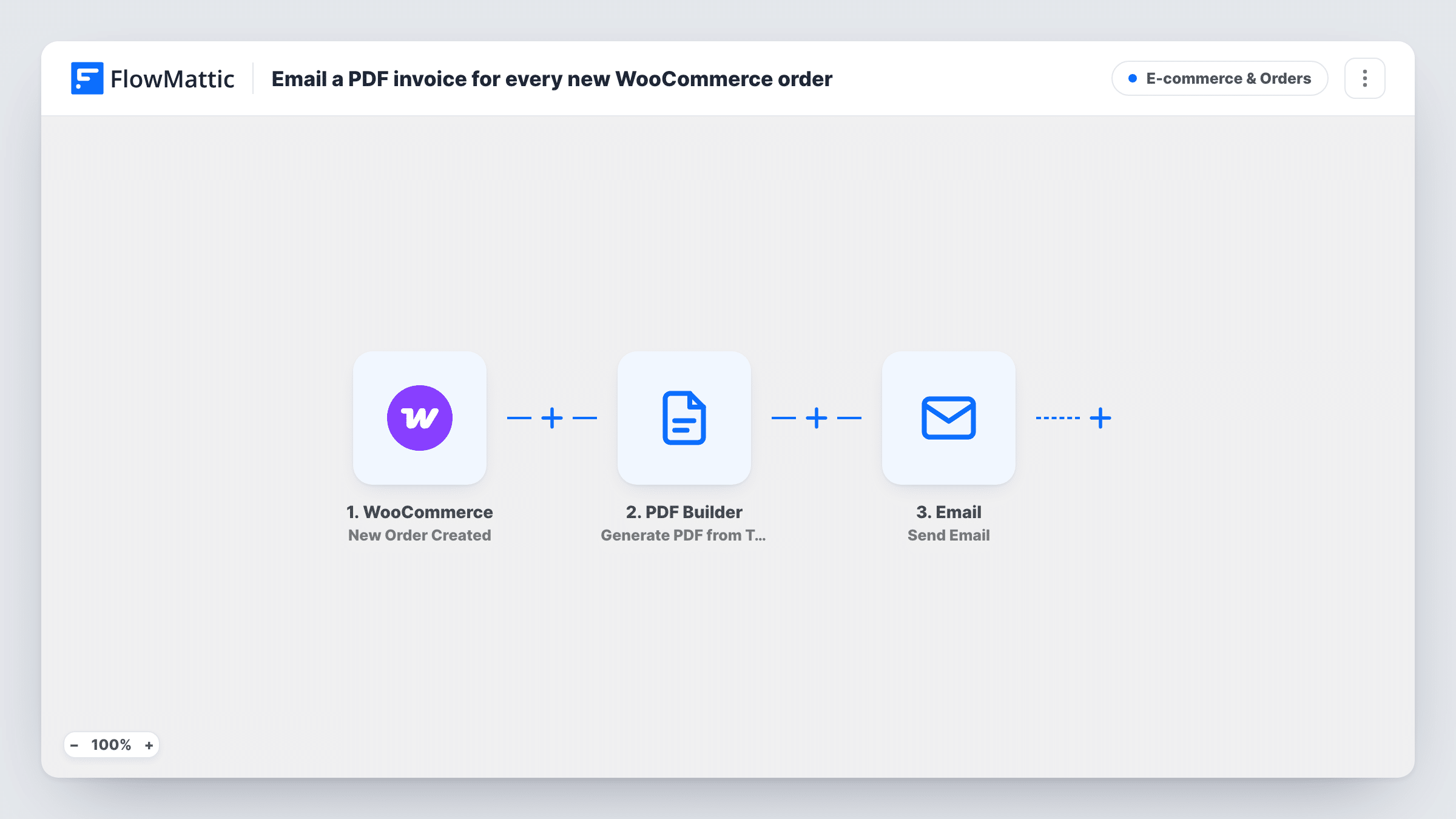
For every new WooCommerce order, this workflow renders a PDF invoice from your saved PDF Builder template and emails the buyer a link to it at their billing address.
 WooCommerce
 PDF Builder
 Email
Email3 steps Setup ~5 min Used on 3.1k sites Revenue Ops Free to import
What this workflow does
WooCommerce sends order emails, but many shops also want a proper invoice built from their own design. This workflow creates that invoice as a PDF for every new order and sends it to the customer, without a separate invoicing plugin.
Each order your shop records starts a run through the WooCommerce New Order Created trigger. The PDF Builder step takes that order's data, fills the saved PDF template you pick, and saves the result to your Media Library as invoice- followed by the order number. FlowMattic's Email step then writes to the billing email with the order number in the subject and the PDF's URL in the body.
As imported, the customer receives a link, not an attachment, even though the email text says the invoice is attached. Reword the body, or attach the file instead, since FlowMattic's Email step can attach files stored on your WordPress site. Files in the Media Library can be opened by anyone who has the URL.
B2B shop whose buyers need invoices
Business customers need an invoice for their accounts team. Each order produces one in your branded layout and lands in the buyer's inbox.
Store with a custom invoice design
You want your logo, tax details and footer on every invoice. The PDF Builder template holds the design, and the order fills in the rest.
Digital product seller
Each purchase of a course or download gets an invoice by email, so customers can claim the expense without asking you for one.
How this workflow runs
What happens at each step once the workflow is on, and what you need before you import it.
 WooCommerce New Order Created
Starts the invoice run as soon as WooCommerce records an order. The order number, billing name and billing email, plus other order data, are available to the PDF and email steps.
- PDF Builder Generate PDF from Template
Fills your saved PDF Builder template with the order's data and saves the PDF to the Media Library as invoice- plus the order number. The template ID is set to 12, so choose your own invoice template.
 Email Send Email
Emails the billing address with the subject "Your invoice for order" and the order number, greeting the customer by first name and giving the PDF's URL. It sends through WordPress mail or your SMTP account.
What you need
- FlowMatticCore
- WooCommerce PluginPlugin
After importing, map your own data. To keep the template universal, not every step is pre-filled. Open each step in the builder and connect your accounts and fields (channels, lists, sheets, recipients) before you switch the workflow on.
Make it yours
Changes worth making after you import it.
- Attach the generated PDF in the Email step instead of only linking it, and change the body so it matches what the customer receives.
- Add a Filter after the trigger on the order status the trigger sends, if invoices should go only for paid orders, such as processing or completed.
- Place a test order after import and open the PDF from the email, so you can check every template field filled from the order.
Questions about this workflow
Is the WooCommerce invoice attached to the email?
Not as imported. The email body contains the PDF's Media Library URL. Switch to attaching the file in the Email step if you want a real attachment, and update the wording.
Do I need to build the invoice template first?
Yes. The step points at template ID 12, which is only an example. Create your invoice design in PDF Builder, then select it in the Generate PDF from Template step.
Does the customer also get WooCommerce's normal order emails?
Yes. The workflow adds its own invoice email and leaves WooCommerce's email settings unchanged.
Where are the WooCommerce invoice PDFs kept?
In your WordPress Media Library, named invoice- followed by the order number. Anyone with a file's URL can open it, so keep that in mind for sensitive details.
More E-commerce & Orders workflows
Other ready-to-import templates from the same category.





Import this workflow into your WordPress site
Download the JSON, import it from the Workflows screen and connect your accounts. Every run stays on your server, with no per-task fees.
30-day money-back guarantee Unlimited workflows and runs Self-hosted