

Reward engaged readers and re-hook the quiet ones
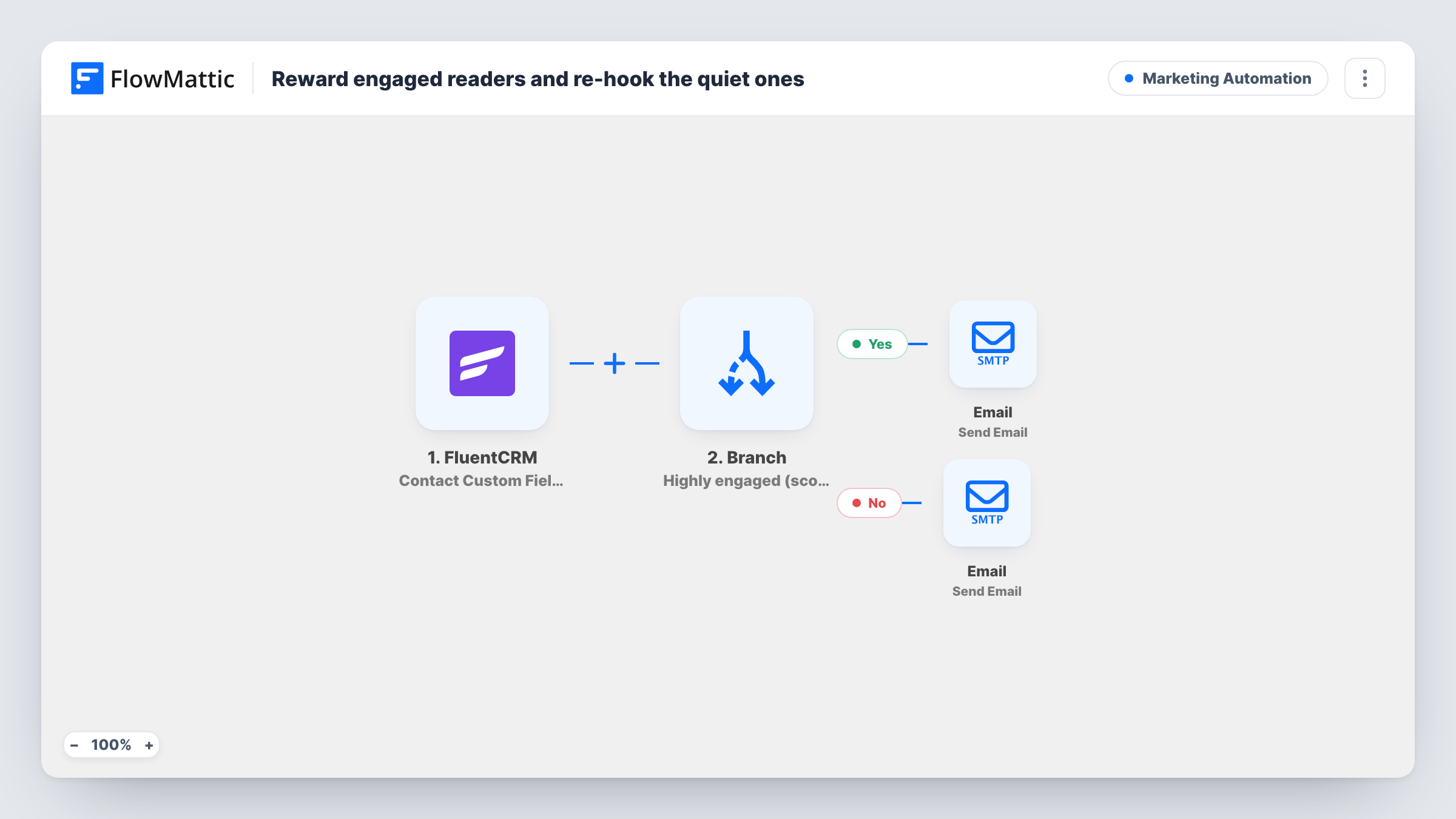
When a FluentCRM contact’s custom fields are updated, a Branch reads their engagement score. Contacts above 70 get an ambassador invite by email; everyone else gets a highlights email to win back their interest.
 FluentCRM
 Branch
 Email
Email4 steps Setup ~8 min Used on 1.7k sites Marketing Free to import
What this workflow does
Your most engaged readers are your best advocates, and your quiet ones are the people you are about to lose. Both deserve a different message from the newsletter everyone gets. If you already keep an engagement score on each FluentCRM contact, this workflow uses it to pick which of two emails to send.
The FluentCRM trigger fires on Contact Custom Fields Updated and passes the contact's email, first name and a custom field named engagement_score. A Branch checks whether the score is greater than 70. On the Yes path, the Email step invites the contact by first name to join your ambassador program. On the No path, the contact gets an email titled Here's something you might have missed, with a short highlights message.
Two things to know before you switch it on. The trigger runs whenever any custom field on a contact changes, not only the score, so the same contact can get these emails more than once. And a contact with no score at all goes down the No path. The tips below show how to narrow it.
Newsletter with a scoring system
You update an engagement score field from opens and clicks. When a reader's score is refreshed, high scorers are invited to become ambassadors.
Community or course with referral perks
Members you rate as highly engaged get an invite to a referral or ambassador scheme, while low-activity members get a reminder of what is new.
Quarterly re-scoring
You re-score your list each quarter with a bulk custom-field update. Each contact whose score changes gets the email that fits their new score.
How this workflow runs
What happens at each step once the workflow is on, and what you need before you import it.
 FluentCRM Contact Custom Fields Updated
Fires when custom fields on a FluentCRM contact are updated. It passes the contact's email, first name and engagement_score field to the Branch.
- Branch Branch
Checks whether the engagement score is greater than 70. If so, the Yes path runs. A score of 70 or less, or no score, sends the contact down the No path.
 Email Send Email
Yes path: emails the contact by first name, calling them one of your most engaged members and inviting them to your ambassador program. Add a sign-up link before going live.
- Email Send Email
No path: sends the contact a short email titled Here's something you might have missed. Replace the one-line body with your actual highlights or links.
What you need
- FlowMatticCore
- FluentCRM PluginPlugin
After importing, map your own data. To keep the template universal, not every step is pre-filled. Open each step in the builder and connect your accounts and fields (channels, lists, sheets, recipients) before you switch the workflow on.
Make it yours
Changes worth making after you import it.
- Add a Filter right after the trigger that continues only when engagement_score is not empty, so contacts without a score are not emailed when another custom field changes.
- Add a FluentCRM Add Tags to Contact step on the Yes path, so you can see in FluentCRM which contacts have already received the ambassador invite.
- Change the Branch to greater than 69 if your label of 70 and over should include a score of exactly 70.
Questions about this workflow
Does FluentCRM calculate the engagement score for me?
This workflow does not. It reads a custom field named engagement_score, so you need to create that field in FluentCRM and keep it updated by your own process.
Will a contact get an email every time any custom field changes?
Yes, as imported. The trigger fires on any custom field update. A Filter on the score field cuts down sends, but a contact whose score stays above 70 can still be invited again.
What does a FluentCRM contact with a score of exactly 70 receive?
The re-engagement email. The Branch tests for greater than 70, so 70 takes the No path. Adjust the value if you want it to count as highly engaged.
Are the emails sent as FluentCRM campaigns?
No. Both go through the FlowMattic Email step using your SMTP settings, so they will not appear in FluentCRM's campaign reports.
More Marketing Automation workflows
Other ready-to-import templates from the same category.







Import this workflow into your WordPress site
Download the JSON, import it from the Workflows screen and connect your accounts. Every run stays on your server, with no per-task fees.
30-day money-back guarantee Unlimited workflows and runs Self-hosted