

AI agent that reads buying intent and flags the ready-to-buy ones
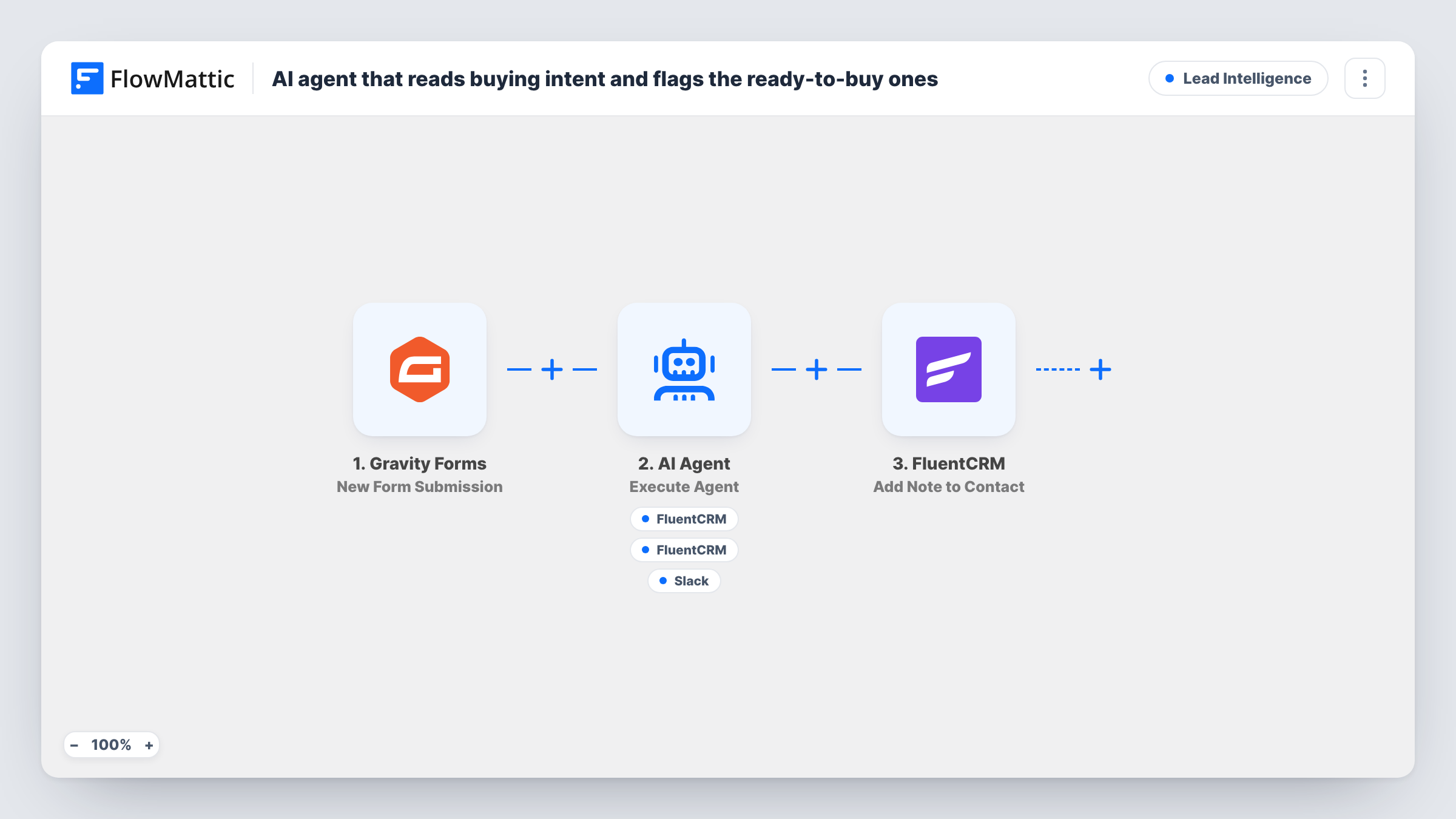
An AI Agent reads each Gravity Forms enquiry, sorts it as ready, exploring or browsing, and can add the sender to FluentCRM, tag them and alert sales in Slack. A FluentCRM note then marks the contact as read.
 Gravity Forms
 AI Agent
 FluentCRM
 Slack
Slack6 steps Setup ~12 min Used on 2.4k sites Growth Free to import
What this workflow does
A contact form mixes people who want a quote this week with people who are just looking around. Reading every message to spot the serious ones takes time, and the hot leads wait in the same pile as the rest. This workflow hands each enquiry to an AI Agent so the likely buyers stand out as soon as they write in.
The Gravity Forms trigger passes the sender's name, email and message to the AI Agent. Its instructions are to look for buying signals, label the message ready, exploring or browsing, tag the CRM contact, and alert sales when the label is ready. To do that it has three tools: Create or Update Contact and Add Tags to Contact in FluentCRM, plus Send Channel Message in Slack. The agent decides which tools to call on each run, and it writes the tag and the Slack text itself.
After the agent finishes, a fixed step adds a note titled Intent read to the FluentCRM contact with that email. The note text is always AI classification recorded, so the label itself lives in the tag, not the note. Each run shows up in Task History, where you can see what the agent was given, which tools it used and what it returned.
Agency enquiry form with a budget question
Messages that mention a start date or a budget get the ready tag and a Slack alert, so a sales lead can reply the same day, while general questions wait for the normal inbox.
B2B product demo requests
A Gravity Forms demo form collects a free-text message. The agent's label in FluentCRM lets you build a segment of ready contacts for a short follow-up sequence.
Course or coaching enquiries
People asking about price and dates are separated from those asking what the course covers, and the tag shows your team who to call first.
How this workflow runs
What happens at each step once the workflow is on, and what you need before you import it.
 Gravity Forms New Form Submission
Runs each time someone submits your Gravity Forms form. The name, email and message fields are passed to the agent, so your form needs fields that map to those three.
- AI Agent Execute Agent
The AI Agent reads the message, classifies it as ready, exploring or browsing, and picks which of its tools to call. The template sets OpenAI GPT-4o as its model, and you connect your own AI provider.
- FluentCRM Create or Update Contact
The agent's tool for adding the sender to FluentCRM, or updating them if that email is already a contact. The email comes from the form and the agent fills in the first name.
- FluentCRM Add Tags to Contact
The agent's tool for tagging the FluentCRM contact by email. The agent writes the tag value, which its instructions tie to the ready, exploring or browsing label.
- Slack Send Channel Message
The agent's tool for alerting sales in Slack. The wording of each alert comes from the agent. Connect your Slack workspace and confirm with a test run where the alert is posted.
- FluentCRM Add Note to Contact
Adds a note titled Intent read, with the text AI classification recorded, to the FluentCRM contact with the submitted email. It runs after the agent step on every submission.
What you need
- FlowMatticCore
- Gravity Forms PluginPlugin
- AI ProviderAccount
- FluentCRM PluginPlugin
- Slack AccountAccount
After importing, map your own data. To keep the template universal, not every step is pre-filled. Open each step in the builder and connect your accounts and fields (channels, lists, sheets, recipients) before you switch the workflow on.
Make it yours
Changes worth making after you import it.
- Spell out the exact tag names in the agent's instructions, for example intent-ready, intent-exploring and intent-browsing, so the model does not invent a slightly different tag on each run.
- Map the agent's output into the note content instead of the fixed text. The FluentCRM note then holds the agent's reasoning next to the contact.
- Add a Filter before the agent that skips submissions with an empty message field, so blank or spam entries never reach the model.
Questions about this workflow
Will every Gravity Forms enquiry trigger a Slack alert?
No. The agent is told to alert sales only when it labels a message ready, and it chooses when to use its Slack tool. Run a few test messages and check Task History to see how it decides.
Where does the ready, exploring or browsing label end up?
In the tag the agent adds to the FluentCRM contact. The note step that runs afterwards always says AI classification recorded, unless you change its text after import.
What if the sender is already a FluentCRM contact?
The agent's Create or Update Contact tool works by email, so an existing contact is updated rather than added again. The tag and the note go on that same contact.
Can the agent get the intent wrong?
Yes. It judges from the wording of one message, so short or vague enquiries can be labelled lower or higher than you would. Review its tags for the first weeks and refine its instructions.
More Lead Intelligence workflows
Other ready-to-import templates from the same category.




Import this workflow into your WordPress site
Download the JSON, import it from the Workflows screen and connect your accounts. Every run stays on your server, with no per-task fees.
30-day money-back guarantee Unlimited workflows and runs Self-hosted