

Create calendar events from Calendly bookings and notify attendees in Gmail
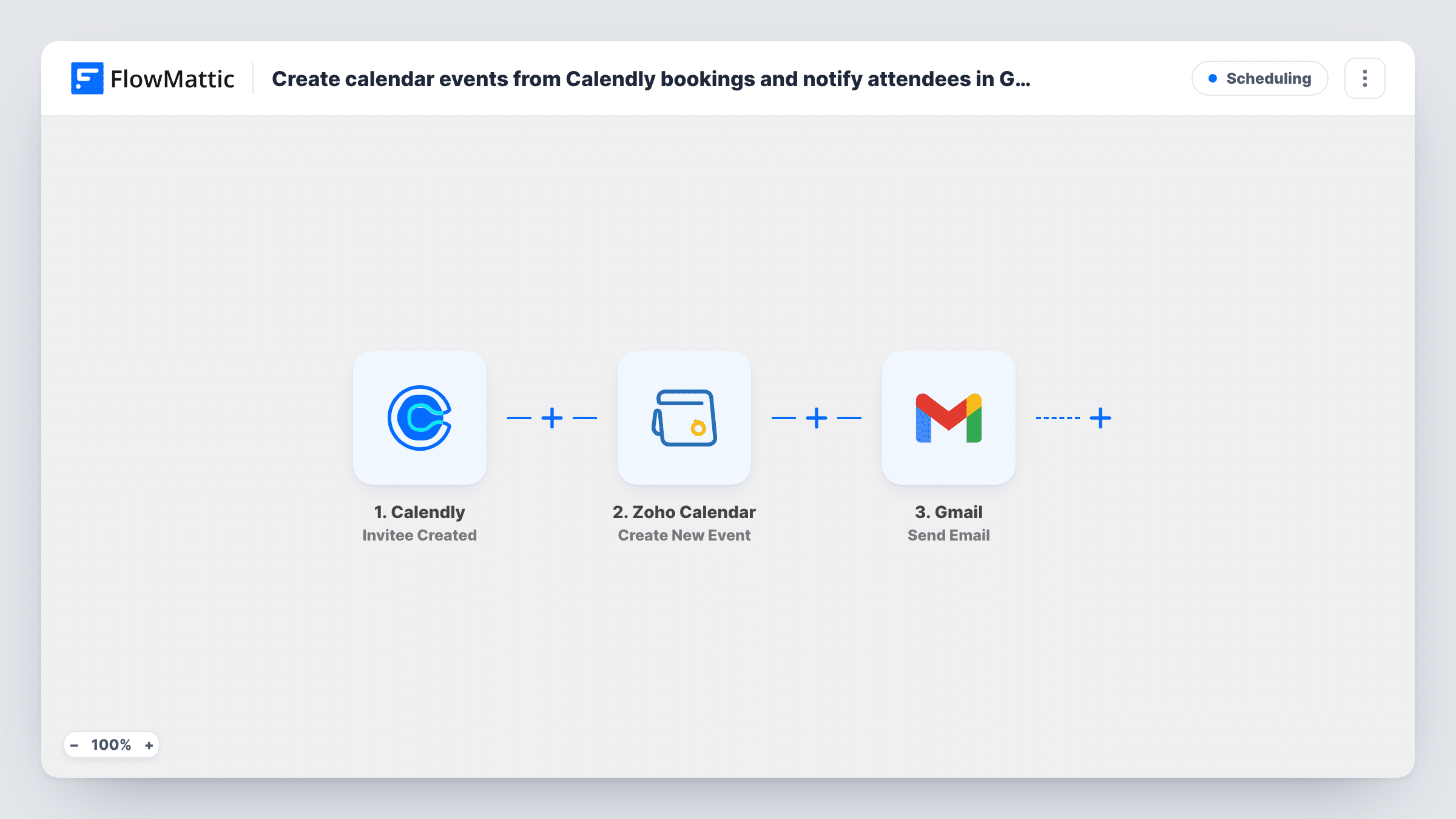
When someone books a meeting through Calendly, this workflow creates a matching event in Zoho Calendar and then sends the invitee an email from your Gmail account with the details you write.
 Calendly
 Zoho Calendar
 Gmail
Gmail3 steps Setup ~5 min Used on 457 sites Free to import
What this workflow does
If your team plans its days in Zoho Calendar, Calendly bookings made elsewhere are easy to miss. You also may want the invitee to get a note written in your own words, from your own Gmail address. This workflow handles both each time a meeting is booked.
The Calendly trigger fires when an invitee is created, which happens when someone books a meeting. Their booking details, such as name, email and the chosen time, become data you can map. FlowMattic then creates an event in Zoho Calendar using the start and end times and any title or notes you map. Last, the Gmail step sends an email to the invitee's address with a subject and message you compose, mixing fixed text with booking fields.
The workflow reacts to new bookings only. A cancellation in Calendly doesn't remove the Zoho Calendar event, and a rescheduled meeting may arrive as a fresh booking while the old event stays put, so tidy those by hand or with a separate workflow. Task History records every run, which helps you check the date and time format during setup.
Consultants who live in Zoho Calendar
A coach shares a Calendly link with clients but plans the week in Zoho Calendar. Each booking appears there, and the client gets a personal note from the coach's Gmail.
Sales demos with a prep note
When a prospect books a demo, the event lands in the rep's Zoho Calendar and the prospect receives a Gmail message listing what to have ready for the call.
Interview scheduling
Candidates pick a slot in Calendly. The interview is added to the hiring manager's Zoho Calendar and the candidate gets directions and a contact name by email.
How this workflow runs
What happens at each step once the workflow is on, and what you need before you import it.
 Calendly Invitee Created
Fires when someone books a meeting through Calendly. The invitee's name, email, answers and the scheduled time are passed on for mapping in the next two steps.
- Zoho Calendar Create New Event
Creates an event in Zoho Calendar. Map the Calendly start and end times, then set a title and description, for example the invitee's name and the meeting type. You link the Zoho account that owns the calendar when you import.
- Gmail Send Email
Emails the invitee through the Gmail account you link to this step. Map the invitee's email from Calendly as the recipient, then write the subject and body using booking details such as the date and time.
What you need
- FlowMatticCore
- Calendly AccountAccount
- Zoho Calendar AccountAccount
- Gmail AccountAccount
After importing, map your own data. To keep the template universal, not every step is pre-filled. Open each step in the builder and connect your accounts and fields (channels, lists, sheets, recipients) before you switch the workflow on.
Make it yours
Changes worth making after you import it.
- Run a test booking after import and look at the time values in Task History. If Zoho Calendar shows the wrong hour, adjust the time zone or date format in the event step.
- Calendly may already send its own confirmation email. Check your Calendly event settings so the invitee doesn't get two similar messages, and use the Gmail note for content Calendly can't add.
- If you use several Calendly event types but want just one in Zoho Calendar, add a Filter on the event type between the Calendly trigger and the Zoho Calendar step. Other bookings then get no Gmail note either, since a Filter stops every later step.
Questions about this workflow
What happens in Zoho Calendar when a Calendly booking is cancelled?
Nothing, as imported. The trigger fires only on new bookings, so the event stays in Zoho Calendar until you delete it. Build a second workflow on Calendly's cancellation trigger if you want to act on cancellations.
Does the invitee get a Zoho Calendar invitation?
Don't count on it. The step creates the event in your calendar, and the email the invitee receives is the Gmail message. Check a test run to see what Zoho sends.
Which Gmail account sends the email to the Calendly invitee?
The Google account you connect to the Gmail step during import. The message goes out from that address and appears in its Sent folder.
Can the Gmail note show the Calendly meeting time?
Yes. Map the scheduled start time from the Calendly trigger into the subject or body. Book a test meeting first to see how Calendly formats the time, and consider naming the time zone in the text.
More Scheduling workflows
Other ready-to-import templates from the same category.




Import this workflow into your WordPress site
Download the JSON, import it from the Workflows screen and connect your accounts. Every run stays on your server, with no per-task fees.
30-day money-back guarantee Unlimited workflows and runs Self-hosted