

When a user is deleted in BrainCert, unsubscribe them in FluentCRM and remove from mailing lists
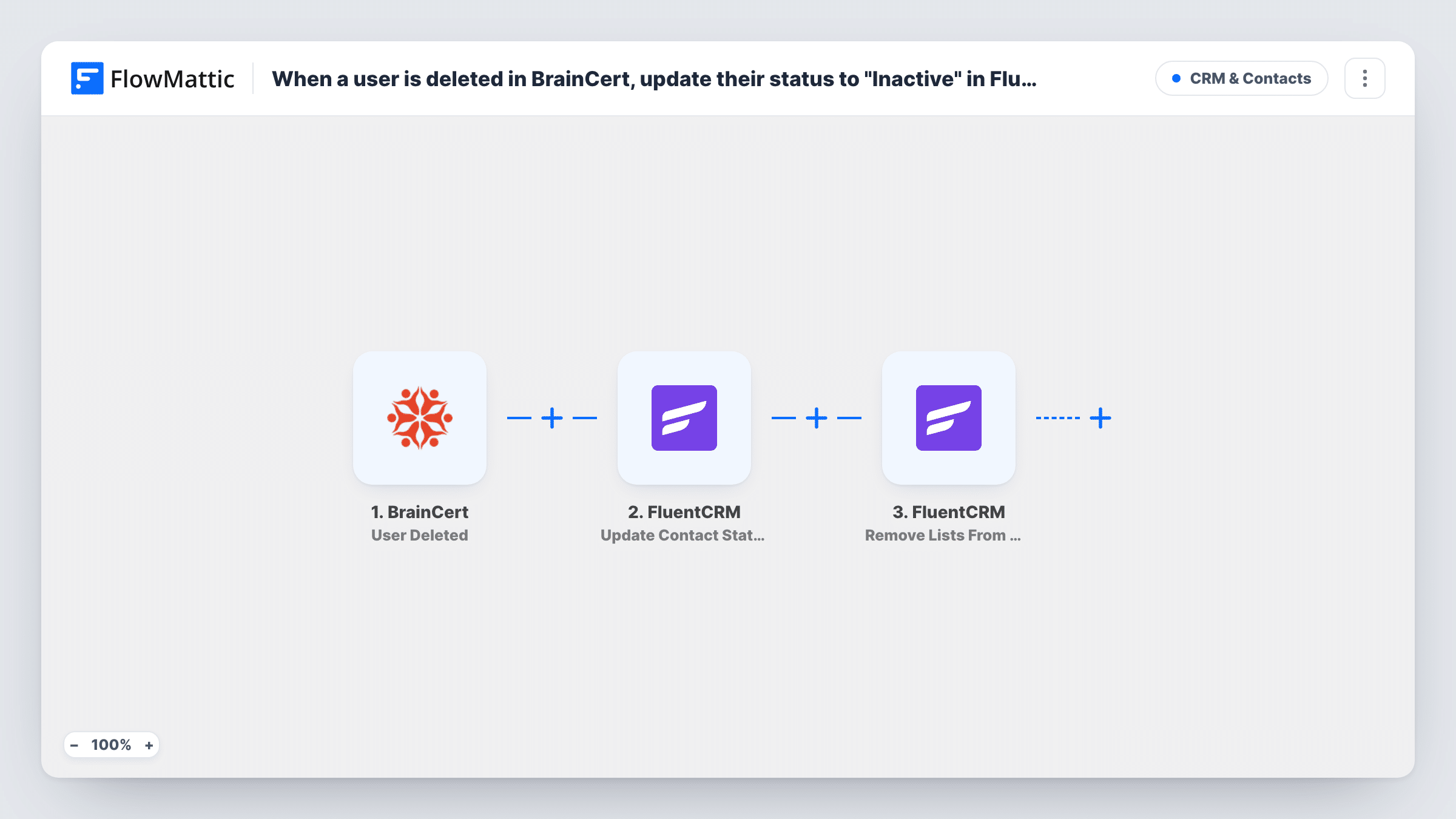
When a user account is deleted in BrainCert, FlowMattic sets the matching FluentCRM contact to unsubscribed and removes the lists you pick from that contact.
 BrainCert
 FluentCRM
3 steps Setup ~5 min Used on 3.1k sites Free to import
What this workflow does
When a learner's account disappears from BrainCert, they often stay on your FluentCRM lists and keep receiving course news they can no longer use. This workflow tidies that up from the deletion itself, so your email list follows the state of your LMS.
The BrainCert trigger fires when a user account is deleted. FlowMattic passes the details BrainCert sends about that user to the FluentCRM steps. Delete a test user after import and look in Task History to confirm the email address comes through.
The first FluentCRM step changes the contact's subscription status. The status is already set to unsubscribed in the template; you map the details that identify the contact, such as the email address. The second FluentCRM step removes one or more lists from that same contact. Choose the lists after import and map the contact the same way.
Both FluentCRM actions work on contacts that already exist. A deleted BrainCert user who was never in FluentCRM has nothing to update, and Task History shows what FluentCRM returned. The contact record itself stays in FluentCRM, so its history and notes are kept.
Stop course emails to removed learners
A training company deletes expired student accounts in BrainCert, and those students stop getting the course announcements list in FluentCRM.
Honour account deletion requests
When a learner asks to have their BrainCert account deleted, the same action marks them unsubscribed in FluentCRM, so marketing emails stop too.
Clean lists after a cohort ends
A bootcamp removes a finished cohort's accounts from BrainCert, and the cohort list in FluentCRM is cleared of those people without a manual export.
How this workflow runs
What happens at each step once the workflow is on, and what you need before you import it.
 BrainCert User Deleted
Fires when a user account is deleted in BrainCert. The deleted user's details that BrainCert provides become available for the FluentCRM steps.
- FluentCRM Update Contact Status
Sets the contact's subscription status in FluentCRM. The template already picks unsubscribed; map the BrainCert user's email or other identifying detail so FluentCRM updates the right contact.
- FluentCRM Remove Lists From Contact
Removes one or more lists from the existing FluentCRM contact. After import, choose which lists to take away and map the same identifying detail you used in the status step.
What you need
- FlowMatticCore
- BrainCert AccountAccount
- FluentCRM PluginPlugin
After importing, map your own data. To keep the template universal, not every step is pre-filled. Open each step in the builder and connect your accounts and fields (channels, lists, sheets, recipients) before you switch the workflow on.
Make it yours
Changes worth making after you import it.
- Delete a test user in BrainCert whose email you know is a FluentCRM contact, then check Task History to confirm both FluentCRM steps found that contact.
- Add FluentCRM's Add Tags to Contact action after the Remove Lists From Contact step to tag the contact as a former BrainCert learner, which helps if they sign up again later.
- Leave your general newsletter list out of the Remove Lists From Contact step if former learners may still want it, and only remove the course-related lists.
Questions about this workflow
Is the BrainCert user removed from FluentCRM entirely?
No. The contact stays in FluentCRM with its status set to unsubscribed and the chosen lists removed. If you want the record gone, FlowMattic's FluentCRM integration also has a Delete Contact action.
What if the deleted BrainCert user isn't in FluentCRM?
Both FluentCRM actions change a contact that already exists, so there is nothing for them to update. Task History shows FluentCRM's response for that run.
Which FluentCRM lists are removed?
The ones you select in the Remove Lists From Contact step. The template leaves that choice to you, so pick the lists after import.
More CRM & Contacts workflows
Other ready-to-import templates from the same category.



Import this workflow into your WordPress site
Download the JSON, import it from the Workflows screen and connect your accounts. Every run stays on your server, with no per-task fees.
30-day money-back guarantee Unlimited workflows and runs Self-hosted