

When an email is received in Email Parser, extract phone numbers and send message on WhatsApp
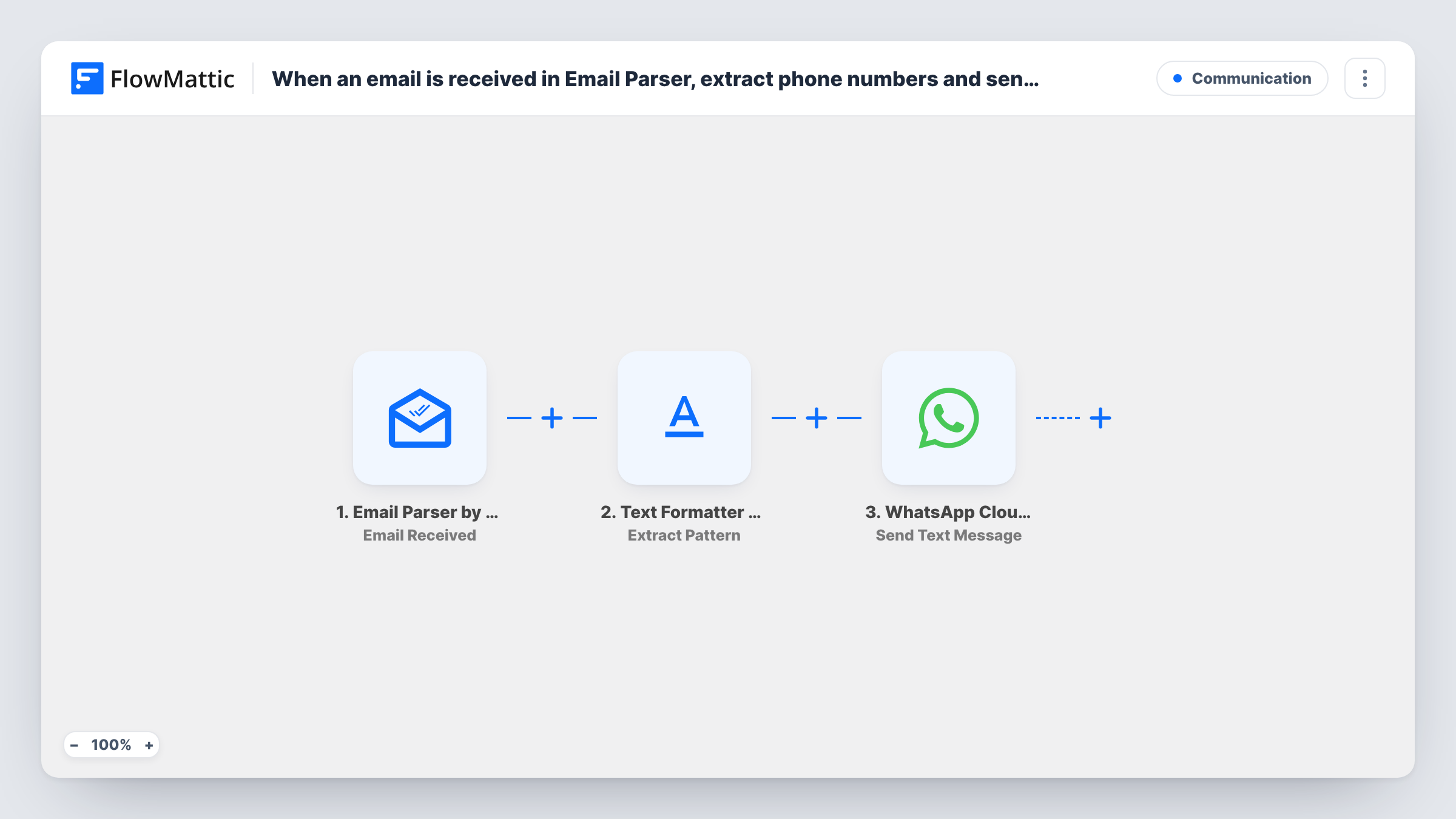
Emails sent to your FlowMattic Email Parser address are scanned for a phone number with a regular expression, and the number found gets a WhatsApp text message through the WhatsApp Cloud API.
 Email Parser by FlowMattic
 Text Formatter by FlowMattic
 WhatsApp Cloud API
3 steps Setup ~5 min Used on 3.3k sites Free to import
What this workflow does
Some leads and orders arrive only as emails, with a phone number buried in the body. Copying that number into WhatsApp by hand is slow. This workflow reads each incoming email, pulls out the number with a pattern you define and sends a WhatsApp text to it.
The Email Parser by FlowMattic trigger runs when an email reaches your parser address. Next, the Text Formatter step uses Extract Pattern: you provide a regular expression, and it extracts the matching text from the email content you map in. The last step sends a text message with the WhatsApp Cloud API to the extracted number. Each email starts one run and sends one message; there is no Iterator, so if an email holds several numbers, run a test to see which one the step returns.
Know WhatsApp's rule before you rely on this: free-form text is only delivered within 24 hours of the person messaging your business number. People who have never written to you usually won't receive it. For first contact, switch the step to Send Template Message and use an approved template.
Lead notification emails from a directory
A listing site emails you each enquiry with the customer's phone number. Contacts who have recently messaged your business number get a WhatsApp reply.
Order emails from a marketplace
A marketplace emails order details that include a phone number. The workflow extracts it and sends an order note to customers already chatting with you on WhatsApp.
Call-back requests forwarded by email
Your answering service emails each call-back request. The number is extracted and messaged on WhatsApp, which works when the caller has messaged you in the past day.
How this workflow runs
What happens at each step once the workflow is on, and what you need before you import it.
 Email Parser by FlowMattic Email Received
Starts a run for every message that lands in your Email Parser inbox address. The email's content is passed on to the Text Formatter step.
- Text Formatter by FlowMattic Extract Pattern
Extracts text matching a regular expression you provide. Enter a pattern that matches phone numbers in the format your emails use and map the email body in as the source.
- WhatsApp Cloud API Send Text Message
Sends a WhatsApp text message to the extracted number. Delivery depends on that person having written to your business number in the past 24 hours.
What you need
- FlowMatticCore
- WhatsApp Cloud API AccountAccount
After importing, map your own data. To keep the template universal, not every step is pre-filled. Open each step in the builder and connect your accounts and fields (channels, lists, sheets, recipients) before you switch the workflow on.
Make it yours
Changes worth making after you import it.
- Switch the WhatsApp step to Send Template Message with an approved template if you need to reach people who haven't messaged you in the last 24 hours.
- WhatsApp needs the number in international format. Write your pattern to capture the country code, or add a Text Formatter step to clean the result.
- Add a Filter after Extract Pattern that continues only when the result is not empty, so emails without a number stop before WhatsApp.
Questions about this workflow
Will a lead who never contacted me get the WhatsApp text?
Usually not. A plain WhatsApp text reaches someone only inside the 24-hour window that opens when they message your business. Use the Send Template Message action with an approved template for first contact.
Does the Email Parser workflow message every phone number in an email?
No. Each email starts one run and sends one message. Extract Pattern returns every match as its own value (result_0, result_1 and so on), and the WhatsApp step uses the one you map, usually result_0. Messaging each number would need an Iterator.
Do I need to write the regular expression myself?
Yes. The Extract Pattern step ships empty, so you enter a pattern that matches the phone format in your emails.
Which account sends the WhatsApp message to the extracted number?
The WhatsApp Cloud API account you connect in FlowMattic, sending from its business phone number.
More Communication workflows
Other ready-to-import templates from the same category.






Import this workflow into your WordPress site
Download the JSON, import it from the Workflows screen and connect your accounts. Every run stays on your server, with no per-task fees.
30-day money-back guarantee Unlimited workflows and runs Self-hosted