

When form submission is received with JSON array in Gravity Forms, loop through the array items using Iterator and create a new contact in FluentCRM
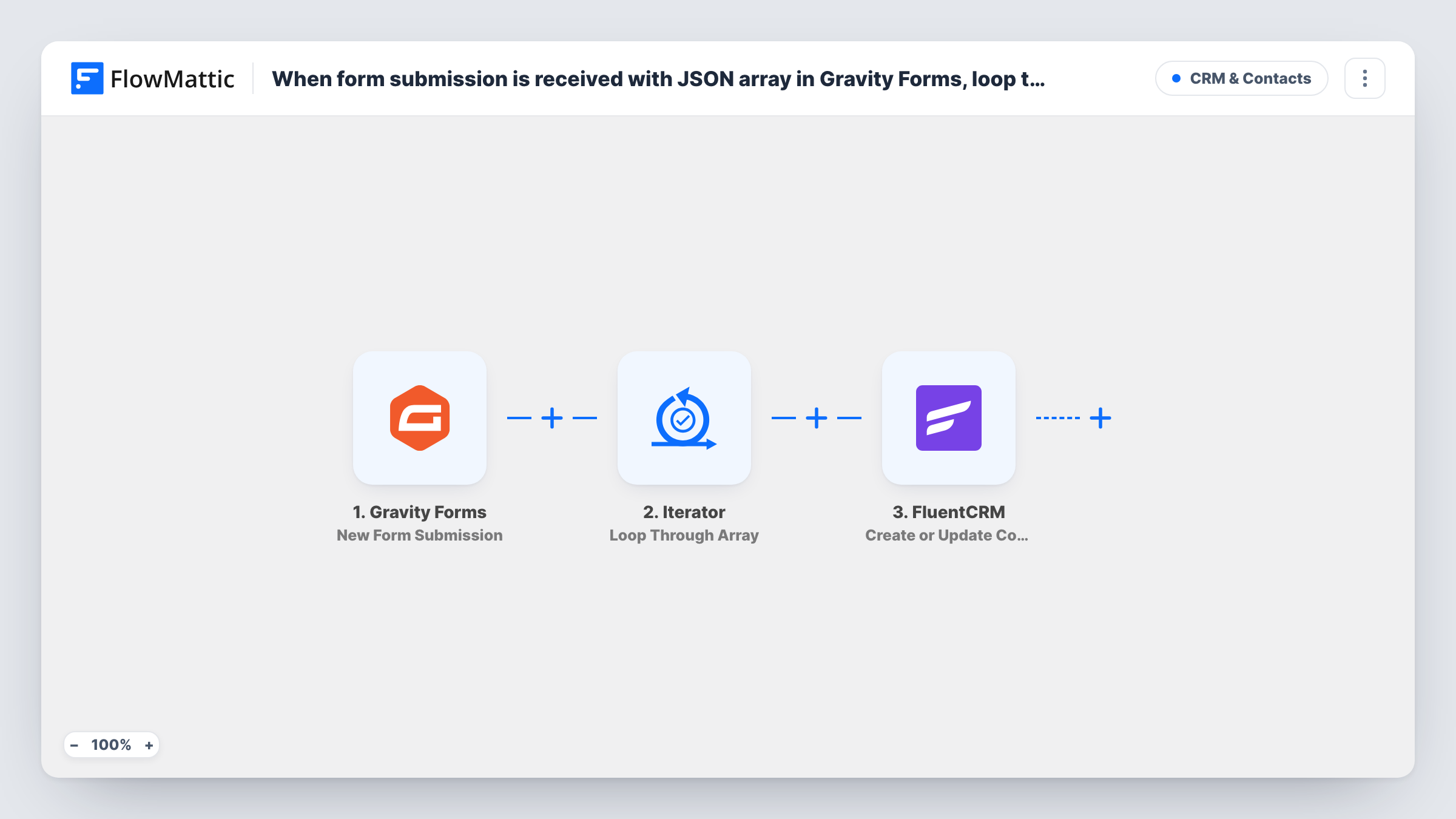
When a Gravity Forms entry carries a JSON array, such as a list of attendees, the Iterator goes through it item by item and FluentCRM creates or updates a contact for each person in the list.
 Gravity Forms
 Iterator
 FluentCRM
3 steps Setup ~5 min Used on 1.2k sites Free to import
What this workflow does
Some forms collect more than one person at a time. A group booking lists every attendee, a team sign-up names each member, and a custom field or script can store them as a JSON array in one entry. A normal workflow would see that as a single value. This template splits it up so each person becomes their own FluentCRM contact.
The Gravity Forms trigger runs when the form you choose is submitted. The Iterator step, Loop Through Array, takes the array field you point it at and runs the next step once for every item. Inside that loop, FluentCRM creates a contact from the item's values, or updates the existing contact when that email is already in your CRM.
The array has to be valid JSON, with each item holding its own email, for example a list of objects with name and email keys. Submit a test entry so you can map the item values. An item without an email can't become a contact, and Task History shows that run's FluentCRM response.
Group event registrations
One person registers a table of six for a dinner. Each guest in the attendee array becomes a FluentCRM contact you can email before the event.
Team sign-ups for a course
A manager enrols their team through one form. FluentCRM gets a contact per team member, ready for course updates.
Referral forms with several friends
A customer refers three friends in one submission, and each referred person is added to FluentCRM as their own contact.
How this workflow runs
What happens at each step once the workflow is on, and what you need before you import it.
 Gravity Forms New Form Submission
Runs when someone submits the selected Gravity Forms form. The entry must include a field holding a JSON array. Submit a test entry so FlowMattic captures it for the Iterator.
- Iterator Loop Through Array
Loops through the JSON array you select from the form data and runs the FluentCRM step once per item. Point it at the array field, then check the test run to see each item's values.
- FluentCRM Create or Update Contact
Creates a FluentCRM contact for the current item, or updates the contact if that email already exists. Map the item's email and name values, not the fields of the whole form entry.
What you need
- FlowMatticCore
- Gravity Forms PluginPlugin
- FluentCRM PluginPlugin
After importing, map your own data. To keep the template universal, not every step is pre-filled. Open each step in the builder and connect your accounts and fields (channels, lists, sheets, recipients) before you switch the workflow on.
Make it yours
Changes worth making after you import it.
- Add a Filter inside the loop, before FluentCRM, that continues only when the item's email is not empty. Items without one are skipped and the Iterator moves to the next.
- Map the person who filled in the form to a separate Create or Update Contact step before the Iterator if they should be a contact too.
- Choose a FluentCRM list or tag in the contact step so you can tell group registrants apart from contacts who signed up on their own.
Questions about this workflow
What format must the Gravity Forms array be in?
Valid JSON, such as a list of objects that each carry an email and a name. Check a test entry in FlowMattic to see whether the Iterator can read it.
Is the person who submits the form added to FluentCRM?
Only if they are an item in the array. The FluentCRM step runs once per item, so add a separate contact step for the submitter if needed.
What if an attendee in the array is already in FluentCRM?
Create or Update Contact matches on email, so that person's existing contact is updated instead of being added again.
Does a bad item stop the rest of the array?
No. Each item is handled on its own. If FluentCRM rejects one, Task History shows the error and the Iterator still goes on to the remaining items.
More CRM & Contacts workflows
Other ready-to-import templates from the same category.






Import this workflow into your WordPress site
Download the JSON, import it from the Workflows screen and connect your accounts. Every run stays on your server, with no per-task fees.
30-day money-back guarantee Unlimited workflows and runs Self-hosted